- 4 -
Getting Started
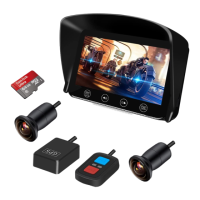
Inserting a Memory Card
Insert the memory card into the card slot until it clicks. To remove the memory card, push
to eject the memory card out of the slot.
Power On/Off
The dash cam will automatically turn on/off when the ignition switch is turned on/off if
you have completed the correct installation.
• Make sure to insert the memory card in the right direction.
• Do not remove or insert the memory card when the device is being powered on. This may damage the memory card.
• Please use a high-speed micro SD card with CLASS⑩ or above.
• Please format cards before use and anytime a significant amount of data has been collected to ensure that the
device and SD cards are working properly together.
Video Recording
Normal Video Mode: Both 2 cameras start simultaneous video recording automatically
when power on and TF card is inserted. Recording stops automatically when the power
is turned off.
Emergency Video Mode
• G-Sensor Event Recording: It automatically activates the emergency recording mode when a collision is
detected. The LED on the wired control is flashing rapidly. The video files saved in this mode will be named
as ''GSR 001 002 003....''.
• Manual Event Recording: To manually activate the emergency recording mode, press the emergency
button on the wired remote control while you are recording. The LED on the wired control is flashing rapidly.
The video files saved in this mode will be named as ''KEY 001 002 003....''. And the dash cam will capture
snapshots from both the front and rear of the vehicle.
Video Playback
Playback on Mobile Device
• Wi-Fi: Connect to the dash cam through Wi-Fi APP (Android & iOS), you can easily play back videos on
your mobile device.
• OTG: Insert the micro-SD card into your mobile device with an OTG card reader (your mobile device must
support OTG). You will find the FRONT and REAR video file folders when you access the memory card. Then
select the video you want to play back.
Playback on Monitor
Acess Main menu and select Playback mode to enter.
Video file name information: REC_220609-163256-00053F.MOV
“REC” means normal video file
“GSR” means file recorded by triggering G-sensor
“KEY” means file recorded by pressing remote
“220609” means date June 9, 2022
• Video cannot be saved if the TF card is not inserted or the card is defective.
• Up to 20 emergency video files (GSR_XXX and KEY_XXX) can be stored and protected from being overwritten. It
starts overwriting the oldest files after there are more than 20 files.
“163256” means 16 o’clock 32min 56s
“00053” means video file No.
“F” means front camera video file
“MOV” means video file format


 To Next Page