8
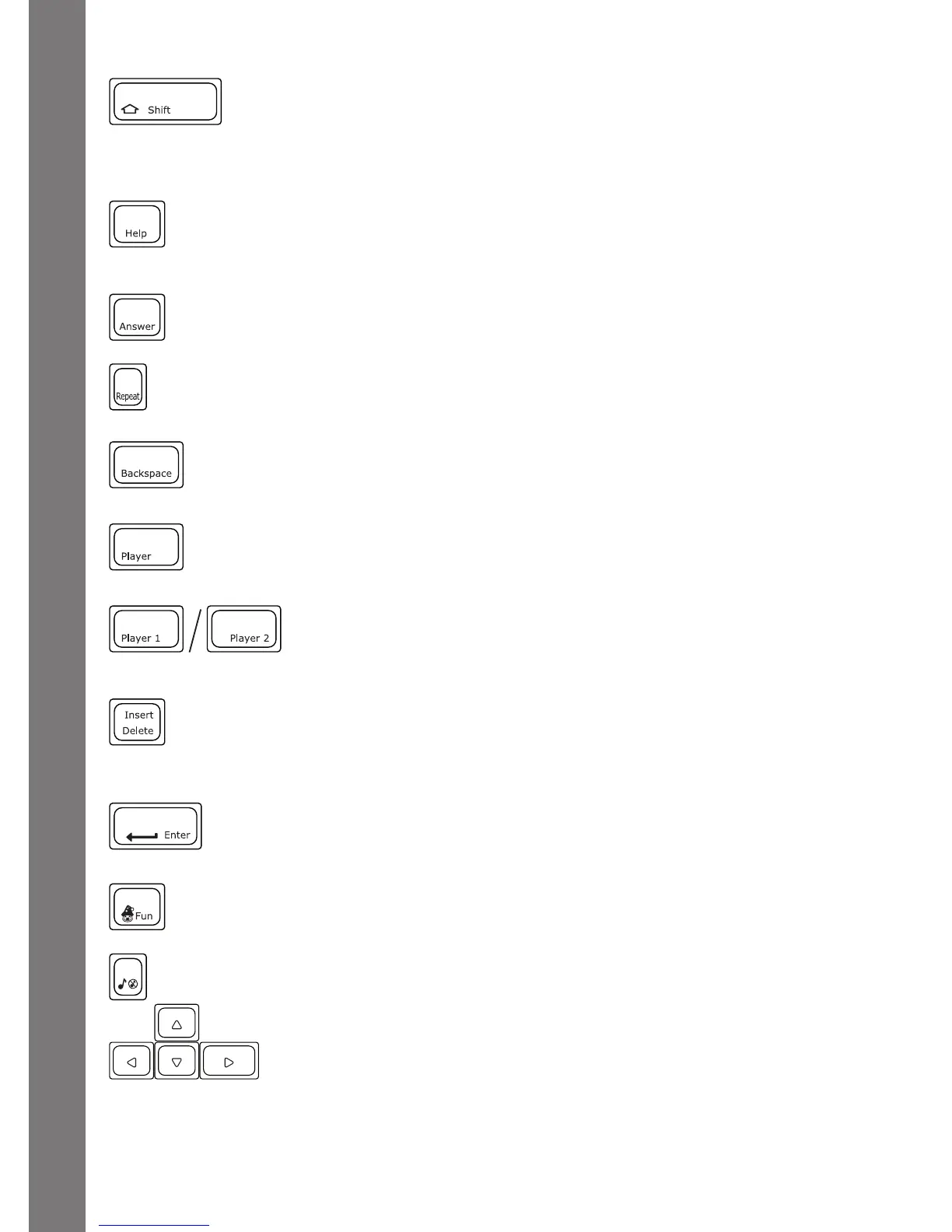
Shift: Press this key together with a letter key to capitalize the
letter. You can also use this key to access the alternate letters/
symbols or functions of some keys.
Help: Press this key to see helpful instructions or hints for the
current activity.
Answer:Pressthiskeytoseethecorrectanswertoaquestion.
You will not receive points if this key is pressed.
Repeat:Pressthiskeytorepeataquestionoraninstruction.
Backspace: Press this key to erase the character to the left of the
cursor.
Player: Press this key to switch between One Player and Two
Player modes.
Player 1 / Player 2: Press to select which player will answer
thequestioninTwoPlayermode.
Delete: Press this key to delete the current character or space to
the right of the cursor or above the underscore.
Enter:Pressthiskeyafterchoosingyouranswertoconrmyour
selection.
Fun Key: Press this key to see a fun animation.
Music On/Off Key: Press this key to turn the background music
on and off.
Arrow Keys: Use these keys to cycle through choices in
activities or in the Main Menu.
PRODUCT FEATURES







 To Next Page