EasyManua.ls Logo

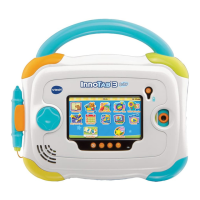
VTech InnoTab 2S Wi-Fi Learning App Tablet - User Manual

VTech InnoTab 2S Wi-Fi Learning App Tablet
10 pages
Print Icon
To Next Page IconTo Next Page
Loading...
T
H
E
L
E
A
R
N
I
N
G
A
P
P
T
A
B
L
E
T
TM & © The Jim Henson Company. All Rights Reserved.
User’s ManualUser’s Manual

Questions and Answers

  • D
    Danielle FlemingJul 27, 2025
    What to do if my VTech Toy malfunctions when inserting or removing an InnoTab[TM] cartridge?
    • A
      anthony25Jul 27, 2025
      If your VTech Toy malfunctions when inserting or removing an InnoTab[TM] cartridge without turning the unit off, disconnect the AC adapter from the main unit or remove the batteries. Then, reconnect the adapter or reinstall the batteries.

Summary

INTRODUCTION

GETTING STARTED

Steps to begin using the InnoTab.

STEP 1: Insert the InnoTab Cartridge

Instructions on inserting the InnoTab cartridge.

THE HARD KEYS

STEP 2: Select the Cartridge Icon

How to select the cartridge icon on the InnoTab desktop.

STEP 3: Choose How You Want to Play

Describes categories: Reading, Learning Games, and Creativity.

HOME

Exits current activity and returns to the InnoTab desktop.

SETTINGS

ACTIVITIES

ONLINE FEATURES

CARE & MAINTENANCE

WARNING

TROUBLESHOOTING

TECHNICAL SUPPORT

VTech InnoTab 2S Wi-Fi Learning App Tablet Specifications

General IconGeneral
Display5" color touch screen
Resolution480 x 272 pixels
ConnectivityWi-Fi
Age Range3-9 years
Memory2 GB internal memory
BatteryRechargeable lithium battery
Preloaded ContentE-books, games
CompatibilityCartridges and downloadable apps

Related product manuals