GETTING STARTED
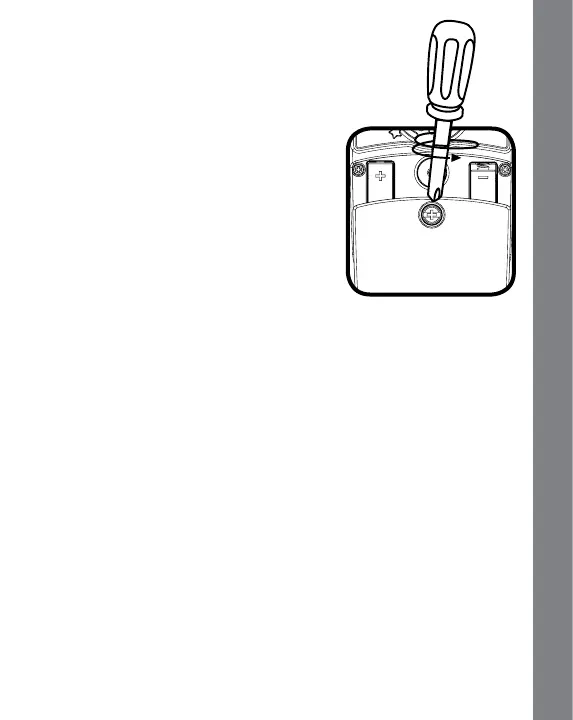
BATTERY INSTALLATION
1. Make sure the unit is turned OFF.
2. Locate the battery cover on the back of
the unit.
3. Install 2 new AAA size LR03/AM-4
batteries following the diagram inside
the battery box. (The use of new
alkaline batteries is recommended for
maximum performance.)
4. Replace the battery cover to secure it.
BATTERY NOTICE
• Usenewalkalinebatteriesformaximumperformance.
• Useonlybatteriesofthesameorequivalenttypeasrecommended.
• Donotmixdifferenttypesofbatteries:alkaline,standard(carbon-
zinc) or rechargeable (Ni-Cd, Ni-MH), or new and used batteries.
• Donotusedamagedbatteries.
• Insertbatterieswiththecorrectpolarity.
• Donotshort-circuitthebatteryterminals.
• Removeexhaustedbatteriesfromthetoy.
• Removebatteriesduringlongperiodsofnon-use.
• Donotdisposeofbatteriesinre.
• Donotchargenon-rechargeablebatteries.
• Remove rechargeable batteries from the toy before charging (if
removable.)
• Rechargeablebatteriesareonlytobechargedunderadultsupervision.
4
GETTING STARTED








 To Next Page