PRODUCT FEATURES
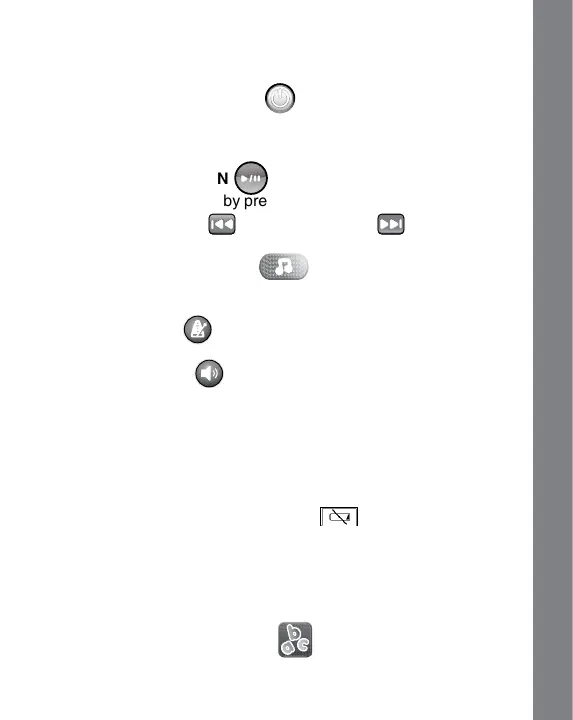
1. ON/OFF BUTTON
Press the ON/OFF BUTTON to turn the unit ON. Press the
ON/OFF BUTTON again to turn the unit OFF.
2. FUNCTION BUTTONS
A) PLAY/ PAUSE BUTTON
Play or pause the music by pressing the PLAY/ PAUSE BUTTON.
B) PREVIOUS BUTTON or NEXT BUTTON
Press the PREVIOUS BUTTON or NEXT BUTTON to make a selection.
C) LIGHT-UP MUSIC BUTTON
Press the LIGHT-UP MUSIC BUTTONto hearmusicor conrm
your selection.
D) TEMPO BUTTON
Press the TEMPO BUTTON to adjust the tempo of the melodies.
E) VOLUME BUTTON
Press the VOLUME BUTTON to adjust the volume.
3. AUTOMATIC SHUT-OFF
To preserve battery life, the unit will automatically power off after
several minutes without input. The unit can be turned on again by
pressing the ON/OFF BUTTON.
When you see this low battery icon on the screen or the
unit repeatedly powers down, please insert new batteries and try
switching it on again.
ACTIvITIES
1. LETTER SONGS MODE
Learn letters and phonics while listening to letter songs. Press the
PREVIOUS & NEXT BUTTONS to select different songs.
6
PRODUCT FEATURES / ACTIvITIES



 To Next Page