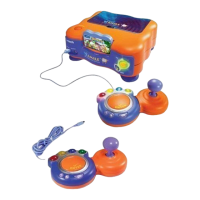
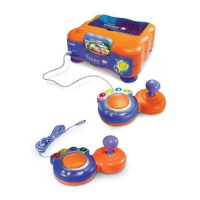
The V.SMILE SmartBook is an interactive learning system designed for children aged 3 to 8, connecting directly to the V.SMILE TV Learning System (sold separately) to provide an engaging and educational video game experience. It aims to make learning to read fun and exciting by combining a touch-sensitive book surface, a unique Smart Pen, and interactive activities with an extensive library of video Smartridges based on popular children's characters. The system supports children's learning at their own pace and grows with them through different educational levels: Early Learners (ages 3-5), Junior Thinkers (ages 4-6), and Master Minds (ages 6-8).
Function Description:
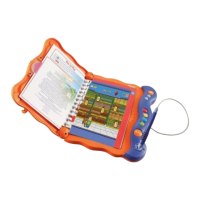
The V.SMILE SmartBook serves as an interactive book reader and game controller for the V.SMILE TV Learning System. It features a main unit with a touch-sensitive pad where physical SmartBook pages are placed. The Smart Pen is the primary input device, allowing children to interact with the book's content, select options, and play games. The system integrates learning concepts seamlessly through two modes of play: the Learning Adventure, an exploratory journey, and the Learning Zone, a series of games focused on specific school skills. The SmartBook connects to the V.SMILE console, which then outputs video and audio to a television, transforming reading into an interactive video game.
Important Technical Specifications:
- Power Source: The SmartBook main unit requires 4 "AAA" size batteries (1.5V UM4, Size AAA or LR03) for normal operation.
- Connectivity: It connects to the V.SMILE TV Learning System via a connection cable that plugs into the PLAYER 1 joystick port on the V.SMILE unit.
- Input Devices:
- Smart Pen: A unique pen used for touch-sensitive interaction with the book pages and for confirming selections (by holding it down). It can also be inserted into a pen holder to function as a joystick-type controller.
- ABC Button: A shortcut to the "Let's Explore" mode of each scene, allowing the game to enter this mode when pressed.
- HELP Button: Provides helpful hints and repeats current game instructions.
- EXIT Button: Pauses the game and displays an EXIT message on the TV screen, allowing the user to quit or continue. Confirmation is done by moving the pen or joystick to "YES" or "NO" and holding down the pen or pressing the ENTER button.
- Color Buttons: Used for making choices in certain games.
- ENTER Button: Used to make choices and confirm selections in certain games.
- Smartridge Compatibility: The system uses V.SMILE SmartBook Smartridges, which contain the game software and interactive content for specific books. These Smartridges are inserted into a dedicated slot on the V.SMILE TV Learning System.
- Display: The game content is displayed on a television screen, requiring the V.SMILE TV Learning System to be connected to the TV's video input.
Usage Features:
- Interactive Reading: The touch-sensitive pad and Smart Pen allow children to interact directly with the physical book pages, making reading an active experience.
- Two Modes of Play:
- Learning Adventure: An exploratory mode where learning concepts are integrated into an exciting journey.
- Learning Zone: A series of games designed to focus on specific school skills.
- Age-Appropriate Curriculum: The SmartBook series is designed with an age-appropriate curriculum for children aged 3 to 8, with Smartridges categorized into Early Learners (3-5), Junior Thinkers (4-6), and Master Minds (6-8).
- User-Friendly Interface: Features like the ABC, HELP, EXIT, Color, and ENTER buttons provide intuitive control during gameplay. The Smart Pen can also function as a joystick for navigation.
- Easy Setup: The SmartBook connects directly to the V.SMILE TV Learning System, which then connects to a television. Battery installation is straightforward.
- Smart Pen Storage: The main unit includes a compartment for storing the Smart Pen and its cable when not in use.
- Lock Mechanism: A lock feature is present on the unit, though its specific function isn't detailed, it likely secures the book or the unit itself.
- Troubleshooting Guide: The manual provides solutions for common issues such as power light not coming on, no picture on the screen, black and white picture, no sound, or the SmartBook not working.
Maintenance Features:
- Cleaning: The V.SMILE SmartBook should be kept clean by wiping it with a slightly damp cloth. Solvents or abrasives should not be used.
- Storage:
- Keep the unit out of direct sunlight and away from direct sources of heat.
- Remove batteries when not using the toy for an extended period.
- Always keep the SmartBook away from water.
- Handling: Avoid dropping the unit and never attempt to dismantle it.
- Battery Care:
- Do not try to recharge non-rechargeable batteries.
- Rechargeable batteries should only be charged under adult supervision.
- Do not mix different types of batteries (new and used).
- Only use recommended or equivalent battery types.
- Ensure proper battery orientation (+/- signs).
- Remove depleted batteries from the toy.
- Do not short-circuit supply terminals.
- Do not use more batteries than recommended.
- Do not dispose of batteries in fire.
- Smart Pen Usage: Always use the attached Smart Pen for interacting with the touch-sensitive pad. Never use a regular pen on the SmartBook pages to prevent damage.
- Program Reset: In case of program issues, disconnecting and reconnecting power supplies, then pressing the Reset Button on the bottom of the main unit (using a ballpoint pen), can resolve the problem.
- Smartridge Handling: Insert and remove Smartridges carefully to avoid damage.


 To Next Page
 General