13
Sound sensitivity and sound activation
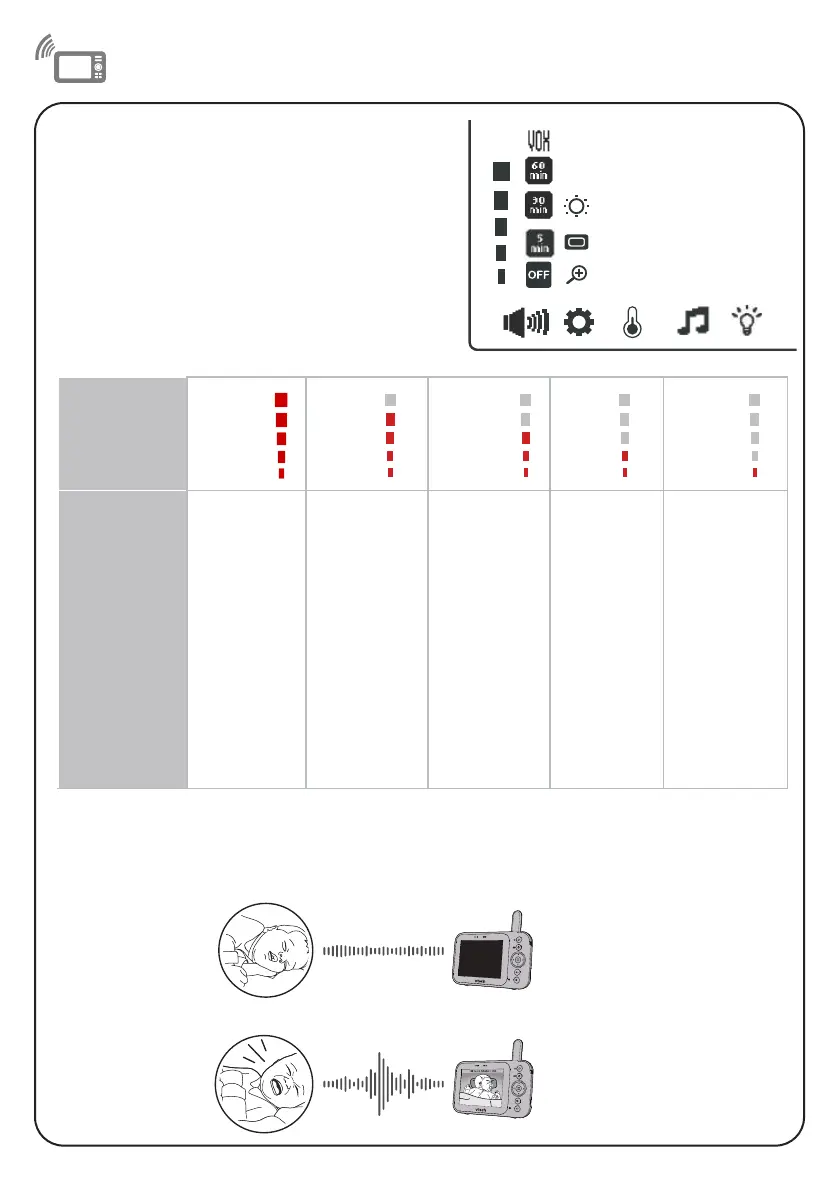
When VOX is selected, the parent unit screen stays off to save power when the baby unit detects
sounds that are lower than the set sensitivity level. Once the baby unit detects sounds that are
louder than the set sensitivity level, the parent unit screen turns on automatically. It will then turn
off again after 50 seconds if the sounds detected are lower than the set sensitivity level.
Adjust the sound sensitivity of the
baby unit
The parent unit screen will turn on only when the
detected sounds exceed a set level.
Use the parent unit to adjust the microphone
sensitivity of your baby unit. The higher the
sensitivity level, the more sensitive the baby unit is
in detecting sounds that transmit to the parent unit.
The VOX sensitivity level is preset to the highest
level.
VOX
Sensitivity
level
Highest High Medium Low Lowest
Description
The parent
unit screen
turns on
for quiet
sounds,
(including
background
noises) from
your baby’s
room.
The parent
unit screen
turns on
for soft
babbling
and louder
sounds from
your baby. It
remains off
when your
baby sleeps
soundly.
The parent
unit screen
turns on
for loud
babbling
and louder
sounds from
your baby. It
remains off
when your
baby makes
soft sounds.
The parent
unit screen
turns on
for crying
and louder
sounds
from your
baby. It
remains
off when
your baby
makes soft
sounds.
The parent
unit screen
turns on
for loud
crying or
screeching
sounds from
your baby. It
remains off
when your
baby makes
soft sounds.


 To Next Page