14
Night vision
Dim mode
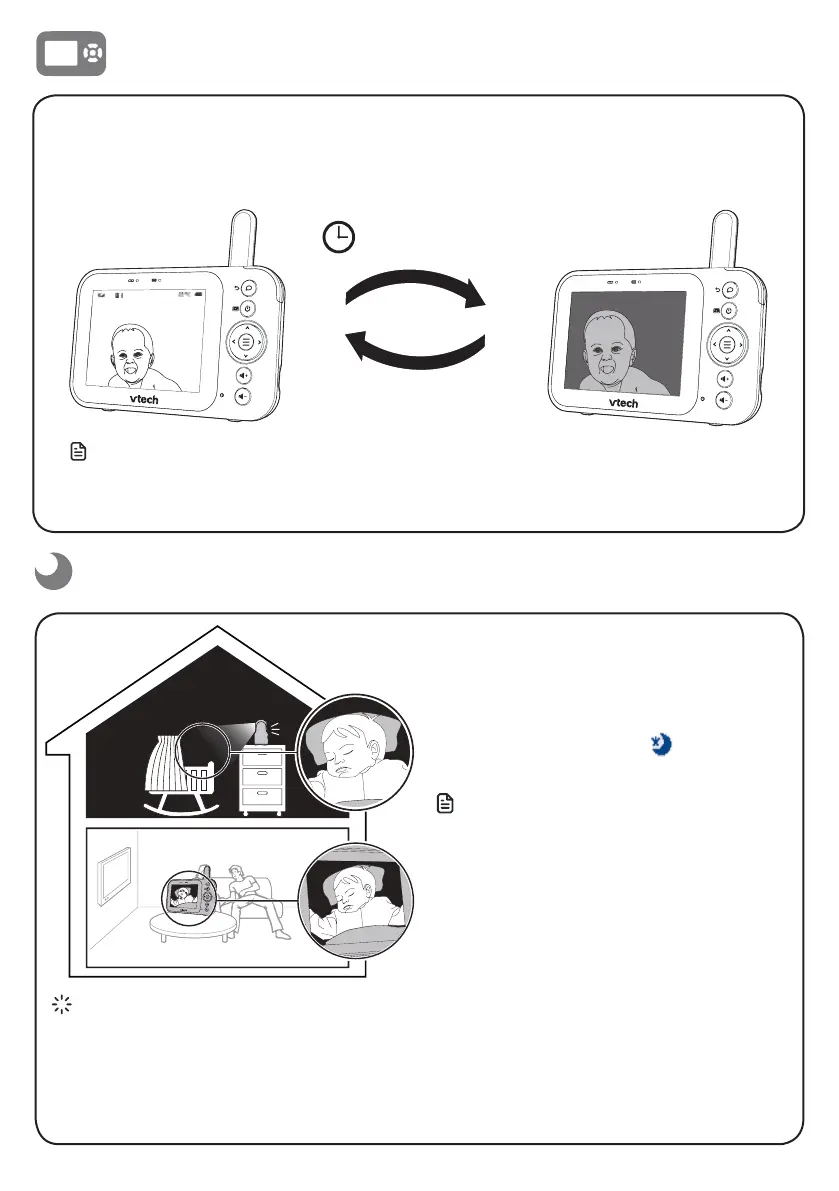
Dim mode helps you save parent unit power. When your parent unit is not charging, the
display will automatically dim after 10 minutes of inactivity if no keys are pressed or alerts
are received from the baby unit.
10 min inactivity
Press any button
Note
• When the screen is dimmed, any keypress or alert message will trigger the screen to return to the
preset brightness level. After 10 minutes of inactivity, it will resume back to dim mode.
The baby unit has infrared LEDs that allow
you to see your baby clearly at night or in a
dark room. When the baby unit detects low
light levels, the infrared LEDs are switched on
automatically. The images from the baby unit
are in black and white, and
appears on
the parent unit screen.
Notes
• A click sound from the baby unit is normal
and occurs when your unit adapts to the
environment lighting conditions.
• To achieve accurate and high quality video,
your baby unit is equipped with an Infrared
cut-off filter lens that optimises colour
accuracy in bright, day-time environments.
When the environment turns dark at night,
this filter lens is withdrawn to enhance night
vision quality. The brief click sound you hear
is from the filter lens activating/deactivating
as the unit switches from day to night vision
(and vice versa).
Tip
• Depending on the surroundings and other
interfering factors, for example, lighting, objects,
colours and backgrounds, the image quality may
vary. Adjust the baby unit angle or place the baby
unit at a higher location to prevent glare and a
blurred display.


 To Next Page