4
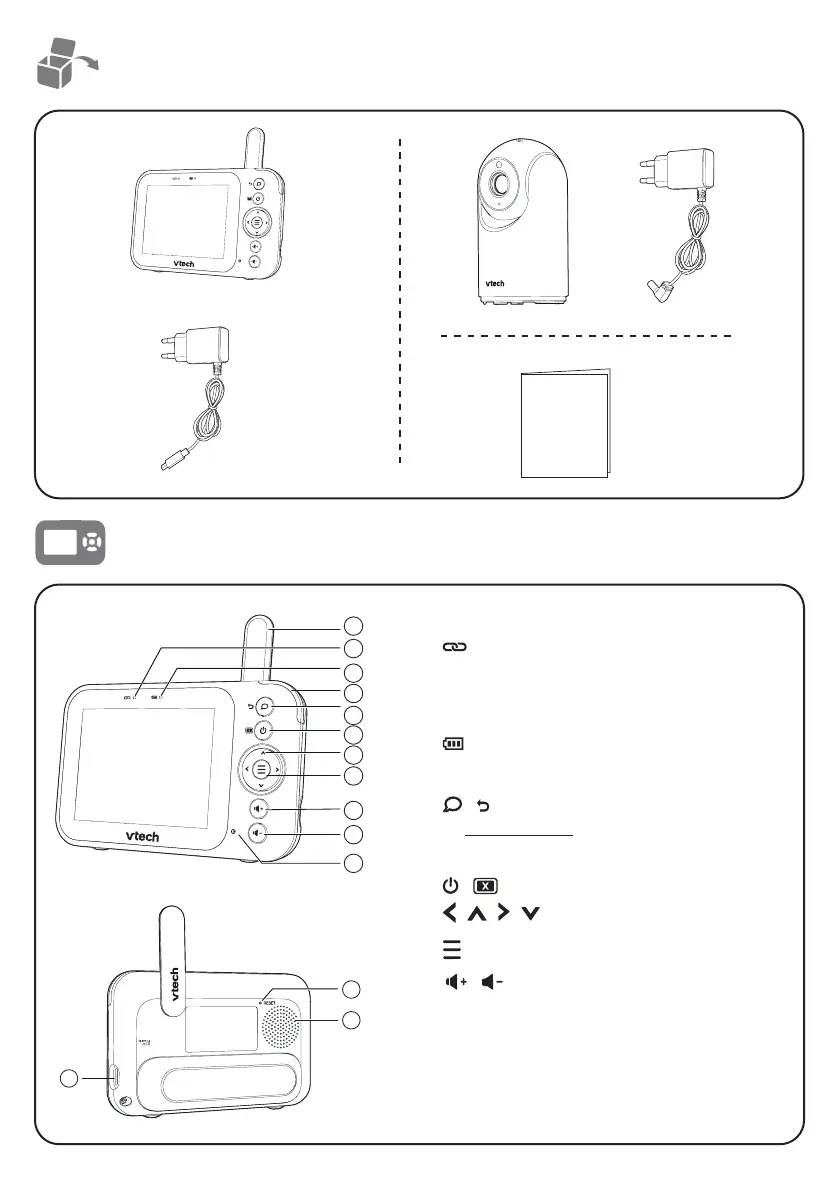
What’s in the box
Quick start guide
Overview - Parent unit
1 Antenna
2
Link LED light
• On when the parent unit is linked to the
baby unit.
• Flashes when the link to the baby unit is lost.
3
Battery LED light
4 3-level sound indicator light
5
/ (Talk /Exit)
• Press and hold to talk to the baby unit.
• While in a submenu, press to exit.
6
/
(
Power / LCD off)
7
|
|
|
Arrow keys
8
(Menu/Select)
9/10
/
(Vol+ / Vol-)
11 Microphone
12 USB Power jack
13 RESET
• Force reboot the parent unit.
14 Speaker
1
2
4
5
6
8
9
7
3
10
11
12
13
14


 To Next Page