10
Parent unit icons (cont’d)
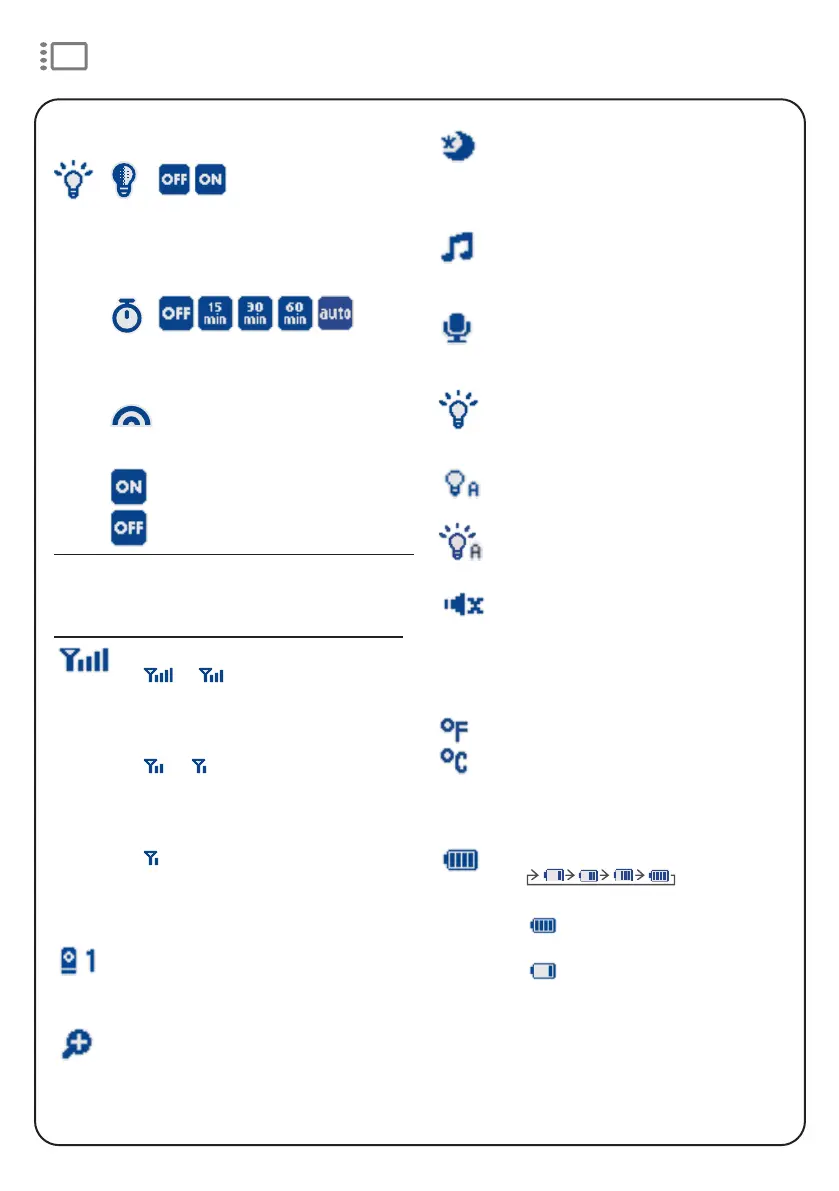
Status icons
Connection status
• or displays when strong
signal strength is detected
between the baby unit and the
parent unit.
• or displays when
moderate or low signal strength
is detected between the baby
unit and the parent unit.
• displays and flashes with an
occasional “beep” when the
connection is lost between the
baby unit and parent unit.
Current view status
• Displays the number of the baby
unit that is being viewed.
Zoom
• Displays when the current image
on the parent unit has zoomed in.
Night Light
Adaptive night light
• Turn on/off the night light’s
ability to automatically
adjust its brightness based
on surrounding lighting
conditions.
Night light timer
• Set the timer to turn the night
light off.
Night light colour
• Select one of the eight night
light colours.
Night light On/Off
• Turn on/off the night light.
Night vision
• Displays when the baby unit
being viewed has activated the
night vision feature.
Lullaby
• Displays when a lullaby is
playing.
Talkback
• Displays when talking back to the
baby unit from the parent unit.
Night light
• Displays when the baby unit’s
night light is turned on.
• Displays when the night light Auto-
on feature is activated, but not yet
triggered by sound.
• Displays when the baby unit’s night
light has been triggered to turn on
automatically by sound.
Mute alert
• Displays when the parent unit
speaker volume is set to zero.
• Displays when the parent unit is
talking to the baby unit.
or
Real-time temperature
• Displays the real-time
temperature detected by the
baby unit in Fahrenheit (
o
F) or
Celsius (
o
C) (e.g. 57
o
F or 14
o
C).
Battery status
•
animates
when the battery is charging.
• displays solid when the
battery is fully charged.
• displays when the battery is
low and needs charging.


 To Next Page