Steps to Use the Air Inflator
6
M
4
3
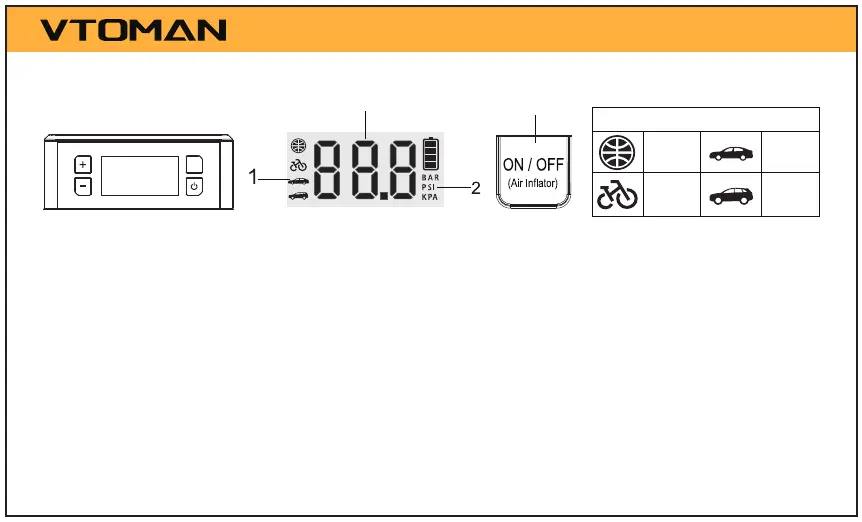
Power on, short press the "M" key to start to set the air inator.
1. Press the "M" key once, the icon on the far left flashes, and then press the "+" or "-" keys
to switch between “basketball”, “bicycle”, “car” and “SUV” icon.
2. Press the "M" key twice, the pressure unit icon flashes, and then press the "+" or "-" keys
to switch between "BAR", "PSI", and "KPA".
3. Press the "M" key again , the current target pressure value flashes, and then press the "+"
or "-" keys to adjust the target pressure value.
4. After setting the target pressure value, press and hold the "ON/OFF" key for 3s to enter
the air inflator mode. Similarly, press and hold the "ON/OFF" key for 3s to exit this mode.
Preset Tire Pressure Value
0.7BAR
2.1BAR
2.2BAR
2.5BAR
Note: The data only for reference.


 To Next Page