vwr.com I Instruction manual VWR Micro Star 21
34 / 87
Operation
3. Operation
3. 1. Control Panel
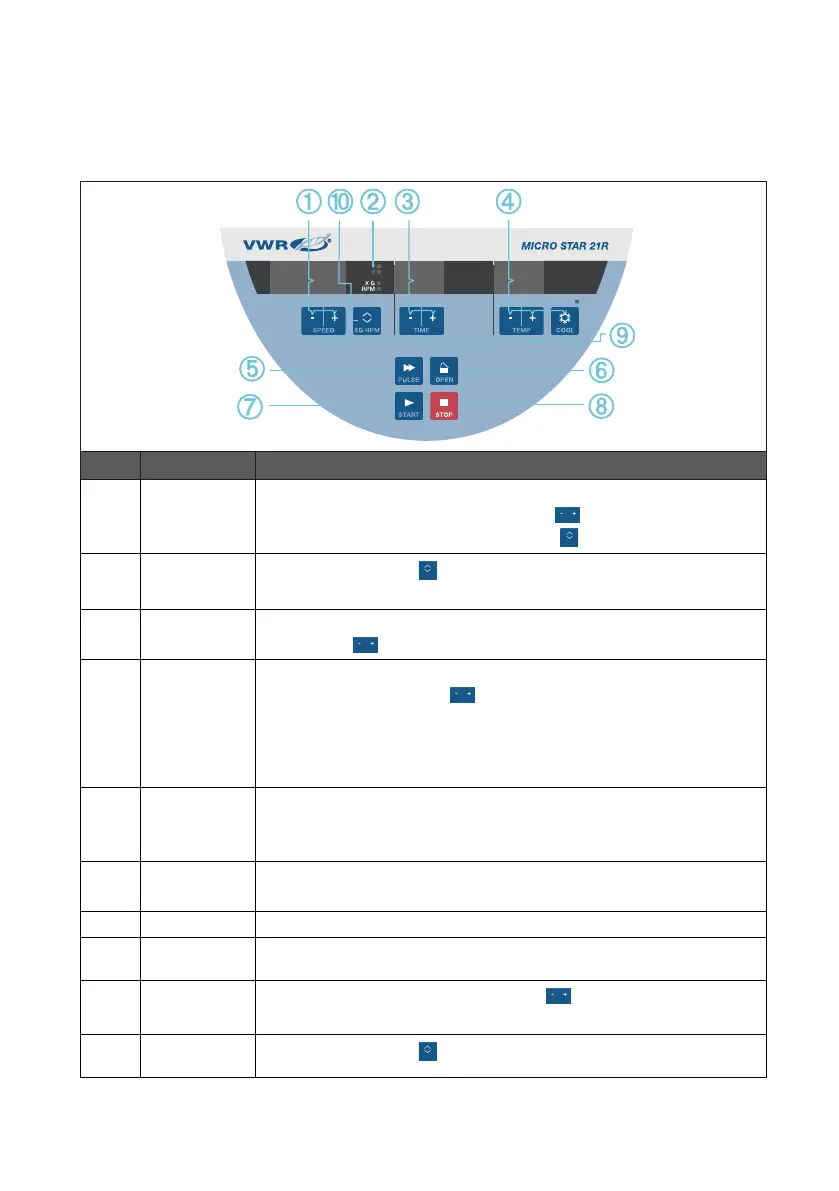
No� Item Description
➀
Speed / RCF
Value
The speed (rpm) or RCF value (x g) is displayed here. You can modify the value
using the up and down MINUS / PLUS buttons . below. You can switch
between rpm and x g using the TOGGLE button .
➁
Display Mode
Use the TOGGLE button to change the display mode. (speed / RCF value,
sample / chamber temperature, run time counter from start or preset speed on).
➂
Running Time The running time is displayed here. You can modify the value using the MINUS /
PLUS buttons .
➃
Temperature
(SNOWFLAKE)
The temperature is displayed here. You can modify the value using the up and
down MINUS / PLUS buttons . You can pre-temper the centrifugation
chamber and the empty rotor before the centrifugation run starts using
SNOWFLAKE button.
NOTICE This function is only available on refrigerated centrifuges.
➄
PULSE Press PULSE to immediately start the centrifugation run and accelerate up to the
maximal permissible end speed (depending on the used rotor). Releasing PULSE
initiates a stopping process according to the set acceleration and braking curve.
➅
OPEN Press OPEN to activate the automatic door release (possible only if device is
powered on and if the rotor is fully stopped).
➆
START Press START to start a centrifugation run or to accept the current settings.
➇
STOP Press STOP to manually end the centrifugation run.
➈
MINUS / PLUS
Use the up and down MINUS / PLUS buttons . to set the parameter in the
field directly above.
➉
TOGGLE
Use the TOGGLE button to change the display mode.
Figure 4: Control Panel Overview









 To Next Page