b. Simultaneously press both the up and down arrows, the display will
indicate zero (0:00). The unit time is now set to zero (0:00) minutes.
Alternately, you can use the up/down arrows to get to zero (0:00).
c. Press the on/off button below the time display. The display will
indicate the accumulated time. The up/down arrows will become
inactive. To stop timer, press the on/off button again. IMPORT
ANT:
This will NOT interrupt the shaking function. Press the on/off button
below the speed display to interrupt the shaking function.
d. To reset, press and hold the on/off button below the time display.
After three (3) seconds the display will indicate the previous set
time, which was zero (0:00).
5. Setting timed mode: Programmed time.
a. Press the up/down arrows below the time display until you reach
the desired time.
b. Start this function by pressing the on/off button below the time
display. The unit will run for the selected time, the up/down arrows
will become inactive while the timer is running. The unit will stop
shaking when the time display reaches zero (0:00). Four (4) audible
beeps will indicate the count down function is complete. The time
display will default back to the set time. To repeat for the same
time, simply press the on/off button again.
c. To interrupt an automatic timing cycle before it is completed, press
the on/off button below the time display. The display will flash off
and on to indicate the time function is on "hold". IMPORT
ANT: This
will NOT interrupt the shaking function. Press the on/off button
below the speed display to interrupt the shaking function. Restart
the timer by pressing the on/off button below the time display.
Unit will continue counting down to zero (0:00). When the display
reaches zero (0:00), you will hear the four (4) audible beeps that
indicate the count down function is complete and the shaking
function will cease.
6. Turning unit off:
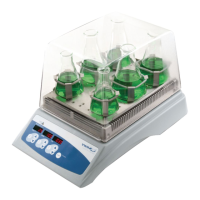
a. To turn the unit off, press the standby button. The temperature,
speed and time displays will be blank, the standby indicator light
will illuminate. The Incubating Mini/Microplate Shaker should be
kept in standby mode when not in use. To completely cut off power
to the unit, disconnect the power cord from the unit or unplug
from the wall outlet.
OPERATING TIPS
As a safety feature, a built-in program will shut power off to the motor if
the tray is prevented from rotating, or the unit is overloaded beyond its
recommended weight capacity.
Built-in memory maintains the last used temperature, speed and time
settings during a power interruption.
10


 To Next Page