F-005L
24
24 25 26
WACFan_841812
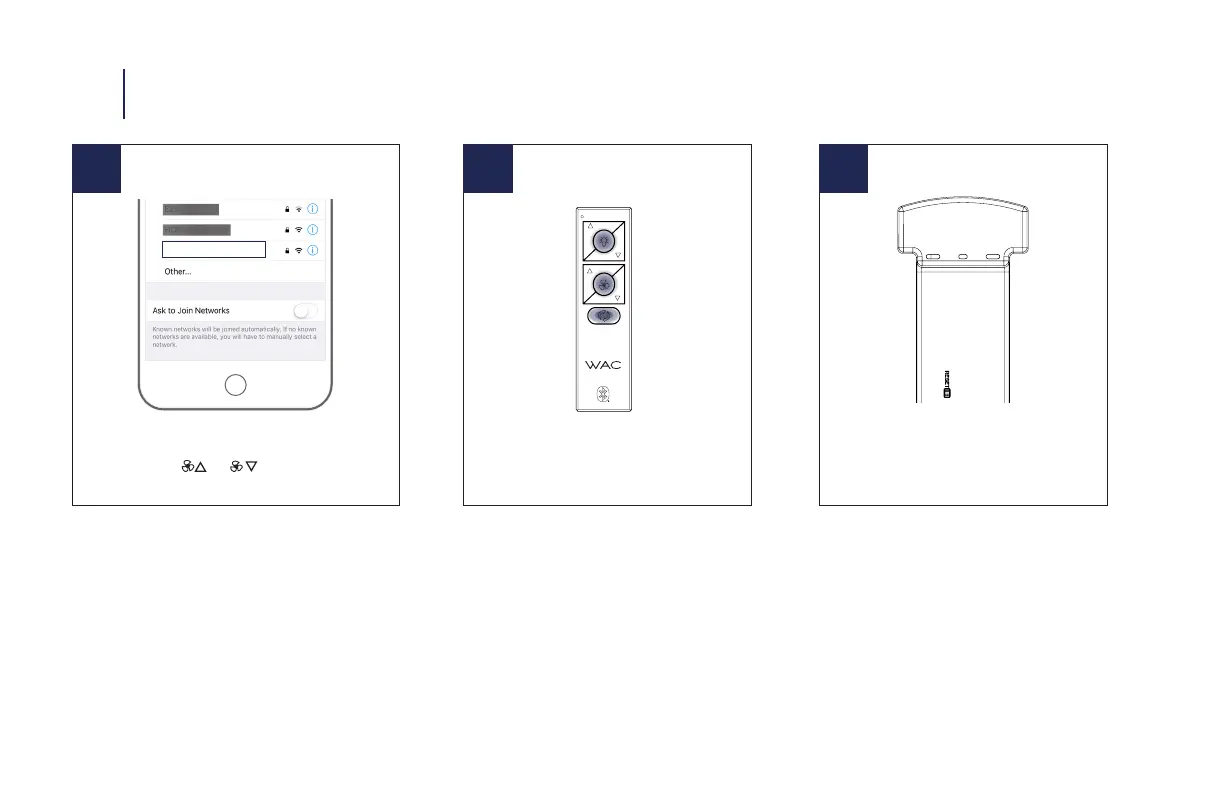
NOTE: If you change your Wi-Fi settings (SSID or Security
Passphrase you will need to perform a Wi-Fi reset on the fan
by holding down the fan speed up and fan speed down buttons
on the remote control for 10 seconds. The light on the remote
will ash green and the fan will sound two long beeps. You can
then use the Modern Forms Fans app to connect your fan to the
new network.
Factory Reset
Press and hold buttons for 10 seconds
Receiver Factory Reset
Press the reset button on the receiver
until the receiver beeps
NOTE: Factory reset will remove remote control(s), wall control(s)
and WAC app connections.
NOTE: If advised by technical support, you can reset your fan to
factory settings by either holding down the light toggle, fan toggle,
and season button for 10 seconds or briey depressing the reset
button on the fan’s receiver. The fan will emit three beeps indicat-
ing the reset was successful.
13 RESET
Fan Wi-Fi Reset
Press and hold the and for 10 seconds until LED
blinks green and receiver emits 2 long beeps


 To Next Page