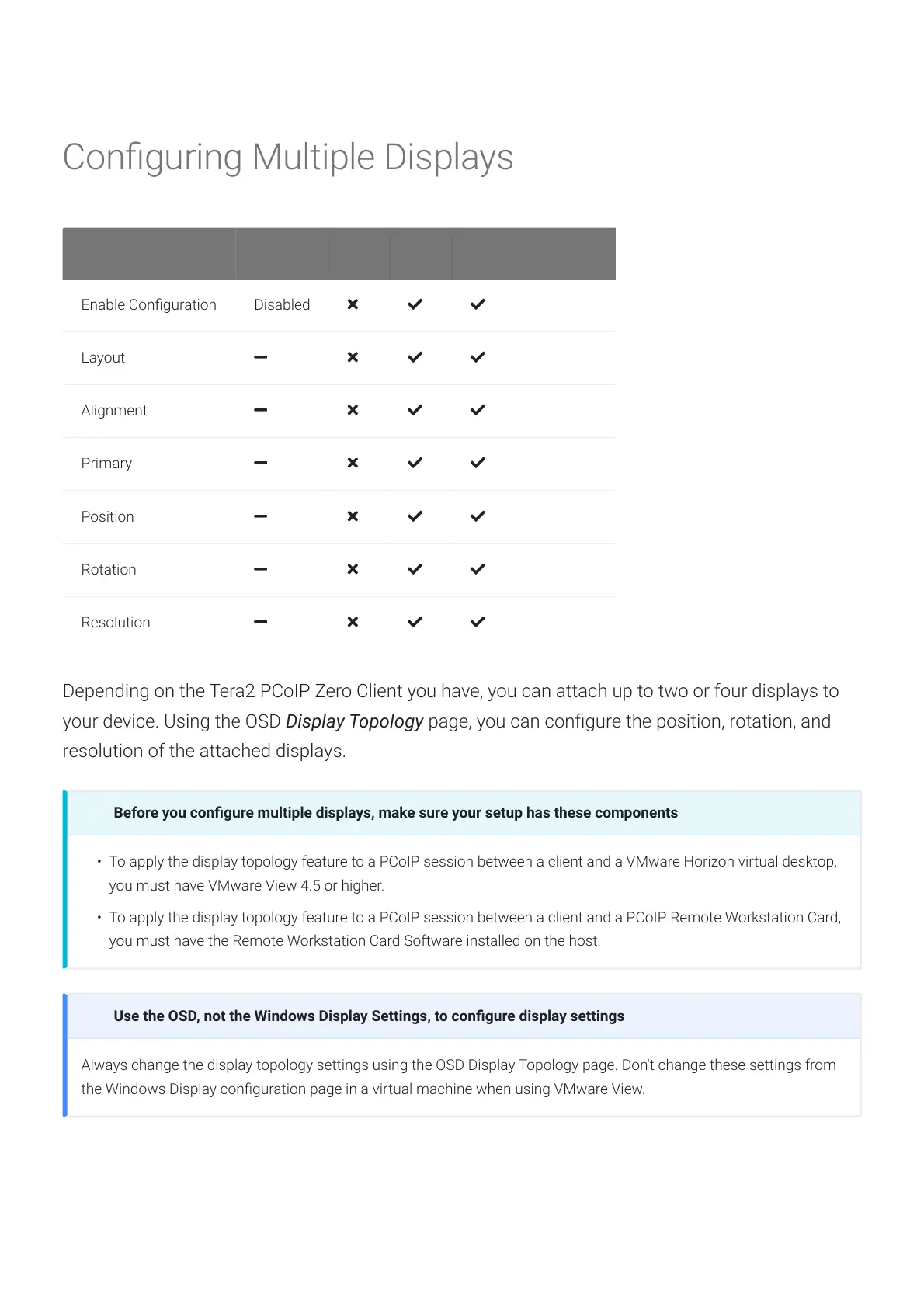
Conguring Multiple Displays
Depending on the Tera2 PCoIP Zero Client you have, you can attach up to two or four displays to
your device. Using the OSD Display Topology page, you can congure the position, rotation, and
resolution of the attached displays.
Before you congure multiple displays, make sure your setup has these components
• To apply the display topology feature to a PCoIP session between a client and a VMware Horizon virtual desktop,
you must have VMware View 4.5 or higher.
• To apply the display topology feature to a PCoIP session between a client and a PCoIP Remote Workstation Card,
you must have the Remote Workstation Card Software installed on the host.
Use the OSD, not the Windows Display Settings, to congure display settings
Always change the display topology settings using the OSD Display Topology page. Don't change these settings from
the Windows Display conguration page in a virtual machine when using VMware View.
Conguring Multiple Displays
© 2020 Teradici 331







 To Next Page