37
Contents Index
37
IndexContents
37
IndexContents
PORTION OF SCREEN AREA
To define which portion of the display screen your tablet will map to, in the MAPPING tab choose a SCREEN
A
REA option.
F
ULL Maps the entire monitor(s) area. This is the default setting. See also Working
with multiple monitors.
M
ONITOR Maps the entire area of a single monitor that you choose. If more than one
monitor is connected to your system, an option will be available for each
detected monitor.
P
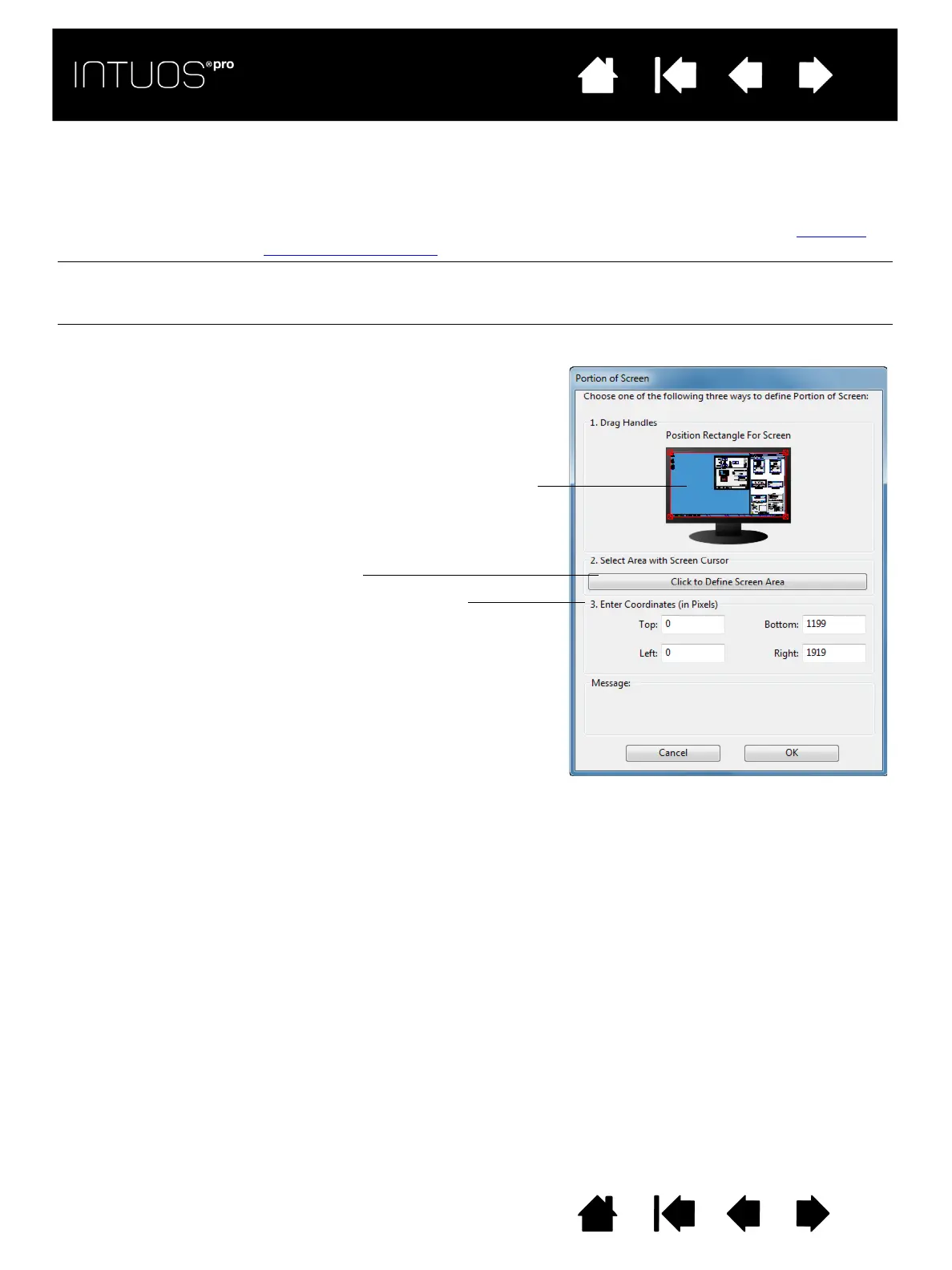
ORTION... In the dialog box that appears, choose a method for defining a portion of the
display:
• Drag corners of the foreground
graphic to select the screen area.
• Select the C
LICK TO DEFINE SCREEN
A
REA button and move the screen
cursor to select the screen area. Be
sure to follow any M
ESSAGE
prompts.
• Enter coordinate values.
After defining a portion of the screen,
you may need to use a different input
device to access other portions of the
screen area.









 To Next Page