smartPRINTER Operating Instructions
smartPRINTER Operating Instructions 003/10.2017 37
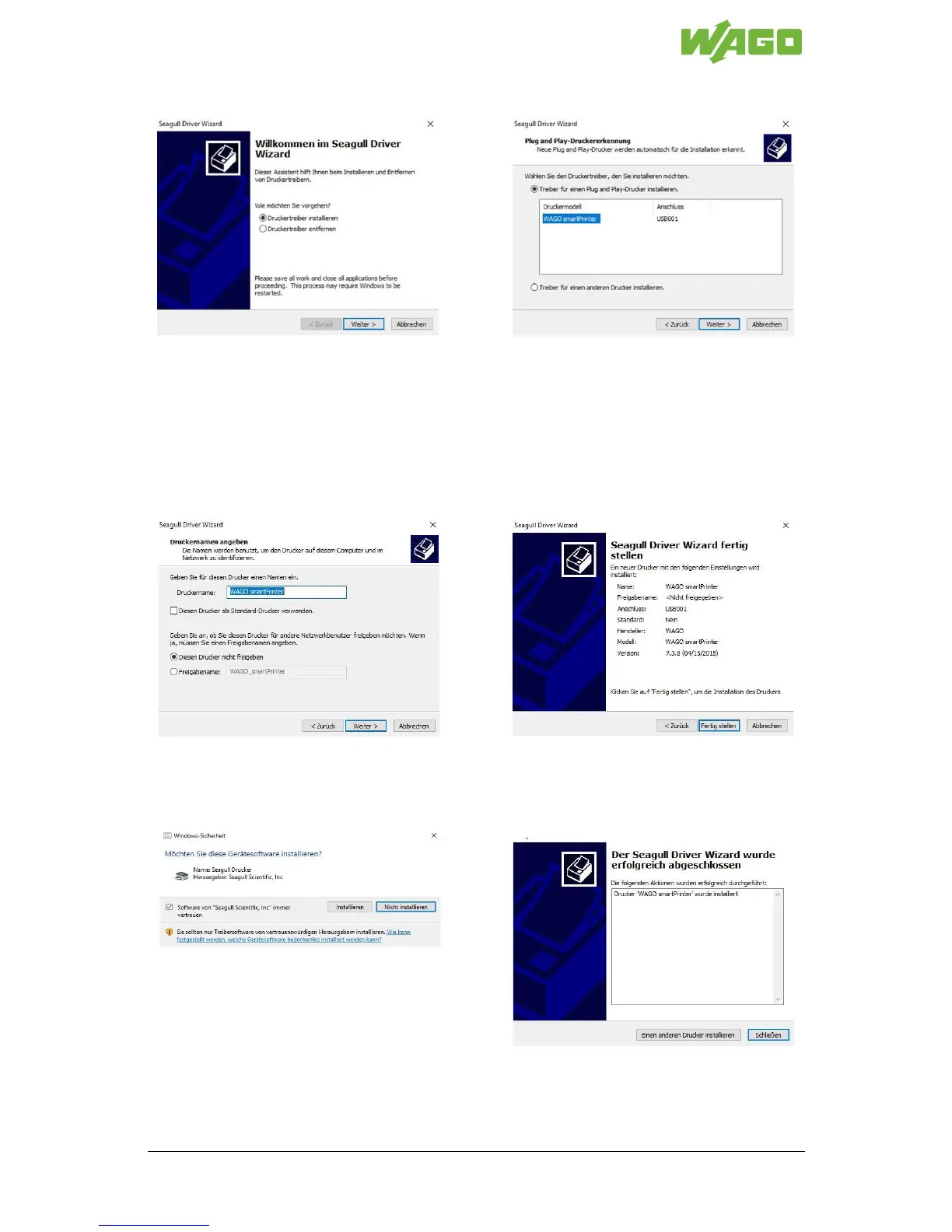
Follow the instructions given in the driver installation program (Seagull Driver Wizard):
Step 1: Select [Install printer driver] and
click [Next >].
Step 2: Select printer model
WAGO-smartPRINTER on the USB port
and click [Next >]
(Check the connection to the printer if the
device is not displayed under “Connection.”
Restart the driver installation program.)
Step 3: Apply the printer name and click
[Next >].
Step 4: A summary of the printer settings
appears. Click [Finish] to complete the
installation of the printer.
Note: Users with Windows 7, 8 or 10 as
their operating system should click [Install]
to confirm the security prompt.
Step 5: Click [Close]. The driver is
installed.


 To Next Page