27
Pro Dry Instruction Manual | Walker Filtration | www.walkerltration.com
Section 6: Maintenance
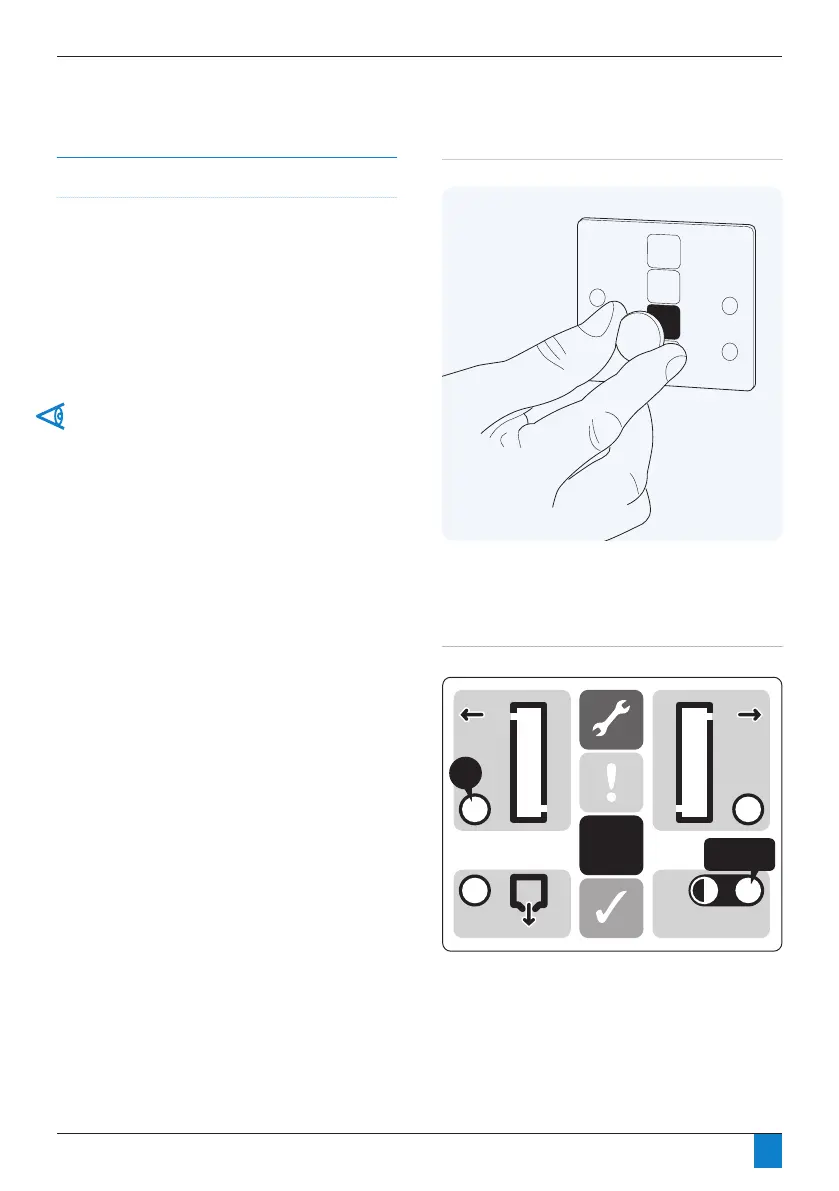
Figure 6.9: Controller reset
Resetting the Controller
• After following the start-up procedure it is necessary to
reset the controller. This is done by using the re-set disc
(suppliedwithcartridgeservicekit)then:
• Hold the disc against the blue pad on the front display of
the dryer panel for 5 seconds.
• Duringthevesecondperiodthepowerindicatorwill
ashgreen.Whentheresethasbeensuccessfulindicator
Xwillashgreenoncetoconrmthatithasbeen
completed successfully.
Sweep the reset disc on the blue pad if the LEDs do not flash
as stated.
Please note: If Energy Management is activated, their will be
a 6 hour delay after reset before Energy Management will be
operational again.
Figure 6.10: Controller description
X
POWER



 To Next Page