English - 10 -
Remote Control Handset
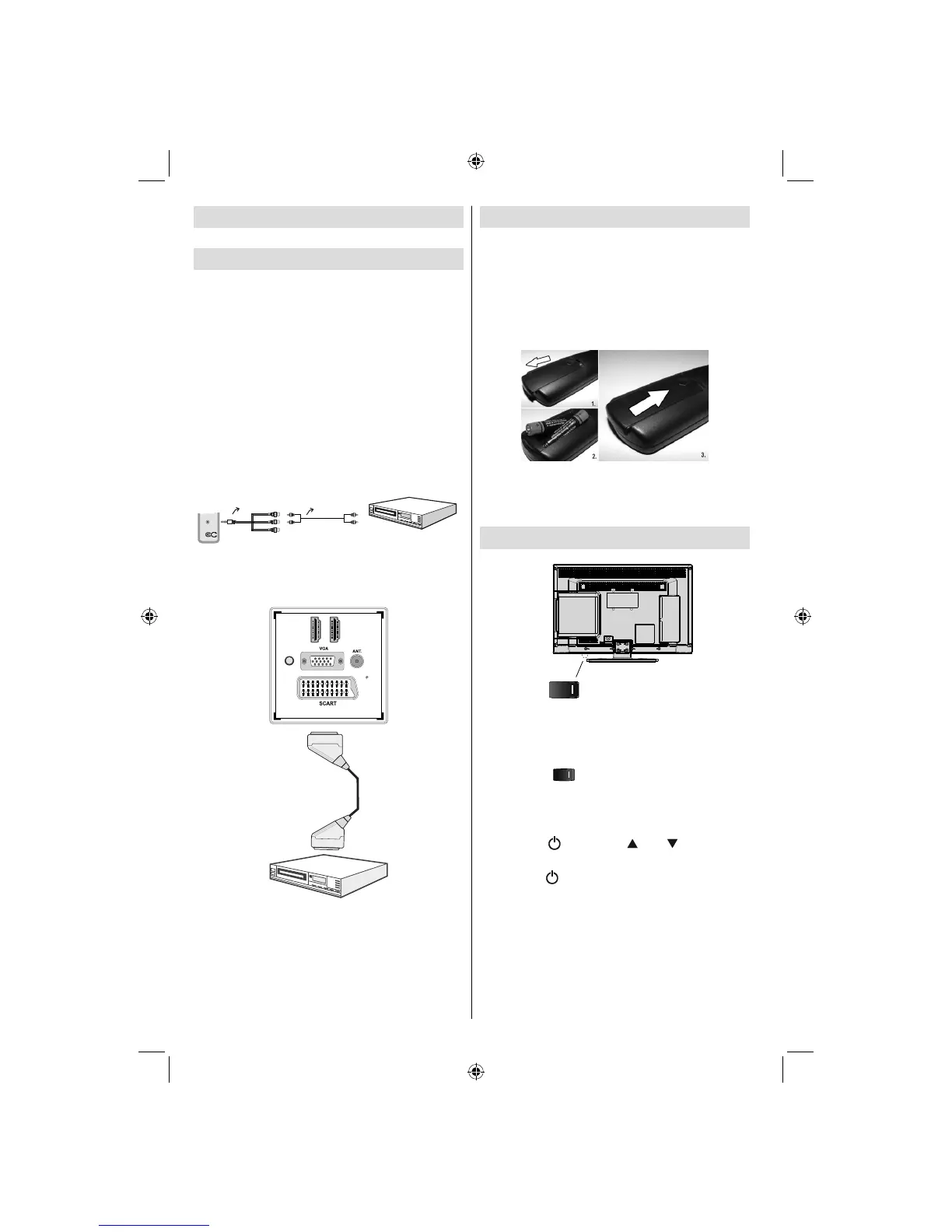
Inserting Batteries
Remove the battery cover located on the back of •
the handset by gently pulling backwards from the
indicated part.
Insert two • AAA/R3 or equivalent type batteries
inside. Observe the correct polarity (+/-) when
inserting batteries and replace the battery cover.
Note: Remove the battery from remote control
handset when it is not to be used for a long period.
Otherwise it can be damaged due to any leakage of
batteries. Remote range is approximately 7m/23ft.
Switching On/Off
Standby Switch)
To Switch the TV On
Connect the power cord to the 220-240V AC 50 Hz.
Switch the “• ” button to position “|” so the TV
will switch to standby mode. Then the standby LED
lights up.
To switch on the TV from standby mode either:•
Press the “• ” button, CH / CH or a numeric
button on the remote control.
Press the “•
” or PCH+ / PCH- button on the TV.
The TV will then switch on.•
Note: If you switch on your TV via standby button
on the remote control, the programme/source that
you were watching last will be reselected.
By either method the TV will switch on.
Connecting to a DVD Player
via Component Sockets
(YPbPr) or Scart Cable
Some DVD players are connected through •
COMPONENT SOCKETS (YPbPr). YPbPr can be
used only when you connect a device that has a
YPbPr output through the PC input with YPbPr to
PC cable (YPbPr cable is not supplied).
When the connection is made, switch to YPbPr •
source. See, “Input selection” section.
To enable audio connection, use the • VGA/
Component Audio cable. First, plug single jack
of the cable to the TV. Afterwards, insert your DVD
player’s audio cable’s connectors into the plural part
of the VGA/Component audio connection cable
(see illustration below). Colours of the connected
jacks should match ( RED & WHITE).
AV Connection
Cable (supplied)
Audio Cable
(not supplied)
To DVD Player's
Audio Outputs.
SIDE AV
When the connection is made, switch to • YPbPr source.
See, Input selection section.
You may also connect through the • SCART input.
HDMI 1
DMHI 2
SPDIF
Coax.OUT
Scart Cable
(not supplied)
External device
Note• : These three methods of connection perform the
same function but in different levels of quality. It is not
necessary to connect by all three methods.
01_MB60_[GB]_(01-TV)_woypbpr_1910UK_IDTV_NICKEL16_24940LED_10075239_50199287.indd 1001_MB60_[GB]_(01-TV)_woypbpr_1910UK_IDTV_NICKEL16_24940LED_10075239_50199287.indd 10 20.09.2011 16:36:4220.09.2011 16:36:42




 To Next Page