English - 14 -
Full: Searches and stores both analogue and aerial
DVB stations.
Whenever you select an automatic search type and •
press OK button, a confi rmation screen will appear
on the screen. To start installation process, select
Yes, to cancel select No by using .“
” or “ ” and
OK button.
After auto channel scan type is set and selected •
and confi rmed, installation process will start and
progress bar will move along. Press “MENU” button
to cancel process. In such a case, located channels
are not stored.
Manual Tuning
HINT: This feature can be used for direct broadcast
entry.
Select • Manual Channel Scan from the Installation
menu by using “
”/“ ” and OK buttons. Manual
Scan options screen will be displayed.
Select the desired • Search Type using “
” or “
” button. Manual search options will change
accordingly. Use “ ”/“ ” button to highlight an item
and then press “ ” or “ ” button to set an option.
You can press “MENU” button to cancel.
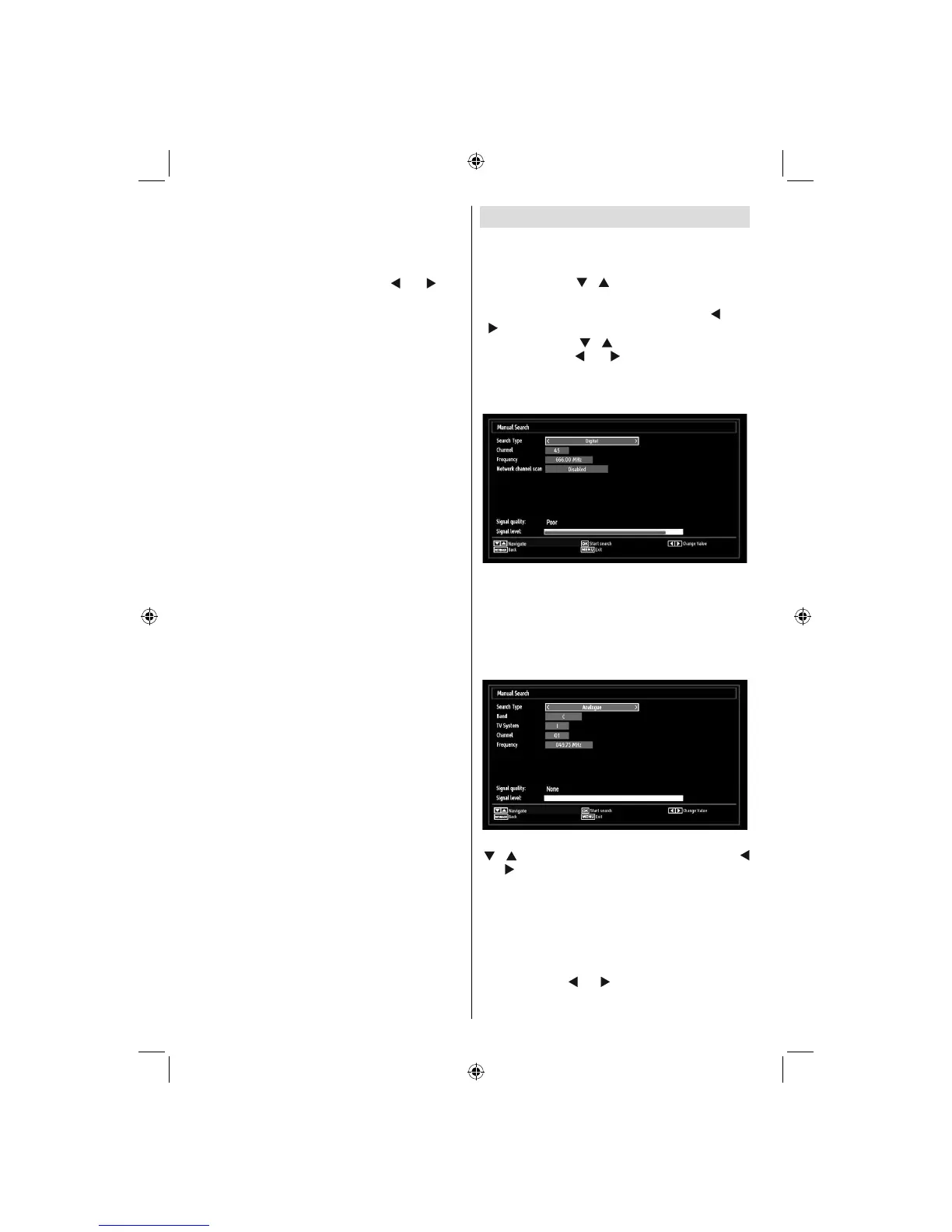
Digital Manual Search
In manual channel scan, the number of the multiplex
or frequency are entered manually and only that
multiplex or frequency are searched for the channels.
After selecting search type as Digital Aerial, you can
enter the multiplex or frequency number using the
numeric buttons and press OK button to search.
Analogue Manual Search
After selecting search type as analogue, you can use
“ ”/“ ” button to highlight an item and then press “
” or “ ” button to set an option.
Enter the channel number or frequency using the
numeric buttons. You can then press OK button
to search. When the channel is located, any new
channels that are not on the list will be stored.
Analogue Fine Tune
Select • Analogue Fine Tune from the Installation
menu by using “ ” or “ ” and OK buttons. Analogue
fi ne tune screen will be displayed. Analogue Fine
Tune feature will not be available if there are no
01_MB60_[GB]_(01-TV)_woypbpr_1910UK_IDTV_NICKEL16_24940LED_10075239_50199287.indd 1401_MB60_[GB]_(01-TV)_woypbpr_1910UK_IDTV_NICKEL16_24940LED_10075239_50199287.indd 14 20.09.2011 16:36:4620.09.2011 16:36:46






 To Next Page