English-25-
Remote control - no operation
The batteriesmay be exhausted.Replace the
batteries.
Thebatteries maybeinserted incorrectly. Referto
thesection“InsertingtheBatteriesintotheRemote”.
No signal on an input source
Itispossiblethatnodeviceisconnected.
Check theAV cablesand connections from your
device.
Checkthedeviceisswitchedon.
The Image is not centered in VGA source
TohaveyourTVautomaticallycentertheimage,enter
the PC Position menu inPicture menu, highlight
AutopositionandpressOK. Waitforit tofinish.In
ordertoset thepositionof theimagemanuallyyou
canuseHPositionandVPositionoptions.Select
thedesiredoptionanduseLeftandRightdirectional
buttonsontheremotetoset.
Recording unavailable
To recorda programme, youshould first correctly
connectaUSBstoragedevicetoyourTV,whilethe
TVisswitchedoff.YoushouldthenswitchontheTVto
enablerecordingfeature.Ifyoucannotrecord,check
thestoragedeviceiscorrectlyformattedandthereis
sufficientspace.
USB is too slow
If a“USB disk writingspeed too slow torecord”
messageisdisplayedonthescreenwhilestartinga
recording,tryrestartingtherecording.Ifyoustillget
thesameerror,itis possiblethatyourUSBstorage
device doesnot meet thespeed requirements. Try
usingadifferentUSBstoragedevice.
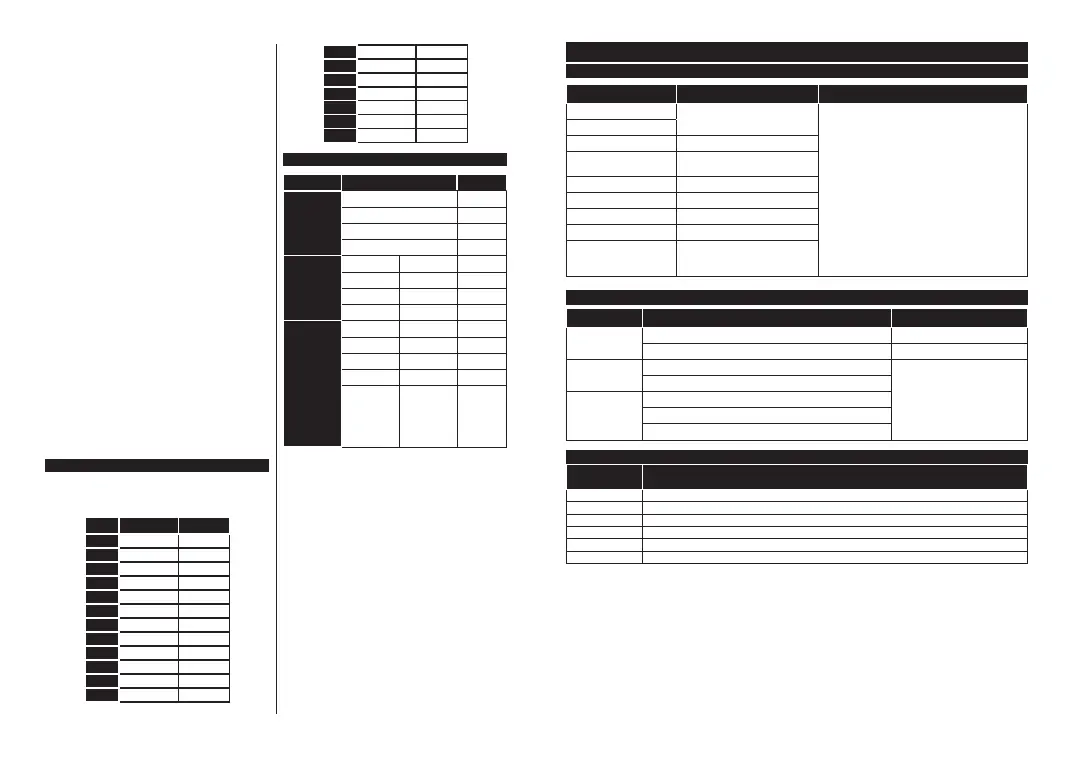
PC Input Typical Display Modes
The followingtable is anillustration of someof the
typicalvideodisplaymodes.YourTVmaynotsupport
allresolutions.
Index Resoluton Frequency
1
640x480 60Hz
2 640x480 75Hz
3 800x600 56Hz
4 800x600 60Hz
800x600 72Hz
6 800x600 75Hz
7 1024x768 60Hz
8 1024x768 70Hz
9 1024x768 75Hz
10 1152x864 75Hz
11 1280x768 60Hz
12 1360x768 60Hz
13 1280x960 60Hz
14 1280x1024 60Hz
1 1280x1024 75Hz
16 1400x1050 60Hz
17 1440x900 60Hz
18 1440x900 75Hz
19 1920x1080 60Hz
AV and HDMI Signal Compatibility
Source Supported Signals Available
Back AV
PAL O
SECAM O
NTSC4.43 O
NTSC3.58 O
YPbPr
480i,480p 60Hz O
576i,576p 50Hz O
720p 50Hz,60Hz O
1080i 50Hz,60Hz O
HDMI
480i,480p 60Hz O
576i,576p 50Hz O
720p 50Hz,60Hz O
1080i 50Hz,60Hz O
1080p
24Hz,25Hz,
30Hz,50Hz,
60Hz
O
(X: Not Available, O: Available)
InsomecasesasignalontheTVmaynotbedisplayed
properly.Theproblemmaybeaninconsistencywith
standardsfromthesourceequipment(DVD,Set-top
box,etc.).Ifyoudoexperiencesuchaproblemplease
contactyourdealerandalsothemanufacturerofthe
sourceequipment.
English-26-
Supported File Formats for USB Mode
Video File Formats
Extension Video Codec Max. Resolution & Frame Rate & Bit Rate
.mpg,.mpeg,.dat,.vob
MPEG1/2,H.264,VC1
H.264: 1080Px2@30fps-50Mbps,1080P@60fps-
50MbpsOther: 1080P@60fps-50Mbps
.ts,.trp,.m2ts
.avi MPEG1/2,MPEG4,H.264,MJPEG
.mp4,.m4a,.m4v,.mov,.qt,
.3gp,.3g2,.3gpp
MPEG1/2,H.263,MPEG4,H.264
.mkv MPEG1/2,MPEG4,H.264
.flv SorensonSp,MPEG4,H.264
.asf,.wmv MPEG4,WMV3,VC1
.webm VP9,VP8
.mp4,.mov,.3gpp,.3gp,
.ts,.trp,.tp,.mkv
HEVC/H.265
Picture File Formats
Extension Specification Resolution (width x height)
.jpg,.jpeg
Baseline 8192x8192
Progressive 3000x3000
.bmp
RGB1/4/8/16/24/32bit
8192x8192
RLE4/8bit
.png
Grayscale,24/32bitperpixel
Interlaceformat
Progressive
Audio File Formats
Extension Format
.mp3 .mp3
.ac3 .ac3
.aac .AAC
.wma .WMA
.amr .AMR-NB,.AMR-WB
.wav .MPEGLa,.AAC,.PCM




 To Next Page