English-27-
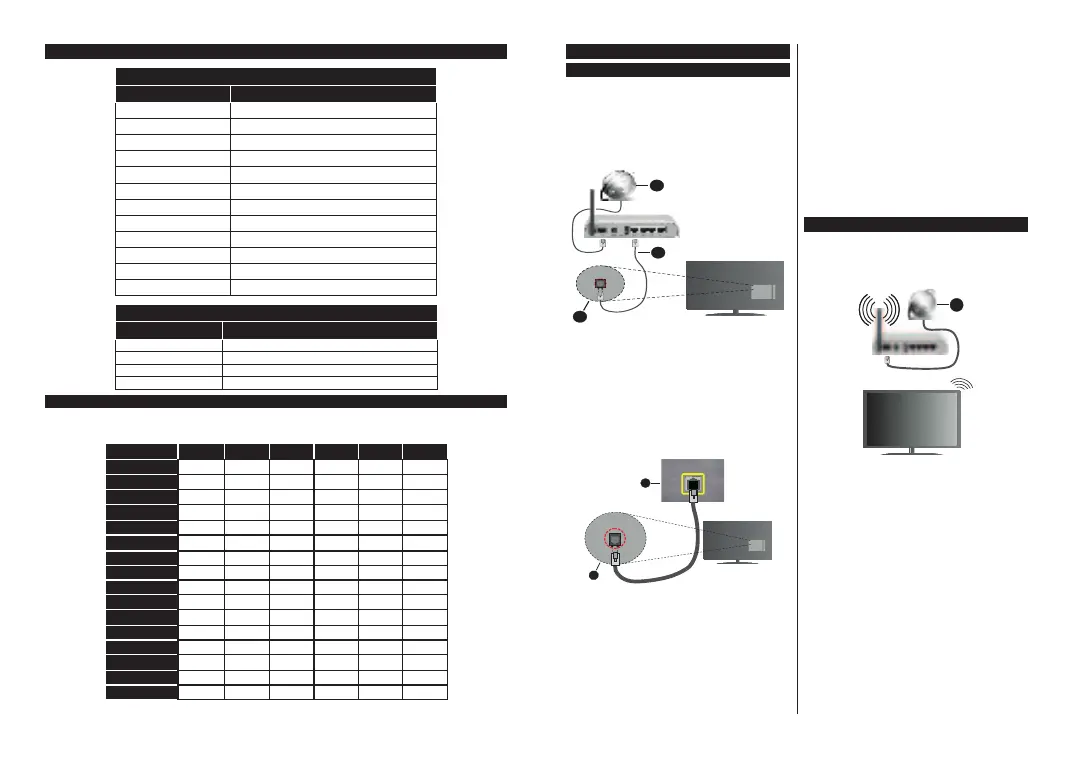
Subtitle File Formats
External Subtitles
Extension Specification
.ssa SubStationAlpha
.ass AdvancedSubStationAlpha
.srt Subripper
.sub MicroDVD/SubViewer
.sub+.idx VOBSub
.txt MicroDVD/TMPlayer/MPL2
.mpl MPL2
.smi Sami
.jss JACOSUB
.ttml TTML
.txt/.sub DVDSUBTITLE
.lrc -
Internal Subtitles
Extension
Specification
.mkv VOBSub
.mkv ASS/SSA/TEXT
.dat,.mpg,.mpeg,.vob DVDSubtitle
.mp4 DVDSubtitle,TEXT
Supported DVI Resolutions
Whenconnectng devces toyour TV’sconnectorsby usng DVIconverter cable(DVIto HDMIcable - not
suppled),youcanrefertothefollowngresolutonnformaton.
56Hz 60Hz 66Hz 70Hz 72Hz 7Hz
640x400
x
640x480 xx xx
800x600 xx xxx
832x624 x
1024x768 xxxxx
1152x864 xxx
1152x870 x
1280x768 xx
1360x768 x
1280x960 xx
1280x1024 xx
1400x1050 xx
1440x900 xx
1600x1200 x
1680x1050 x
1920x1080 x
English-28-
Connectivity
Wired Connectivity
To Connect to a Wired Network
You musthavea modem/router connectedto an
actvebroadbandconnecton.
Connect yourTV to yourmodem/router va an
Ethernet cable.There sa LAN port atthe rear
(back)ofyourTV.
1. BroadbandISPconnection
2. LAN(Ethernet)cable
3. LANinputontherearsideoftheTV
To confgure wred settngs refer to the Network
secton n theSettings menu.
YoumghtbeabletoconnectyourTVtoyourLAN
dependngonyournetwork’sconfguraton.Insuch
acase,useanEthernetcabletoconnectyourTV
drectlytothenetworkwalloutlet.
1. Networkwallsocket
2. LANinputontherearsideoftheTV
Configuring Wired Device Settings
Network Type
TheNetwork TypecanbeselectedasWiredDevice,
Wireless Device orDisabled,inaccordancewiththe
activeconnectiontotheTVset.SelectthisasWired
DeviceifyouareconnectingviaanEthernetcable.
Internet Speed Test
Highlight Internet Speed Testand press theOK
button.TVwillchecktheinternetconnectionbandwidth
anddisplaytheresultwhencomplete.
Advanced Settings
Highlight Advanced Settingsand press theOK
button.OnthenextscreenyoucanchangetheIPand
DNSsettingsoftheTV.Highlightthedesiredoneand
pressLeftorRightbuttontochangethesettingfrom
AutomatictoManual.NowyoucanentertheIPand
/orDNSvaluesmanually.Selecttherelateditemin
thedropdownmenuandenterthenewvaluesusing
thenumericbuttonsoftheremote.HighlightSaveand
presstheOKbuttontosavesettingswhencomplete.
Wireless Connectivity
To Connect to a Wireless Network
TheTVcannotconnecttothenetworkswithahidden
SSID.Tomakeyourmodem’sSSIDvisible,youshould
changeyourSSIDsettingsviathemodem’ssoftware.
1. BroadbandISPconnection
A Wireless-Nrouter (IEEE 802.11a/b/g/n) with
simultaneous 2.4and 5 GHzbands is designed to
increasebandwidth.Theseareoptimizedforsmoother
and fasterHD video streaming,file transfers and
wirelessgaming.
The frequency andchannel dffer dependngon
thearea.
Thetransmsson speed dffersdependng on the
dstanceand numberof obstructonsbetween the
transmsson products,the confguraton ofthese
products,theradowavecondtons,thelnetraffc
andtheproductsthatyouuse.Thetransmssonmay
alsobecutofformaygetdsconnecteddependng
ontheradowavecondtons,DECTphonesorany
otherWLAN11bapplances.Thestandardvaluesof
thetransmssonspeedarethetheoretcalmaxmum
valuesforthewrelessstandards.Theyarenotthe
actualspeedsofdatatransmsson.





 To Next Page