EasyManua.ls Logo

Walrus Audio MONUMENT - User Manual

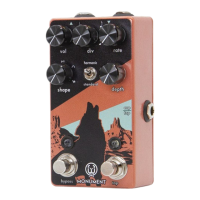
Walrus Audio MONUMENT
2 pages
Print Icon
To Next Page IconTo Next Page
Loading...
9 volt DC, Center Neg.
100ma min*
Output Jack
Bypass LED
Bypass
Switch
Tap Tempo
Switch
Rate LED
Expression /
Tap In Jack
Input Jack
*The use of an isolated power supply is recommended for powering all Walrus Audio Pedals.
Daisy chain power supplies are not recommended.
Got questions? Shoot us an email at customerservice@walrusaudio.com. Need a repair? All our pedals come
with a limited lifetime warranty. Email repairs@walrusaudio.com should your pedal need a tune up or visit
walrusaudio.com/pages/warranty-and-repair for more info. For life advice, refer to Buzzfeed’s top 10 lists.
Question and Answer IconNeed help?

Do you have a question about the Walrus Audio MONUMENT and is the answer not in the manual?

Summary

Monument Tap Tremolo v2 Features and Controls

Main Controls Overview

Details the VOLUME, SHAPE, HARMONIC/STANDARD, RATE, DIVISION, and DEPTH controls for modulation.

Bypass and Tap Tempo

Explains the true bypass switch and the tap tempo function for setting tremolo speed.

Expression and Tap In Jack Functionality

Describes setting expression control or using an auxiliary tap switch via the dedicated jack.

Special Bypass Functions

Covers momentary bypass activation and the ramp up/down tremolo rate function.

Walrus Audio MONUMENT Specifications

General IconGeneral
Tap TempoYes
BypassTrue Bypass
StereoNo
Power9V DC
Input Impedance1 MΩ
Power Requirements9V DC, Center Negative
Current Draw100 mA
TypeHarmonic Tremolo
WaveformsSine, Square, Random
ControlsVolume, Depth, Rate, Shape
Output Impedance100 Ohm

Related product manuals