Need help?
Do you have a question about the Walrus Audio Eons and is the answer not in the manual?
Specifies 9 volt DC, Center Neg. power with 100mA minimum. Recommends isolated power supply.
Sets overall output volume and interacts with Gain and Voltage controls for ample output.
Adjusts circuit voltage (3V-18V) for tone shaping, affecting compression and frequency response.
Sets gain amount, interactive with Voltage for gritty, starved, or overdriven sounds.
Allows cutting or boosting low frequencies after the fuzz circuit for tone shaping.
Adjusts high frequencies to increase clarity or tame them based on rig and gain.
Details five distinct modes (I-V) affecting clipping style and frequency response for varied tones.
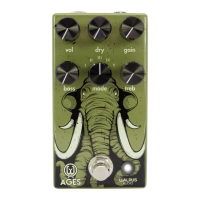
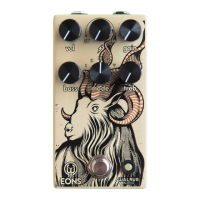
The Walrus Audio EONS is a five-state fuzz pedal designed to deliver a wide range of aggressive and dynamic fuzz tones, inspired by the powerful and commanding sound of a mythical beast residing in the highest mountains. This pedal is crafted to provide a thick, attention-grabbing sound that can warn all who stand in its way, much like the gnarled and twisted horns of the creature it embodies.
The EONS pedal functions as a versatile fuzz effect for guitar signals, offering five distinct clipping styles and frequency responses. It allows users to sculpt their fuzz tone through controls for volume, gain, voltage, bass, and treble, in addition to a five-position mode switch. The core of its functionality lies in its ability to manipulate the operating voltage of the fuzz circuit, which significantly alters the character of the fuzz from a starved, dying battery sound to an open, less compressed tone. The pedal's various modes provide different "flavors" of fuzz, ranging from traditional smooth silicon clipping to aggressive hard clipping with LED and silicon diodes.
The EONS pedal offers a comprehensive set of controls for shaping your fuzz sound:
Volume (Vol) Knob: This control sets the overall output volume of the pedal. It's important to note that the "Voltage" and "Gain" controls are highly interactive with the output volume, so the "Vol" knob provides ample range to compensate for any perceived volume changes when adjusting other parameters.
Voltage Knob: This is a key feature of the EONS, allowing you to adjust the circuit's operating voltage. At its minimum setting, the main fuzz section operates at approximately 3 volts, producing a "dying battery" sound characterized by a starved tone and a brighter frequency response. As you increase the voltage, the pedal moves towards 18 volts, resulting in a more open and less compressed sound with added bass. Around the noon position, the "Voltage" control can introduce a gating effect. Lower voltages will also drastically reduce the output volume, requiring adjustment of the "Vol" knob. The behavior of this knob varies slightly across the different modes.
Gain Knob: The "Gain" knob determines the amount of gain applied to your guitar signal as it passes through the fuzz circuit. This control is highly interactive with the "Voltage" knob. Pushing more gain through the pedal at lower voltage settings will yield grittier and dirtier sounds. Conversely, lower gain settings at lower voltages will produce very starved sounds, potentially causing the signal to cut out completely at extreme low settings. Users are encouraged to adjust to taste.
Bass Knob: This control allows you to cut or boost low frequencies after the fuzz circuit. It can be used to tighten up the low end or to increase the low-frequency emphasis. Starting at the noon position, turning the knob down removes bass, while turning it up adds bass.
Treble Knob: The "Treble" knob helps to increase clarity in the high-frequency region or to tame them, depending on your amplifier and rig. Similar to the bass control, you may find that at higher gain settings, you might want to add more treble, while at lower gain settings, you might prefer to roll the treble back. Starting at noon, turning the knob down cuts out highs, and turning it up allows more highs.
Mode Switch: This is a five-position rotary switch that offers different combinations of frequency response and clipping styles. Each position provides a distinct "flavor" of fuzz:
It's important to note that since the Mode switch changes the internal gain and clipping style, the other controls will behave slightly differently across modes. There is an internal gain change designed to help even out the output level difference between the different clipping modes, but users may still need to adjust the "Vol" knob to set the overall output. The "Voltage" knob also heavily interacts with the volume and gain, so users may need to compensate by adjusting the "Gain" or "Volume" knobs to achieve their desired sound.
The Walrus Audio EONS pedal is designed for reliability and comes with a limited lifetime warranty, indicating a commitment to product longevity and customer support. For any questions or repair needs, users can contact Walrus Audio directly via email, ensuring access to real human assistance for their gear. The use of an isolated power supply is recommended for powering all Walrus Audio Pedals, and daisy chain power supplies are not recommended, which helps prevent noise and ensures optimal performance and potentially extends the life of the pedal by providing stable power.
 General
| Power Supply | 9V DC |
|---|---|
| Current Draw | 100 mA |
| Weight | 1.5 lbs |
| Bypass | True Bypass |
| Input Impedance | 1 MΩ |
| Output Impedance | 1 kΩ |
| Type | Fuzz |
| Controls | Tone |
| Voltage Range | 9V |

 To Next Page