Section 3
Operatíon
OPERATION/EXAMPLE
Find
1200000'?.
REMARKS
Window displays
+144.0000000,
with a flash-
ing decimal
point.
The decimal
point
should
be
shifted l0
places
to the
right to
get
the true
result.
KEYBOARD
CODE
KEYBOARD
CODE
1
61
1
61
2
62
2
62
0
60
0
60
0
60
0
60
0
60
0
60
0
60
0
60
0
60
0
60
ENTER
41
x=
46
3.12
DIVISION
KEYS
MODEL 3OO
@tr
í------luur r rrutnv
I laccr rv rccrrrv
L;lo o
f--]mJ
I ltïil
I + I r-l
I ll...o,' I
L-,JEÏJ
@trtrtr
n trtrtr
I srurrn I
ti
trtrtr
"'lH3*r---l
(0)e)[
"l
I
'l
@In
ffill
*ll*=l
tïïËlli L__,J
0
60
WANG LABOFATORIES
INC,
TEW(SBUFY, N'IASS. U,S,A,
15
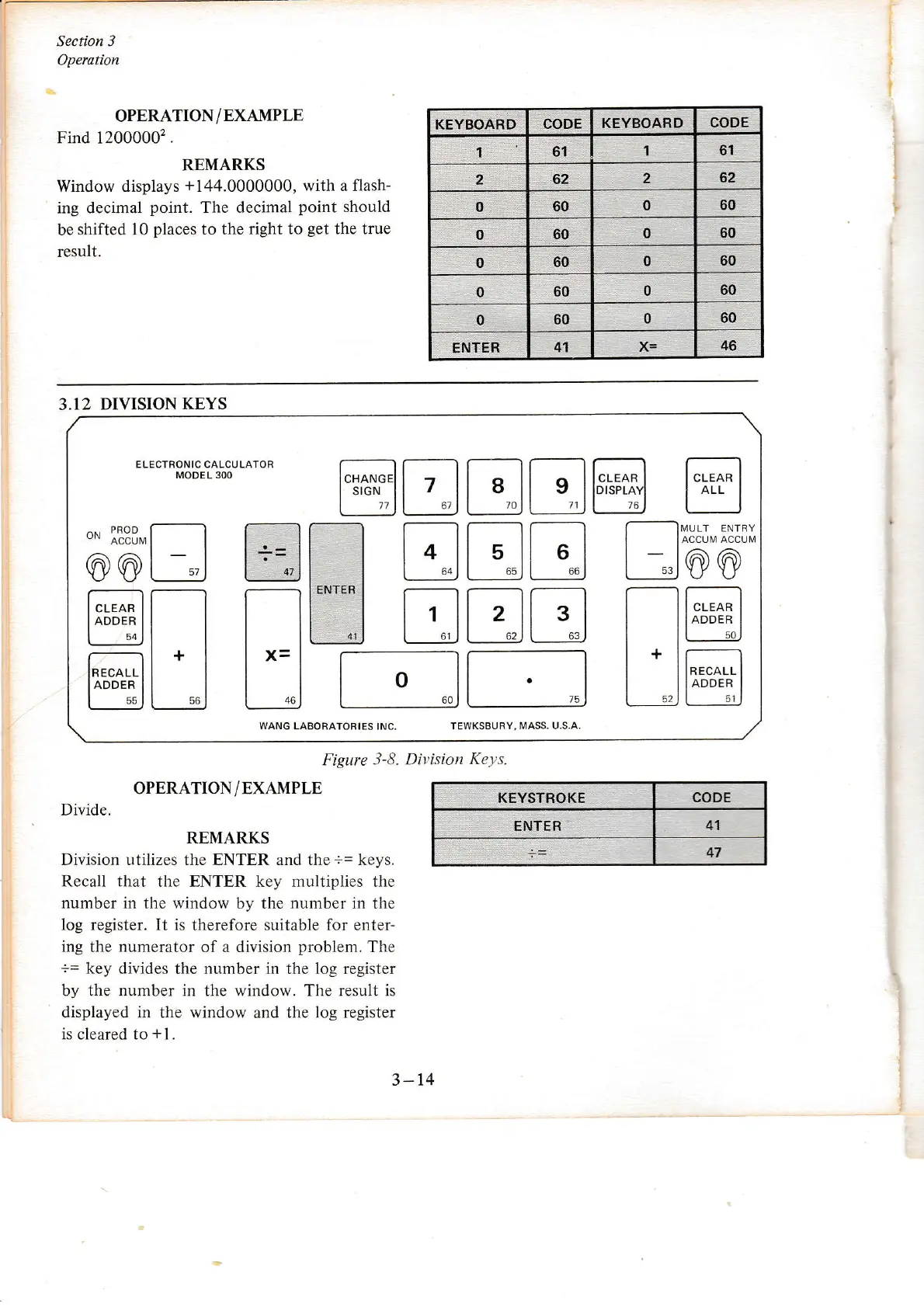
Figure
3-8. Division
Keys.
KEYSTROKE CODE
ENTER
41
OPERATION/EXAMPLE
Divide.
REMARKS
Division utilizes the ENTER and the
+=
keys.
Recall that the ENTER key multiplies the
number
in the window by the
number
in the
log register. It
is therefore suitable for enter-
ing
the
numerator
of a division
problem.
The
:=
key
divides the number in the log registeÍ
by the number in the window. The result is
displayed in the window
and
the log register
is cleared to
*1.
3-14
t--_



 To Next Page