EasyManua.ls Logo

Wang 300 Series - Page 44

Wang 300 Series
72 pages
Print Icon
To Next Page IconTo Next Page
To Previous Page IconTo Previous Page
Loading...
Section 3
Operation
I
È
I
I
F..-
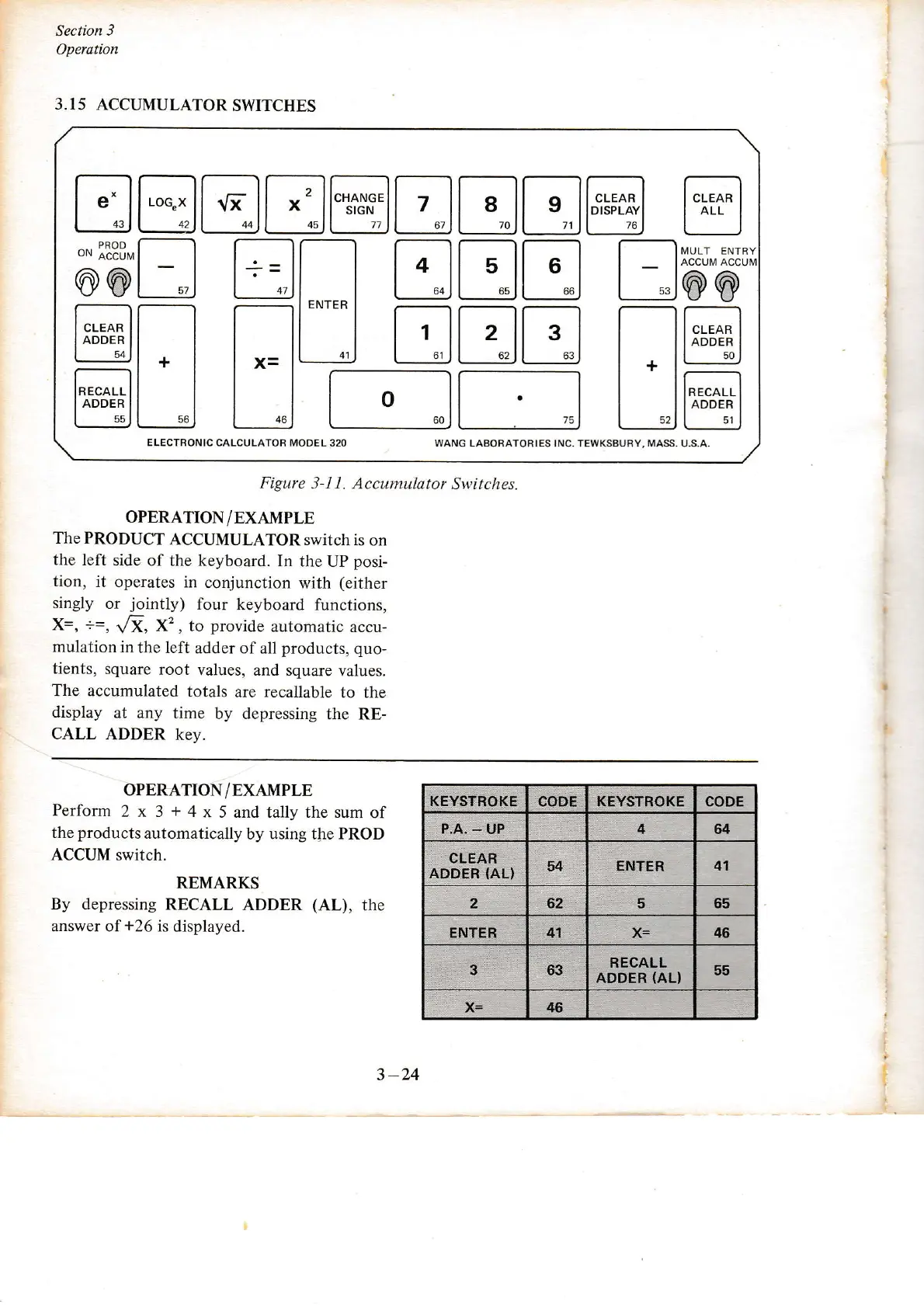
OPERATION/EXAMPLE
The
PRODUCT
ACCUMULATOR
switch is
on
the left
side of
the keyboard. In
the UP
posi-
tion,
it operates
in conjunction
with
(either
singly
or
jointly)
four
keyboard functions,
x=,
==,
/Ï,
X2, to
provide
automatic
accu-
mulation
in
the left
adder of all
products, quo-
tients,
square
root values,
and square
values.
The accumulated
totals
are recallable
to the
display
at
any
time
by depressing
the RE-
CALL
ADDER
key.
3.15
ACCUMULATOR
SWITCHES
ELECTRONIC CALCULATOB MODEL
320 WANG LABOFATOBIES INC, TEWKSBUBY, MASS.
U.S.A.
E
a
öötr
tr
ffiEE
trtrtrtr@trtrtr@
@
trtrtr
tröö
F;I-;
Figure
3-1 1. Accumulator
S\ritches.
OPERATION/EXAMPLE
Perform
2 x 3
+
4
x 5 and tally the sum
of
the
products
automatically
by using the PROD
ACCUM
switch.
REMARKS
By depressing
RECALL
ADDER
(AL),
the
answer of
*26
is displayed.
3-24
KËYSTROKE
CODE KEYSTROKE CODE
P.A.
-
UP
4
64
CLEAR
ADDER
(AL)
54 ENïER
4t
2 62 5 65
ENTER 41
x=
46
3 63
RECALL
ADDËE
{AL}
55
x=
46

Other manuals for Wang 300 Series

Related product manuals