EasyManua.ls Logo

Wang 300 Series - Page 46

Wang 300 Series
72 pages
Print Icon
To Next Page IconTo Next Page
To Previous Page IconTo Previous Page
Loading...
Section
3
Operation
OPERATIONi
EXAMPLE
Solve 1/2
+
113
+
ll4
and findthesumof
the
divisors
by using
the MULT
ACCUM
switch.
REMARKS
Answer
is 9
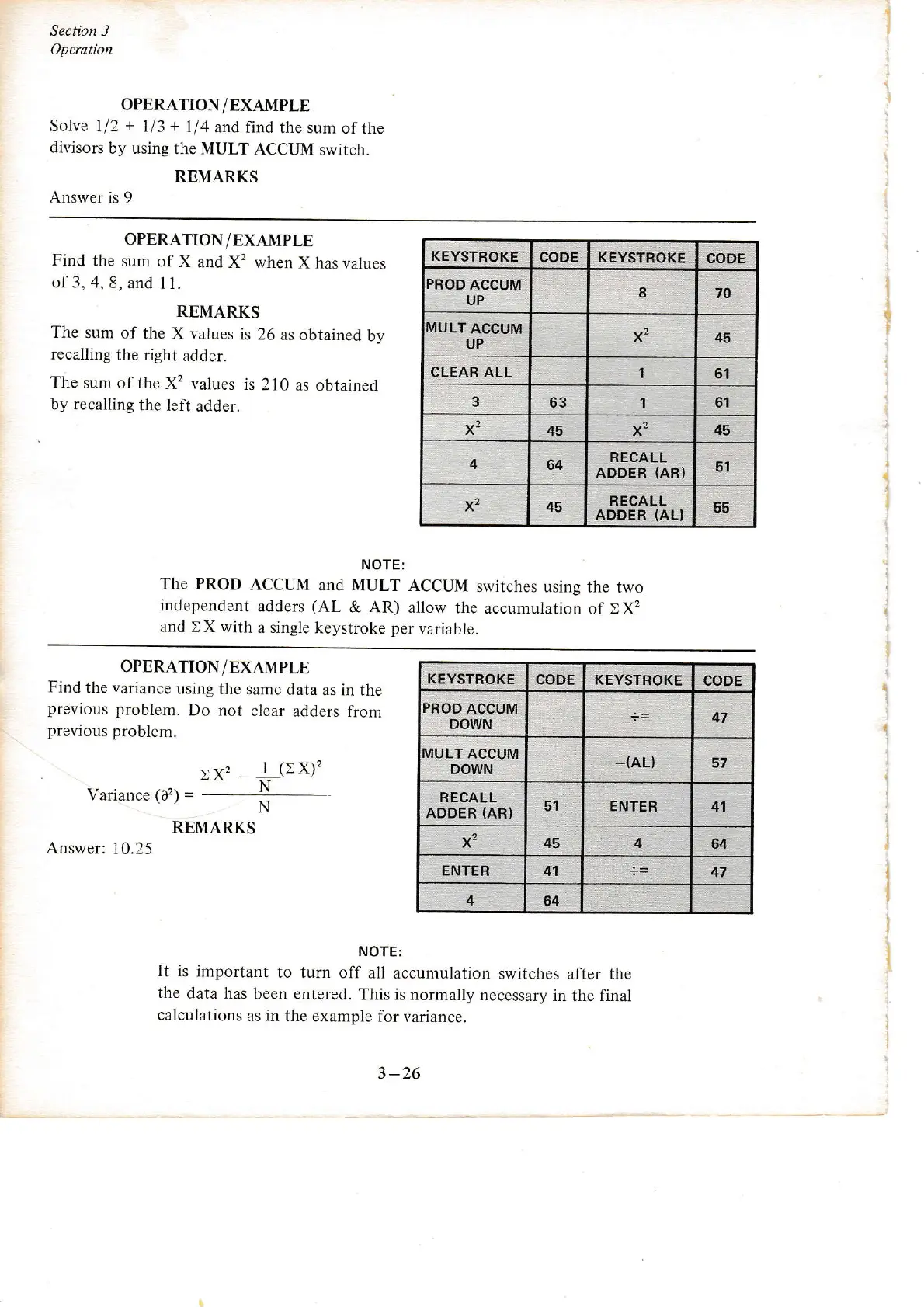
OPERATION/EXAMPLE
Find
the
sum of
X
and X2 when
X has
values
of 3, 4,
8, and
11.
REMARKS
The
sum of
the X
values
is 26
as obtained
by
recalling
the
right
adder.
The sum
of the
X2 values
is
2 l0 as
obtained
by recalling
the
left
adder.
NOTE:
The PROD
ACCUM
and MULT
ACCUM
switches
using the
two
independent
adders
(AL
& AR) allow
the accumulation
of EX,
and
t X with
a single
keystroke
per
variable.
KEYSïROKE
CODE
PBOD
ACCUM
UP
70
MULT
ACCUM
UP
x2 45
CLËAR
ALL
1
61
63
,|
61
x2
45
x2
45
4
64
RECALL
ADDER
(AR}
51
x2 45
RECAL!
ADDER
(AL}
55
OPERATION/EXAMPLE
Find
the
variance
using
the same
rlata as
in the
previous
problem.
Do not
clear
adders from
previous
problem.
,az
_
I
(>X)'?
N
Variance
(a2)
=
REMARKS
Answer:
10.25
N
NOTE:
It is
important
to turn
off all
accumulation
switches after the
the
data has
been entered.
This is normally
necessary
in
the
final
calculations
as in the
example for
variance.
KEYSTAOKE
CODE
KEYSTROKE
CODE
47
MULT ACCUM
DOWN
_(AL}
57
RECALL
ADDER
(AR}
51 ENTER 41
x2
45 4
64
ENTER
41
47
4
64
3
-26
I
CODE
KEYSTROKE
PROD
ACCUM
DOWN

Other manuals for Wang 300 Series

Related product manuals