EasyManua.ls Logo

Wang 300 Series - Page 50

Wang 300 Series
72 pages
Print Icon
To Next Page IconTo Next Page
To Previous Page IconTo Previous Page
Loading...
Section
3
Operation
(i.e.,
RECALL
Ha 0 command
recalls
the
"A"
half
contents
of register
0). Numeral
keys
0
through
9 are
used
to address
ten
of the
twelve
registers.
The remaining
two registers
are
addressed via
the
CLEAR
DISPLAY and
CHANGE
SIGN
keys; for
example,
full
regis-
ter no.
l0
can
be addressed
by the
commands
STORE
FULL
CLEAR
DISPLAY.
By
depres-
sing one
of
the eight
right-side
command
keys
first, the
conventional
functions
of
the address
keys
are aborted.
NOTE:
The full registers
have
a capacity
of l4
digits,
decimal
point,
and
algebraic
sign. When
used
as half registers,
each
hzLlf has
a capacity
ol
6 digits,
decimal
point,
and algebraic
sign. If
a number
larger
than
six digits
is in the
display window
when
the
half register
store
command
is
performed,
only
the six
most
significant
digits will
be
stored.
The half
register
recall
command
will readily
illustrate
this
fact.
Il
by accident
a storage
register
command
key
and a
blue log
register
key
is depressed
instead
of a storage
register
commancl
key
and
a
proper
address
key,
the keyboard
may
"lock
up,, until
the
CLEAR
ALL key
is depressed.
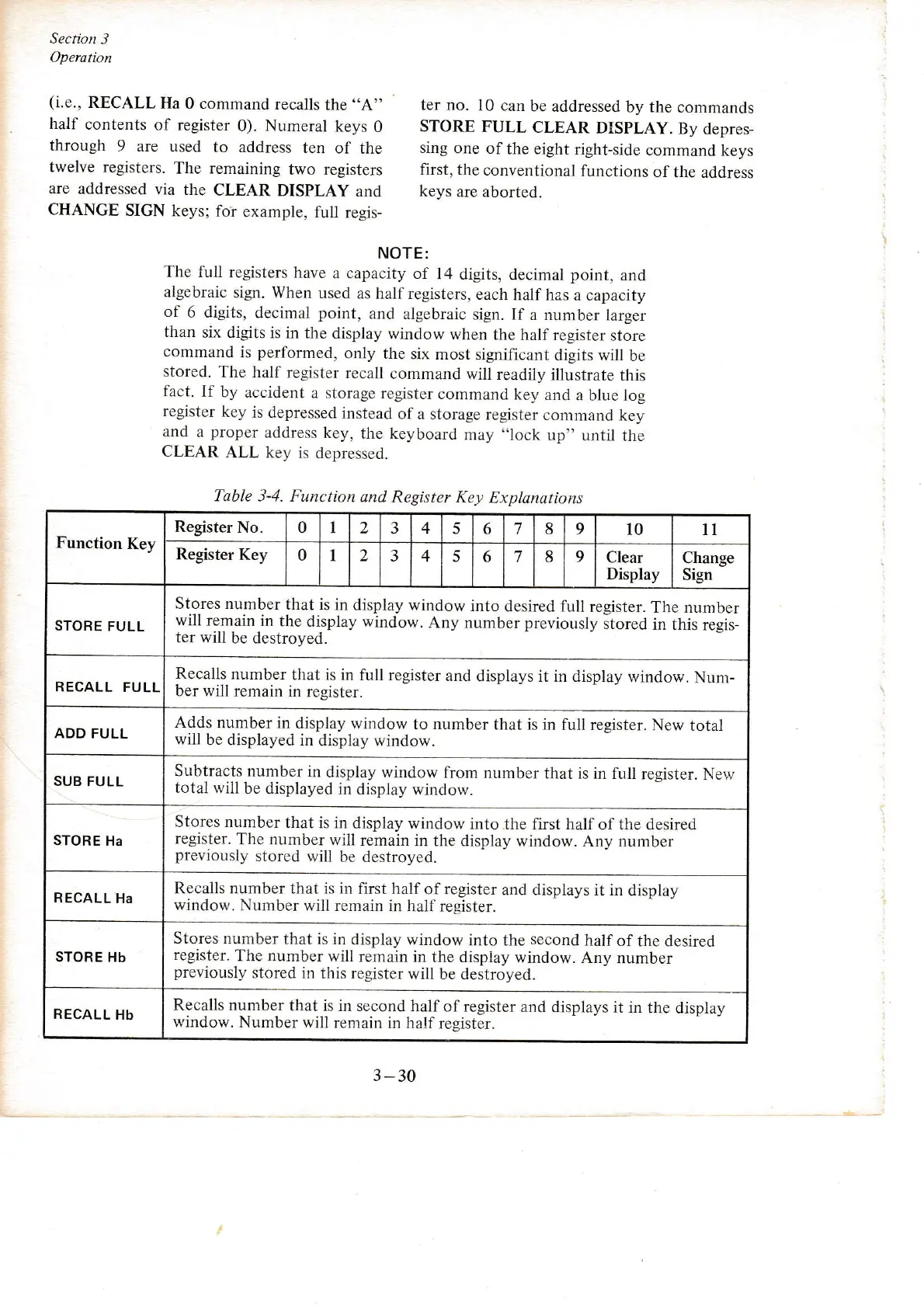
Table 3-4. Function
dnd
Register Key
Explanations
Function
Key
Register
No. 0 I
2
3 4 5 6
7 8 9
10 11
Register
Key
0
1 2 3
4 5 6
7 8 9
Clear
Display
Change
Sign
STORE
FULL
Stores number
that
is in display
window
into
desired full
register.
The number
will rem-ain_in
the display window.
Any number
previously
itored
in this
regis-
ter will
be destroyed.
RECALL
FULL
Recalls
number
that is in
full register
and displays
it in display
window.
Num-
ber will remain
in register.
ADD
FULL
Adds
number in
display window
to
number
that is in
full register. New
total
will be
displayed in
display window.
SUB FULL
Subtracts number
in
display window
from
number
that is in full
register. Nerv
total will
be
displayed
in display window.
STORE
Ha
Stores number
that
is in display
window
into the first half
of the desired
register.
The number
will
remain
in the display window.
Any number
previously
stored
will
be destroyed.
RECALL
Ha
Recalls number that is in
first half
of
register
and displays it in
display
window. Number
will remain
in
half
resister.
STORE Hb
Stores
number
that is in
display window
into the
second
half
of
the desired
register.
The
number
will
remain
in the display
window. Any number
previously
stored il'l
this register
will be destroyed.
RECALL
Hb
Recalls number
that is in second
half of
register and displays
it in
the display
window. Number
will remain
in half
register.
3
-30
I
:

Other manuals for Wang 300 Series

Related product manuals