2
Operating elements and displays
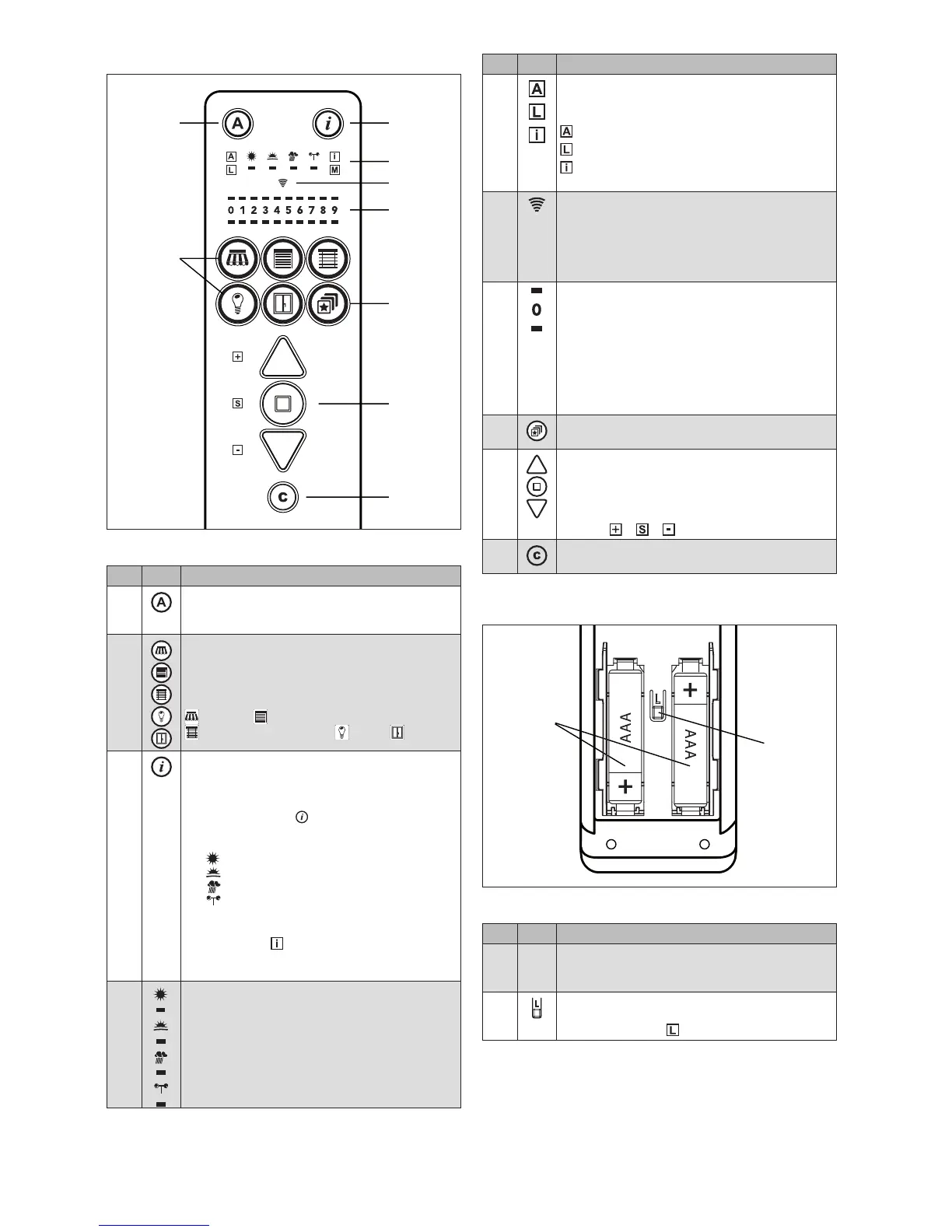
Fig. 2 Operating panel of the WMS Hand-held transmitter
Pos. Fig. Function
A
Control on/off button
Switch on and off the control functions of the
receivers that were learned.
B
Product buttons
Select the product type or switch between product
channels.
(All product buttons that can be pressed light up.
The currently selected product type flashes.)
Awning Roller shutter
External venetian blind Light Window
C
Info button
Information displays on the currently selected
product channel.
Multiple display modes can be called up one by
one. Every press on changes to the next mode:
1. Assignment of channel and receivers
(display only)
2. Sun control
3. Dawn/dusk control
4. Precipitation control
5. Wind monitoring
6. Leave the info mode
Move commands cannot be sent while the info
mode is active ( lights up).
In the info mode, the hand-held transmitter switch-
es off one minutes after the last press of a button.
D
Control function display
Display of the control functions for sun, dawn/
dusk, precipitation and wind.
If a control function was the reason for the last
movement, the corresponding symbol lights up for
2s when you operate the product the next time.
The LEDs below the symbols indicate the
current state of the control functions.
Pos. Fig. Function
D
Display of special functions
These fields are active if the corresponding func-
tion was activated by the press of a button.
Control mode
The learn mode is active
Info mode: Channels, parameters or control
function information is displayed
E
Transmission LED
GREEN: The hand-held transmitter is transmit-
ting.
RED: The hand-held transmitter did not
receive a response from the receiver
YELLOW: Change the batteries
F
Numbers display
The numbers display block indicates a variety of
information, depending on the state of the hand-
held transmitter.
Upper row of LEDs:
Scanned receivers, parameter
values
Numbers: Channel numbers, parameter
levels
Lower row of LEDs:
Active channel
G
Scene button
Select stored scenes or store new scenes
H
UP/STOP/DOWN or +/Save/- buttons
Send move or switch commands to the selected
receiver.
If the hand-held transmitter is in the info or learn
mode, the buttons can be used to change or store
settings ( + + light up).
I
Comfort button
Save and recall comfort positions and scenes
Operating elements on the back
Fig. 3 Back of the WMS Hand-held transmitter
Pos. Fig. Function
K
Batteries
The hand-held transmitter requires two batteries of
type AAA (IEC LR03, "Micro")
L
Learn button
Activates or ends the learn mode of the hand-held
transmitter (symbol lights up in green)



 To Next Page