Operation
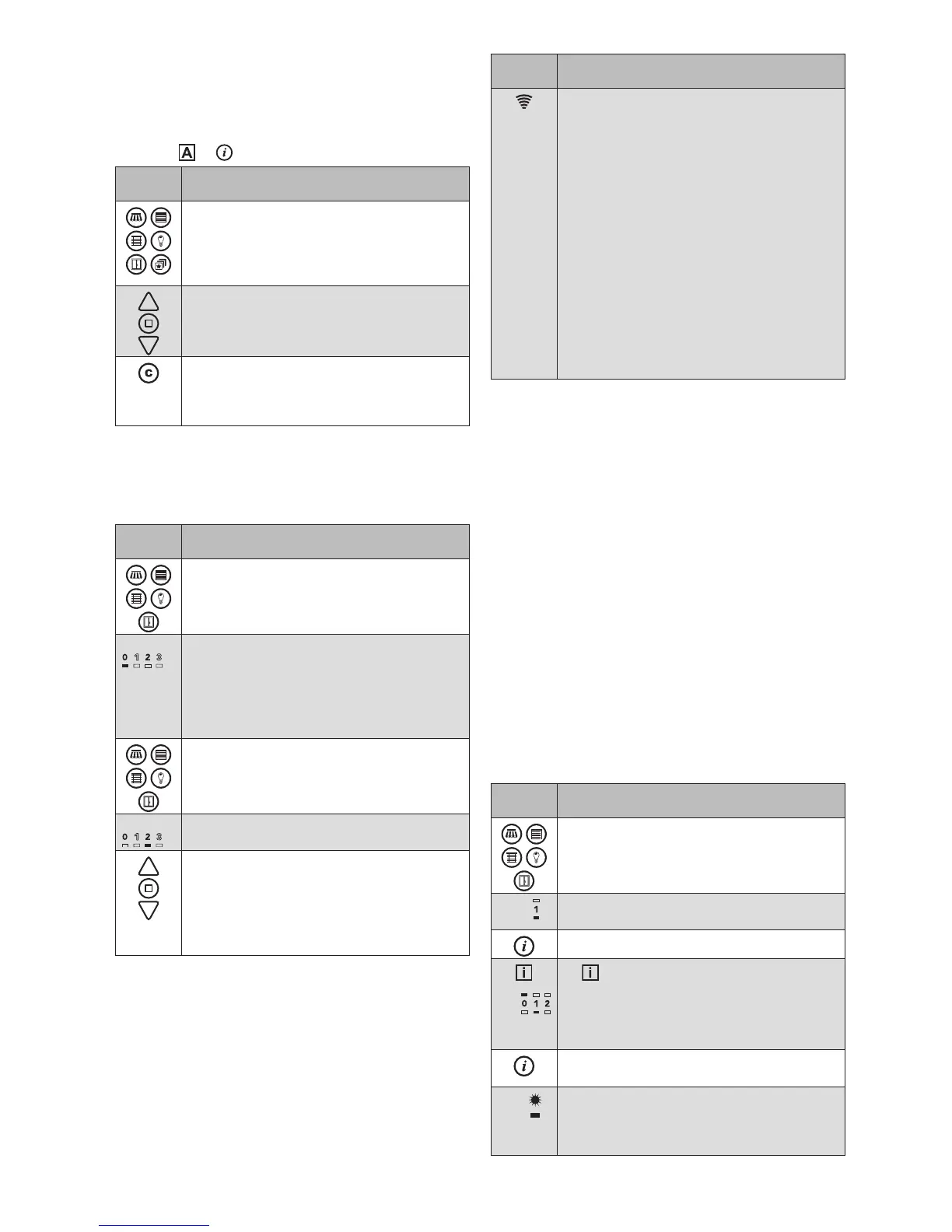
Waking up
The hand-held transmitter is normally in the energy saving
mode. The energy saving mode is activated 5 seconds
after the last press of a button. All buttons on the front
except for
or wake up the transmitter as follows.
Button/
display
Action/result
Product or scene button: The first press of
the button does not yet cause a function to
be performed. The channel of this product
type that was selected last is active again
even after waking up.
UP/STOP/DOWN buttons: A move com-
mand is immediately sent to the product
channel selected last.
Comfort button: The products in the chan-
nel selected last are moved to the comfort
position. If a scene was selected last, it is
recalled immediately.
OTEN The hand-held transmitter remains switched on
for several minutes, depending on the function
or mode.
Operating the products
Button/
display
Action/result
Select the product type that you would like
to operate.
Only those product buttons light up for
which products have been learned in.
E.g.
...
The selected product button flashes.
In the number field, the channels on which
products have been learned in light up (in
the example on the left, 0 and 2). The LED
below the currently selected channel lights
up (in the example, channel 0).
Press the flashing product button repeat-
edly until the LED below the desired chan-
nel lights up.
E.g.
...
The LED below the selected channel lights
up (in the example, channel 2).
Operate the selected product with the UP/
STOP/DOWN buttons.
The operating instructions of the respective
receiver describe which operating options are
available to you for the selected product (e.g.
UP=ON, DOWN=OFF, STOP=switch).
Button/
display
Action/result
The transmission LED indicates the trans-
mission process:
Flashes GREEN: The hand-held transmitter
is transmitting
2s GREEN: The receiver confirms the
command
2s RED: The command was not con-
firmed (e.g. the receiver is
outside of the transmission
range)
2s GREEN + control symbol is red:
The receiver confirms the com-
mand, but does not execute
it because of the displayed
control function (e.g. the awn-
ing is not extended because
the wind alarm is active).
OTEN The WMS Hand-held transmitter remembers the
product channel selected last. You can operate
this product again directly using the UP/STOP/
DOWN buttons or the comfort button without
having to reselect it.
If the reason for the last movement was a sun,
dawn/dusk, precipitation or wind alarm, the
symbol lights up for 2s when the product is
operated the next time.
Displaying/setting the control functions
If you retrofit your products with suitable WMS sensors in
a WMS network, they can be extended and retracted auto-
matically as a function of sunlight, dawn/dusk or precipita-
tion. Detailed information can be found in the instructions
of the WMS sensors.
The parameters of the comfort control functions can be
displayed and changed on the hand-held transmitter.
OTEN Only those parameters are displayed that
belong to the selected product type (e.g. there
is no precipitation control for the "light" product
type). The parameters of the wind safety func-
tion can be displayed but not changed.
Button/
display
Action/result
Select the product type and channel that
you wish to set.
E.g.
The LED below the channel number lights
up
Press the info button briefly
+
E.g.
lights up
The upper row of LEDs shows how many
receivers belong to the selected chan-
nel. One LED lights up in green for each
receiver (one receiver in the example).
Press the info button repeatedly until the
desired control function lights up.
E.g.
The LED below the control symbol shows
the state of the control system.
GREEN: Active
RED: Inactive


 To Next Page
 Loading...






