4
Button/
display
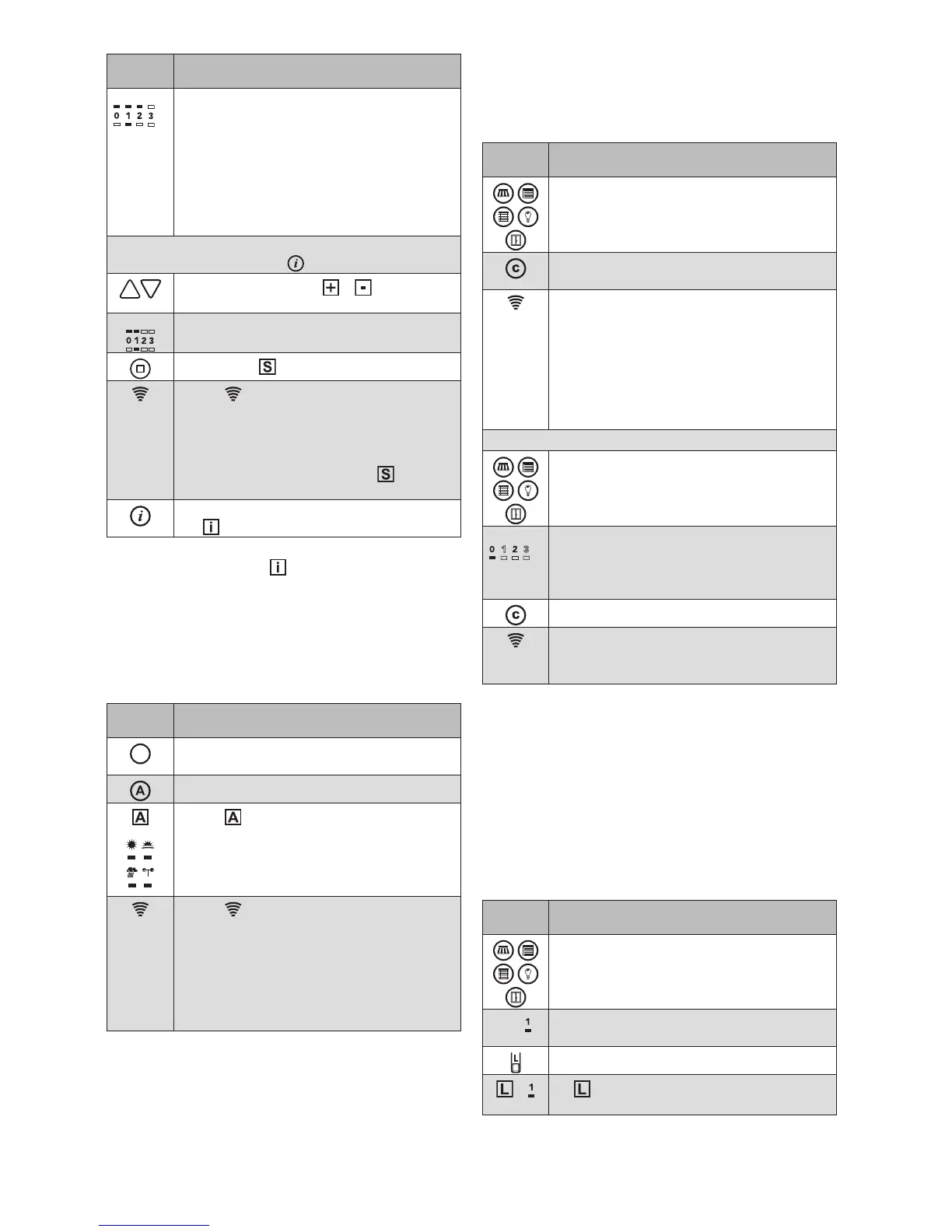
Action/result
E.g.
...
The parameter value of the current control
function is displayed in the upper row of
LEDs (here, limit value 2 of the previously
selected sun control).
RED:
Value 0; the control function is off
GREEN: Values 1 to 9
FLASHES:
Multiple receivers with different
values in the channel. The value
of the first receiver is displayed.
You can now change this parameter value or switch to
the next info mode using the
button:
Use the arrow keys ( + light up) to
change the parameter value.
E.g.
The upper row of LEDs shows how the
value changes (new value = 1)
Press the button
The transmission LED lights up for 2
seconds
GREEN: The parameter value was stored
in all receivers of the channel
RED: Not all receivers could be
reached; press the button
again.
Leave the info mode using the info button
( is no longer lit)
OTEN Move commands cannot be sent while the info
mode is active ( lights up). In the info mode,
the hand-held transmitter switches off one
minute after the last press of a button.
If multiple receivers belong to a single channel,
the set parameter value is written to all receiv-
ers of that channel.
Switching on/off the comfort control functions
Button/
display
Action/result
Wake up the hand-held transmitter with
any product button
Press the control button.
+
The and the control symbols light up.
The LEDs below the symbols indicate the
type of switch command:
GREEN: Switch on the control functions
RED: Switch off the control functions
The transmission LED lights up for 2
seconds
GREEN: The control functions were
switched in all receivers
RED:
Not all receivers could be
reached; switch the control func-
tions OFF and ON again (or ON
and OFF).
OTEN
The hand-held transmitter always remembers the
command last sent. When the control button is
pressed again, the hand-held transmitter sends
the opposite command (ON - OFF - ON -...).
Learning/recalling the comfort positions
A comfort position can be stored for every receiver in the
network (e.g. awning half extended). The awning can be
automatically moved to this comfort position at the press
of a button.
Button/
display
Action/result
Move any product to the position that is
to be stored as the comfort position (see
Operating the products).
Hold down the comfort button for 5 sec-
onds until the transmission LED lights up.
The transmission LED indicates the trans-
mission process:
2s GREEN: The comfort position is
stored
2s RED: The command was not con-
firmed (e.g. the receiver is
outside of the transmission
range); repeat the procedure
To recall a comfort position:
Select any product channel.
E.g.
...
The selected product button flashes.
The LED below the currently selected
channel lights up (in the example, channel
0).
Briefly press the comfort button.
The transmission LED lights up
The comfort position for the selected prod-
uct is restored automatically.
OTEN If a product is already in the comfort position or
if a comfort position has not been stored, the
selected product does not respond to pressing
of the comfort button.
Advanced functions
Forming groups
In the following example, channel1 and then channel2
are assigned to the new channel3. Channel3 can then
be used to jointly operate the products in channel1 and
channel2.
Button/
display
Action/result
Select the product type and the channel
that is to belong to the group
E.g.
The LED below the channel number lights
up
Press the learn button briefly
+ lights up in green and the previously
selected channel number flashes.


 To Next Page
 Loading...






