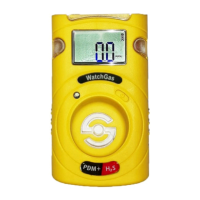
The WatchGas PDM Single Gas Detector is a portable, user-friendly device designed to monitor the presence of dangerous concentrations of specific gases in the atmosphere, such as oxygen, combustible gases, or various toxic gases. Its primary function is to alert users to potential hazards through a combination of acoustic alarms, flashing LEDs, and vibration when gas concentrations exceed predefined safety levels. This multi-faceted alert system ensures that workers are promptly notified of danger, allowing them to take immediate action, such as evacuating to a clean air location.
Function Description
The PDM operates by continuously sampling the surrounding air for the target gas. The device features a gas sensor (1) that detects the specific gas it is configured for, indicated by a gas type sticker (2). The detected gas concentration is displayed in real-time on an LCD display (3). For oxygen, concentrations are shown in percent by volume (%VOL), while toxic gas concentrations are displayed in parts per million (ppm). The device also tracks and displays the maximum and minimum concentrations detected, providing a comprehensive overview of gas levels over time.
Upon activation, the PDM undergoes a stabilization period, during which it prepares its sensor for accurate readings. If stabilization fails, an 'X' symbol will appear, indicating that the device is not ready for use and may require calibration or service. Once stable, the device enters detection mode, continuously monitoring gas levels.
The PDM is equipped with a key (4) for user interaction, a beeper port (5) for acoustic alarms, and alarm LEDs (6) for visual alerts. An IR port (7) allows for communication with an optional WatchGas IR-Link, which enables users to modify settings, including alarm set points and calibration concentrations.
Usage Features
The PDM is designed for simple operation. To activate the device, the user presses and holds the key for three seconds. After a countdown, the monitor turns on, displaying the gas type and firmware version, followed by a stabilization countdown. Once stable, it enters detection mode.
In detection mode, the current gas concentration or remaining battery life is displayed. By pressing the key for one second, users can cycle through various display modes to view additional information. This includes:
- Minimum concentration (for oxygen only)
- Maximum concentration
- Clear (CLR) function
- Remaining life time (indicated by 'M' for months, 'D' for days, or 'H' for hours)
- Low alarm set point
- High alarm set point
- Firmware version
- Calibration concentration
If no button is pressed for a second, the device automatically returns to detection mode.
The PDM provides clear indications for various states and alarms:
- Gas Alarms: When gas concentration exceeds the low or high alarm set points, the device will display the corresponding alarm symbol (1 for low, 2 for high), vibrate, flash its LEDs, and emit an audible beep. To silence the alarm, users must evacuate to a clean air location.
- Remaining Life: An icon indicates when the device has less than 30 days of remaining battery life.
- End of Life: If the device has passed its 24-month operational period, "EOL" will be displayed, signifying that the PDM should be replaced.
- Test Failure: An 'X' symbol indicates a failure in sensor test, calibration, or self-test, accompanied by intermittent beeping.
- Battery Low: "BAL" is displayed when the battery is low.
- Bump Test Due: "bES" flashes when a bump test is due. Pressing the button turns off this alarm.
- Calibration Due: "CAL" flashes when calibration is due. Pressing the button turns off this alarm.
The device also stores an event log of the last 30 events, including alarm types, alarm concentrations, and peak concentrations. This log can be transferred via the WatchGas-IR Link for record-keeping and analysis.
Maintenance Features
While the PDM is a disposable product with non-replaceable battery and sensor, it incorporates several features to ensure its accuracy and longevity, primarily through calibration and self-testing.
-
Calibration:
- Fresh Air Calibration: This should be performed regularly, at least every 30 days, in a clean, contaminant-free environment. To initiate, press and hold the key for 5 seconds to enter calibration mode. The 'CAL' mark and a star icon will appear. Press the key for three seconds to start a countdown, after which a checkmark symbol will appear if successful. If calibration fails (indicated by an 'X' symbol), users should check for sensor blockages and retry. Repeated failures require contacting WatchGas.
- Standard Gas Calibration: For more precise calibration, a standard gas cylinder matching the calibration concentration is used. The calibration adapter is attached to the PDM and the gas cylinder. Entering calibration mode (5-second key press) and then pressing the key again for one second switches to standard gas calibration. After starting the gas flow, pressing the key for three seconds initiates a countdown. A successful calibration is indicated by a checkmark symbol. If calibration fails, users should check the gas cylinder's status and ensure no blockages.
-
Self-Test: The PDM has a default self-test interval of 20 hours of use, which can be configured or switched off via the IR-Link. When due, an "STS" message flashes. Pressing the button initiates a test of the buzzer, LEDs, vibration, and LCD, and displays alarm thresholds. An "END" message with a checkmark indicates completion.
-
Bump Test: The bump test interval is configurable from 1 to 365 days, with the default being off. When a bump test is due, a "bTS" message flashes. The test involves placing the PDM in a docking station or attaching a calibration adapter with a valid gas cylinder. Pressing and holding the key for 3 seconds starts a 45-second countdown. Gas flow should be initiated within this period. A "SUC" message with a checkmark indicates a successful test, while an "FA" message with an 'X' indicates failure. Repeated failures require contacting WatchGas.
Regular fresh air calibration, self-tests, and bump tests are crucial for maintaining the device's accuracy and ensuring it reliably detects hazardous gas concentrations. The PDM is designed to be activated only when needed and to avoid prolonged alarm situations to maximize its 24-month operational life. Cleaning the exterior with a soft cloth is recommended, avoiding chemical detergents.


 To Next Page
 General