Watson-Marlow 520DuN IP66/NEMA 4X User Manual 29
15.2 Main menu entry
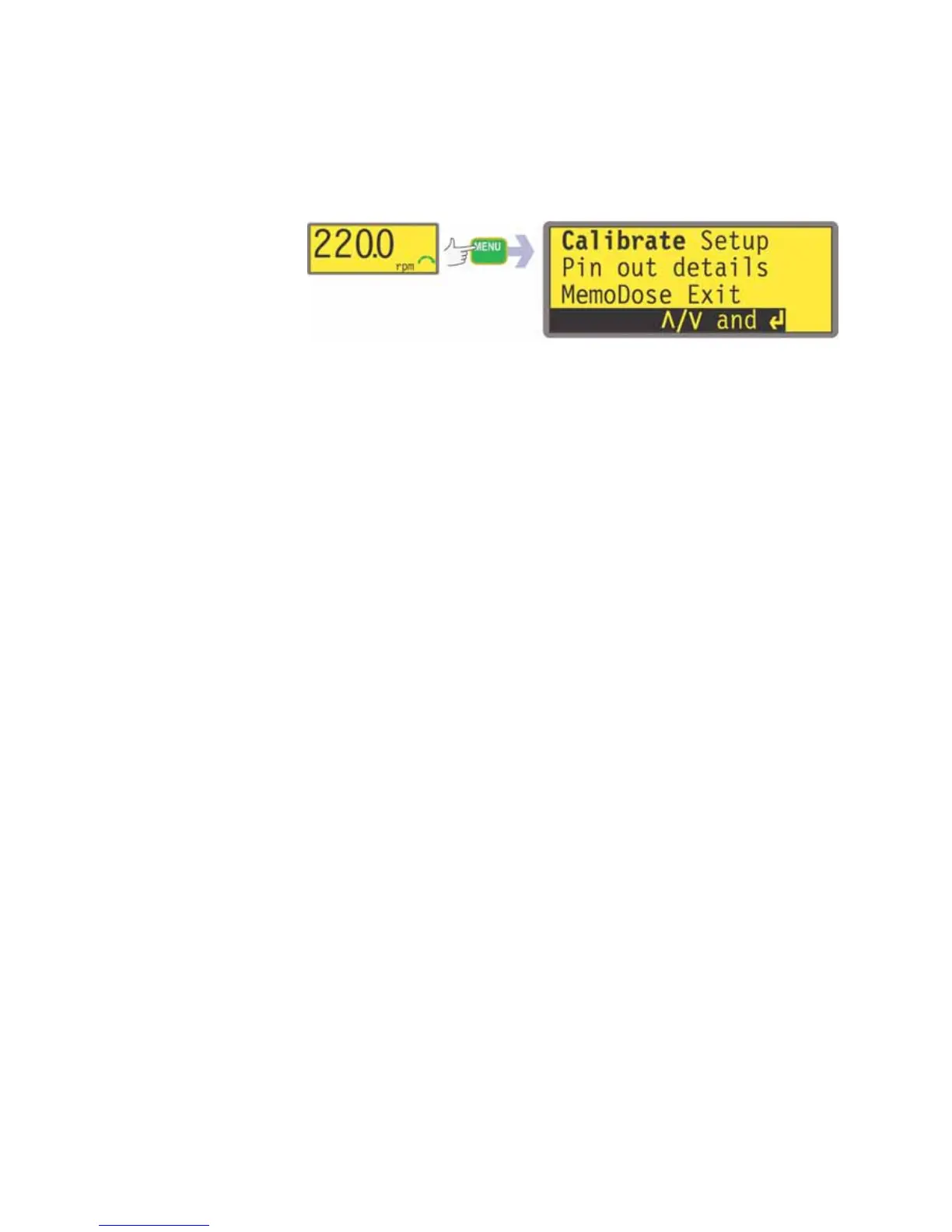
The MENU key displays the main menu. It operates at any point in the pump’s activ-
ity except where error screens are displayed, or screens where UP and DOWN keys
are used to enter values.
The main menu offers five options: Calibrate, Setup, Pin out details, MemoDose
and Exit. Use the UP and DOWN keys to make a choice. Press the ENTER key to
confirm your decision.
Calibrate
Calibrate allows the user to calibrate the pump with default figures for a range of
pumpheads and tubes, as well as to refine the flowrate figures with a calibration
dose facility.
Setup
Setup allows the user to set the pump’s operating parameters under 20 headings:
Trim, Analogue, Display, Pump number, Baud, Stop bits, Xon/Xoff, Flow
units, Run time, Outputs, Remote stop, Auto-restart, Set max speed,
Backlight, ROM, Language, Defaults, Beep, Security and Exit.
Pin out details
Pin out information is not relevant to the 520DuN IP66/NEMA 4X pump. Selecting
Pin out details causes the pump to display a warning screen and redisplay the main
menu.
MemoDose
The MemoDose facility is used to remember the number of revolutions needed to dis-
pense a set volume of fluid, and cause the pump to dispense that volume repeatedly.
Exit
If Exit is selected, the pump returns to its last manual state with the pump stopped.


 To Next Page