Watson-Marlow 520DuN IP66/NEMA 4X User Manual 65
22.4 Scaling: analogue input
It is possible to scale the speed of the pump remotely by one
of these methods: a voltage analogue signal within the range
0-10V; or a current analogue signal within the range
4-20mA; or a remote potentiometer using the 10V supply at
J7.
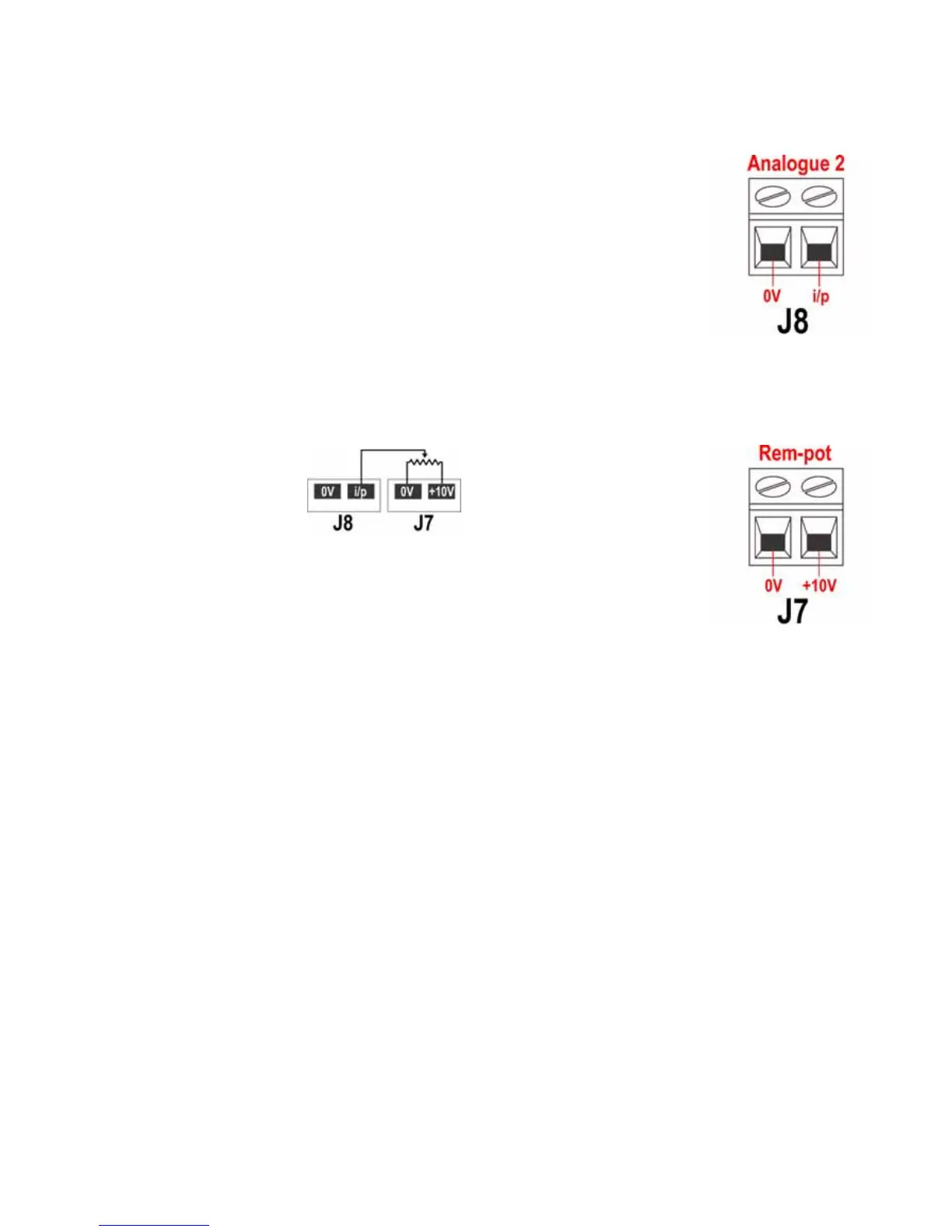
The analogue process signal must be applied to the i/p ter-
minal of the Analogue 2 connector (J8). Ground to the 0V
terminal of the same connector.
4-20mA circuit impedance: 250Ω.
For voltage mode, 0-10V, a stable, reliable voltage source can be used with a DC
voltmeter. Circuit impedance: 22kΩ.
Inverting the response is set up in software. Do not invert the polarity of the termi-
nals.
A remote potentiometer with a
nominal value of between 1k and
2k with a minimum of 0.25W
should be wired between the ter-
minals of the Rem-pot connector
(J7) and the i/p terminal of the
Analogue 2 connector (J8). When
using a remote potentiometer, do not apply a voltage or cur-
rent control input signal at the same time. The scaling con-
trol signal will require calibration relative to the minimum
and maximum settings of the potentiometer. This is done in
software - see 18.1 Trim in the Setup section.
When using a remote potentiometer, it is important to set the analogue input to
voltage in the Setup menu. Otherwise the reference voltage supply from the Rem-
pot connector will be overloaded and will not provide a full 10V.
The speed of the pump as set by Analogue 1 is scaled in proportion to the signal
from Analogue 2 according to the formula y=as, where a is the speed set by
Analogue 1, s is the scaling set by Analogue 2 (0V or 4mA = 0, increasing linearly
to 10V or 20mA = 1), and y is the scaled rotation speed. If Analogue 2 has been set
for an inverted response, the reverse is true. See 18.2 Analogue in the Setup menu.


 To Next Page