Watson-Marlow 520DuN IP66/NEMA 4X User Manual 71
23 Automatic control and operation
Check that the pump is ready to run before selecting automatic operation. Remote
control signals may start the pump without warning.
How to get into auto operation
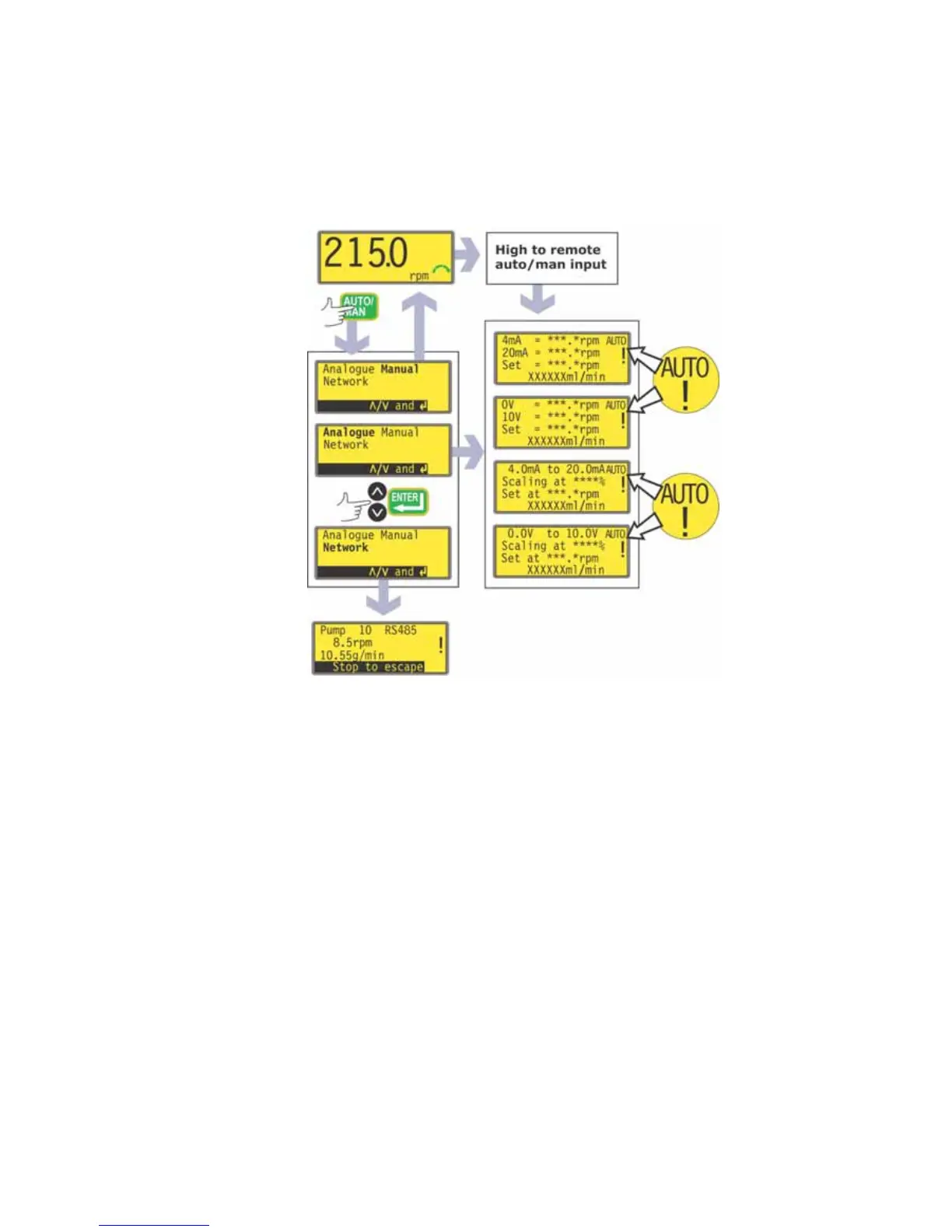
While the maunal mode main screen is displayed, press the AUTO/MAN key,
or apply a high signal (5V to 24V) to the remote auto / manual input.
If auto entry was triggered remotely, the pump responds to the analogue signal
as soon as this is done and shows the “AUTO” icon.
If auto entry was triggered using the AUTO/MAN key, the pump offers three
choices: Analogue, Manual and Network. Use the UP and DOWN keys to
choose and press ENTER to confirm.
Selecting Manual returns the user to the manual mode main screen. See 14
Manual operation.
Selecting Network puts the pump into network (RS485) mode. See 24
Network control and operation.
Selecting Analogue puts the pump into analogue mode. It responds to the
analogue signal as soon as this is done and shows the “AUTO” icon.


 To Next Page