3.2. Assembling
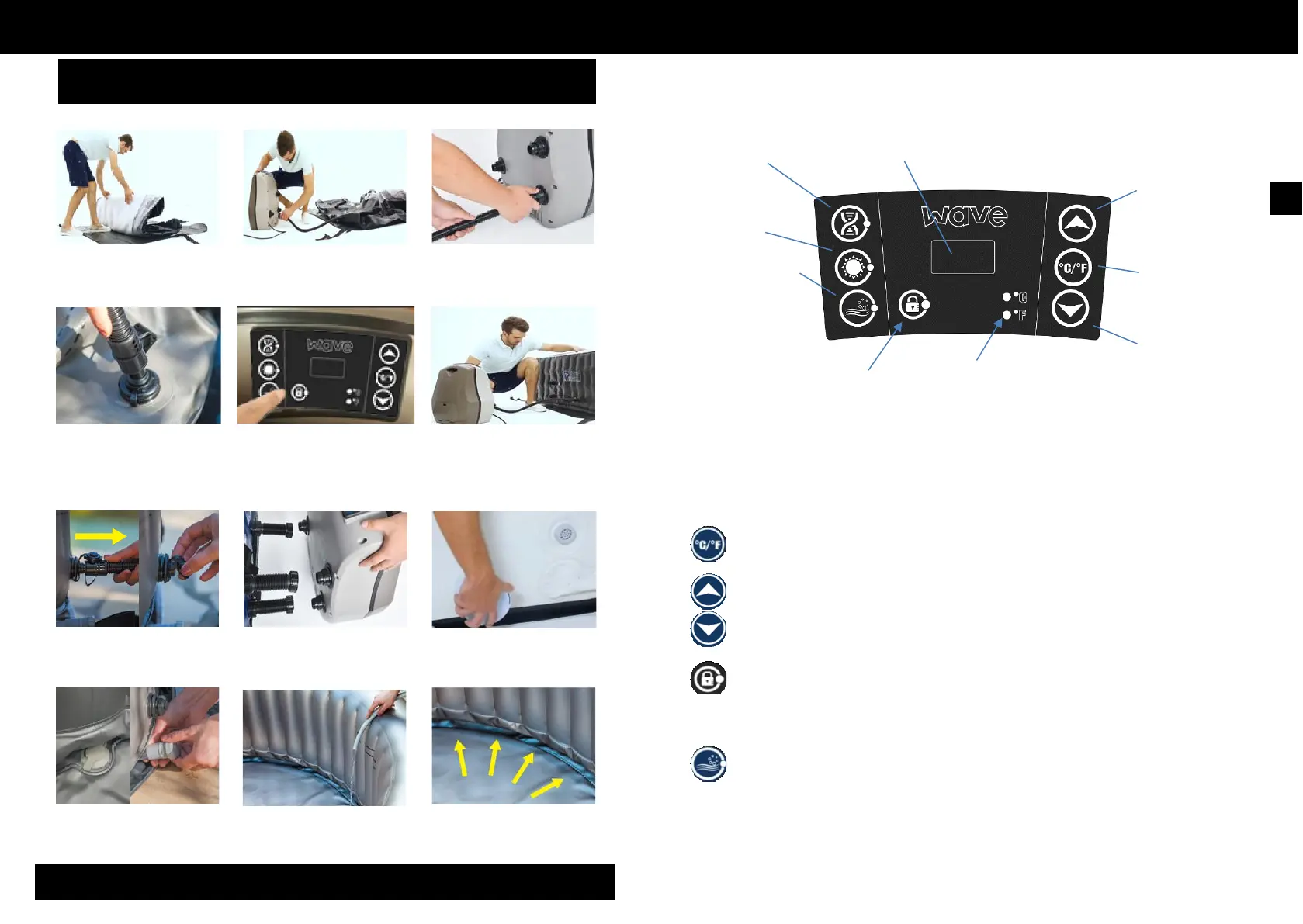
1) Unfold the inflatable spa over the
base protector. - IMPORTANT
2) Bring the pump unit to the inflatable
spa.
3) Connect the inflation hose to the
pump on the socket.
4.1. Control panel
Filtration
Heat Button
Bubble
Button
LED Display
Temperature
Increase Button
Temperature
units
selector
Lock Button
Temperature
units indicator
Temperature
Decrease Button
4) Insert the inflation hose into the
inflatable spa
7) Remove the inflation hose and
screw the cap firmly in place.
5) Connect the pump unit, then press
the button to inflate the spa.
The air flow valve prevents your spa
from over-inflating.
8) Connect the unit pump to the spa
using the 3 connectors to screw in.
Ensure the icons on the pump and the
spa match up
6) Inflate the inflatable spa for about
10 minutes. Ensure that the spa is
firmly inflated. For ‘California’ use
hand pump and blow to 10 PSI.
9) Attach the filter cartridge in the spa,
it can be pressed and screwed in
place. Ensure filter is in filter housing
4.2. Functions
Once powered-up, the LED displays the current water temperature automatically.
The temperature unit’s se lector changes the temperature units from Celsius
degrees to Fahrenheit degrees.
Press the temperature adjustment buttons, then the screen will flash. When it is
flashing, you can set the desired temperature. The value will increase or decrease
1 degree at once. The temperature could be set between 30°C to 42°C (86°F to
108°F).
To lock or unlock the control panel, press the Lock button and hold 3 seconds.
Lock the control panel when you are away to prevent other people come to
change your settings.
10) Ensure that the drain caps are
properly closed before filling the spa
11) Fill the spa with 10 cm of water. 12) Smooth wrinkles out of the bottom
of the spa, then fill the spa to the level
indicated. Your spa is ready.
Press the Bubble button to activate the bubble and massage system, the
green indicator light turns on. It can be turned off by pressing it again.
The bubble system will stop automatically after 30 minutes of operation. Re-activate the bubble
function by pressing the bubble button again.
When the filter button is on, pressing bubble button will a l t e r t h e f I l t e r mode into bubble mode: The
filter indicator light will turn off and the bubble indicator light will turn on. If the bubble button is pressed
again, the
bubble mode will be changed back to the filter mode.


 To Next Page