There are a couple of nal steps before your installation is complete.
In this section we’ll describe how to weatherproof and properly ground your system. These
steps are crucial to ensuring the longevity of your system by protecting it from the elements.
Weatherproong Your Outdoor Connections
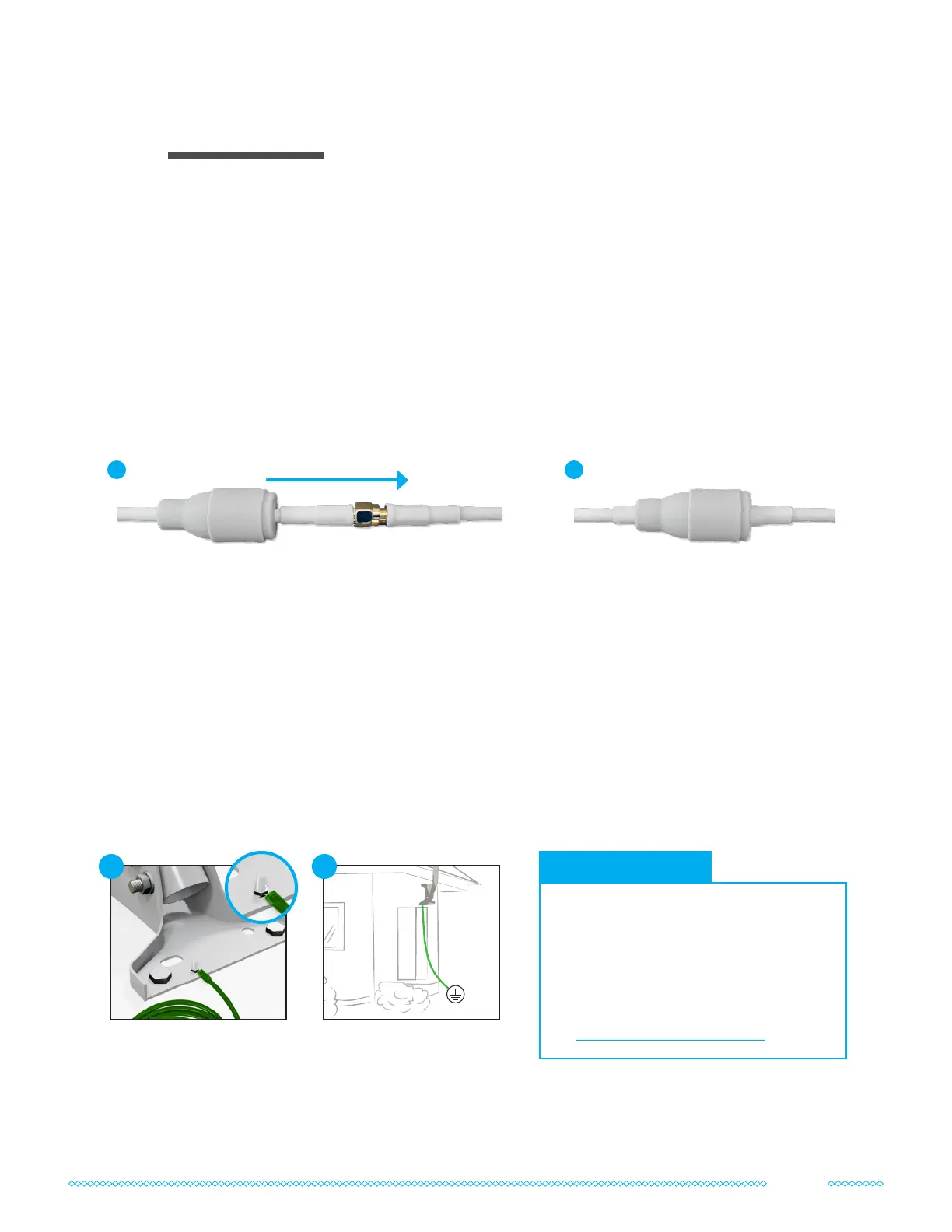
The QuadPro and UltraFlex-Quad cables come with weatherproong boots to help
waterproof each outdoor cable connection. Once your connectors are tightened, slide the
weatherproong boots over all of the outdoor cable connections, as shown below:
Grounding Your System
It’s important to ground your FlexMount and UltraPole (optional in the complete kit) to a
suitable electrical ground in order to help protect your equipment. Equipment mounted
outdoors can be prime targets for lightning strikes. Grounding a mounting pole with 10 AWG
or lower gauge (thicker) grounding cable is required by the National Electric Code (NEC).
Follow the instructions within the manuals included with your FlexMount and UltraPole to
properly ground them for your system. The general steps are described below:
Protecting Your System
05
1 2
• If you’re unsure about your
grounding setup, reach out to an
electrical contractor.
• Expanded instructions on
grounding and examples of suitable
electrical grounds can be found at
waveform.com/grounding
Grounding Tips
Attach a ground wire
to your pole. e.g. Some
mounting poles use a
grounding bolt & nut.
1
Attach the Ground Wire
to a suitable Electrical
Ground.
2
11



 To Next Page