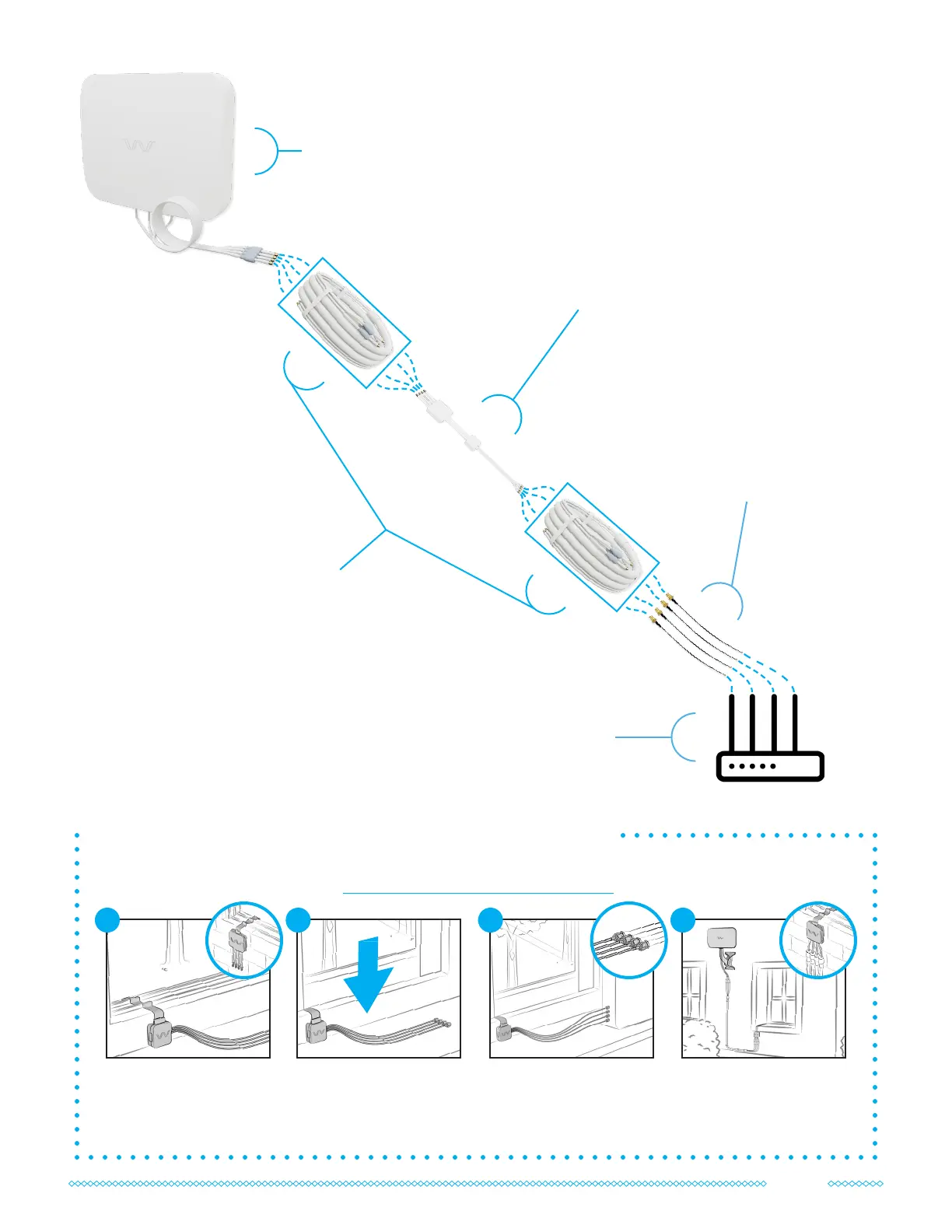
QuadPro
Antenna
OPTIONAL:
Adapters
Only included in the complete kit.
Adapters are required for routers
without SMA ports.
OPTIONAL:
UltraFlex-Quad
Cable(s)
Only included in the complete kit.
Lengths vary by kit.
Keep track of the cable paths
by matching each label number
(e.g. Cable 1 to Antenna 1).
OPTIONAL:
Quad Window Entry Cable
Only included in the complete kit.
Can be connected at any point in the
cable path.
Your Cellular
Router
Your Quad Window Entry Cable can be connected at any point in your system as needed. Follow the
manual included or nd it online at waveform.com/window-entry-manual
How to Install the Quad Window Entry Cable
Loosely position the
window entry cable in your
window frame, with its
larger case outside.
1
Connect its indoor
connectors to your router
or UltraFlex cable.
3
Connect its outdoor
connectors to your
QuadPro or UltraFlex cable.
4
Check that your window
fully closes. If not, please
reach out to us for
assistance.
2
9



 To Next Page