NRF52840 Eval Kit User Manual
Vision: V1.0.1 Date: 2019.01.19 44 / 72
CHAPTER 9. BLUETOOTH
The examples used in this chapter are: Part-2-Bluetooth-Slave-Device,Part-3-
Bluetooth-Master-Device,Part-4-Bluetooth-Master&Slave-Device.
PREPARATION
The software required:
⚫ MDK5.25
⚫ Jlink driver
⚫ nRFx-Command-Line-Tools
⚫ nRF Toolbox (mobile APPP)
⚫ Mobile phone which supports BLE
INSTALL SOFTDEVICE
To run the examples, you need to first install Softdevice.
⚫ Erase Flash
⚫ Install Softdevice
BLUETOOTH SERIAL TRANSPARENT
The example located in Bluetooth-Slave-Device\USER
⚫ Open SlaveDevice-Bluetooth-To-UART(APP) example, compile and download to
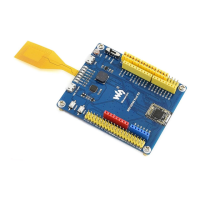
NRF52840 eval kit.
Expected Result:
⚫ LED1 is blinking when broadcast after downloading the code.


 To Next Page