EasyManua.ls Logo

Wavetek 132 - Page 21

Default Icon
52 pages
Print Icon
To Next Page IconTo Next Page
To Previous Page IconTo Previous Page
Loading...
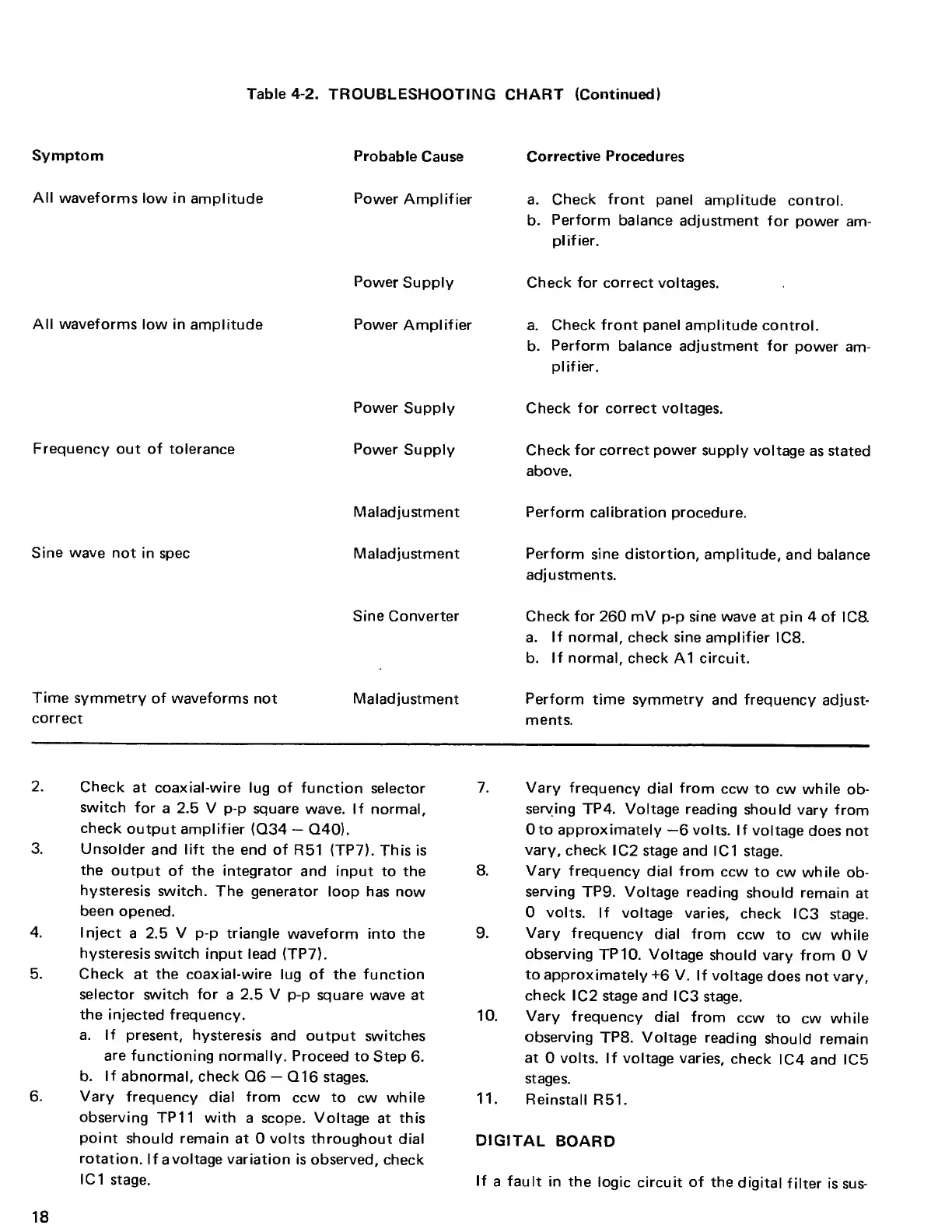
Table
4-2.
TROUBLESHOOTING CHART
(Continued)
Symptom
Probable
Cause
Corrective Procedures
All
waveforms low in
amplitude
Power
Amplifier
a.
Check front
panel
amplitude
control.
b.
Perform
balance
adjustment
for
power am-
plifier.
Power
Supply Check for correct
voltages.
All waveforms
low in
amplitude Power
Amplifier
a.
Check front panel amplitude
control.
b.
Perform
balance adjustment for
power am-
plifier.
Power
Supply Check for correct
voltages.
Frequency
out of tolerance
Power
Supply
Check for correct
power
supply
voltage
as stated
above.
Maladjustment
Perform calibration procedure.
Sine wave
not in spec
Maladjustment Perform
sine distortion,
amplitude,
and balance
adjustments.
Sine Converter
Check for 260
mV
p-p
sine wave
at
pin 4 of
IC8.
a.
If
normal,
check
sine amplifier
IC8.
b.
If normal, check
A1 circuit.
Time
symmetry of
waveforms not
correct
Maladjustment Perform
time symmetry
and frequency
adjust-
ments.
2.
Check
at
coaxial-wire lug
of
function
selector
switch
for
a 2.5 V
p-p
square wave. If
normal,
check
output amplifier
(Q34
Q40).
3. Unsolder
and lift
the end of
R51 (TP7).
This is
the
output of the integrator
and input
to the
hysteresis switch.
The generator
loop has now
been
opened.
4. Inject
a 2.5
V
p-p
triangle
waveform
into the
hysteresis switch input
lead (TP7).
5. Check
at the coaxial-wire
lug of the function
selector
switch
for
a
2.5 V
p-p
square wave at
the
injected frequency.
a.
If
present, hysteresis and
output switches
are
functioning normally.
Proceed to Step
6.
b.
If
abnormal, check
Q6
Q16
stages.
6.
Vary
frequency dial from
ccw to
cw while
observing
TP11 with
a
scope. Voltage
at this
point
should remain
at 0 volts throughout dial
rotation.
If
a
voltage variation
is observed,
check
IC1
stage.
7. Vary
frequency
dial
from
ccw
to
cw
while
ob-
serving
TP4. Voltage reading
should
vary from
0 to approximately
—6
volts. If
voltage
does not
vary,
check
IC2 stage and
IC1 stage.
8. Vary
frequency
dial
from
ccw to
cw while
ob-
serving
TP9. Voltage
reading should
remain
at
0 volts. If
voltage varies,
check
IC3 stage.
9. Vary
frequency
dial from
ccw to
cw while
observing
TP 10. Voltage
should vary
from
0
V
to approximately
+6 V.
If voltage
does not vary,
check
IC2
stage
and
IC3 stage.
10.
Vary
frequency dial
from
ccw
to cw while
observing
TP8. Voltage
reading
should remain
at
0 volts. If voltage varies,
check
IC4 and IC5
stages.
11.
Reinstall
R51.
DIGITAL
BOARD
If
a
fault
in the
logic circuit
of
the
digital
filter is sus-
18

Other manuals for Wavetek 132

Related product manuals