EasyManua.ls Logo

Wavetek 132 - Troubleshoot

Default Icon
52 pages
Print Icon
To Next Page IconTo Next Page
To Previous Page IconTo Previous Page
Loading...
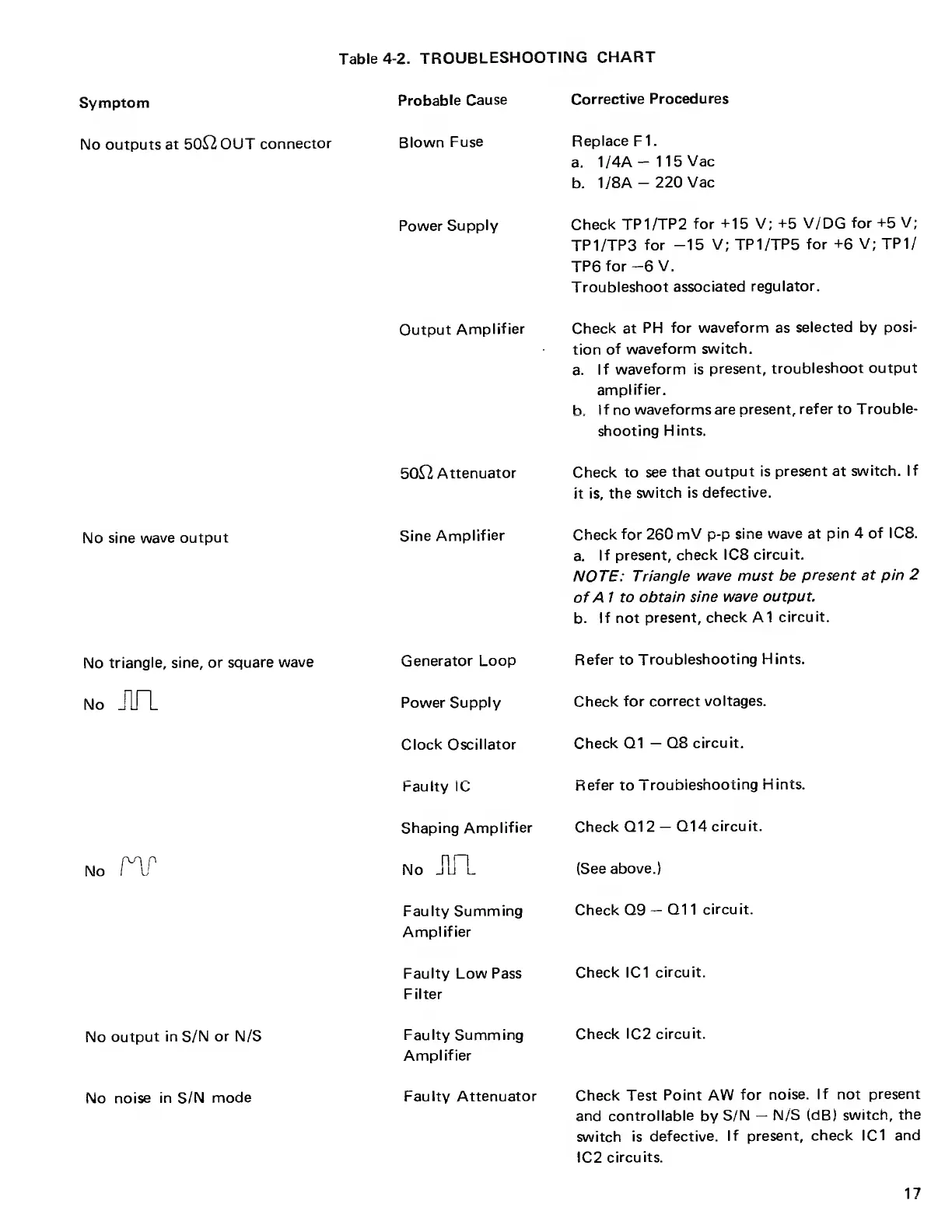
Table
4-2. TROUBLESHOOTING
CHART
Symptom
Probable
Cause
Corrective
Procedures
No outputs
at 50&2 OUT
connector
Blown
Fuse
Replace FI.
a.
1/4A
1
15
Vac
b.
1/8A
-
220 Vac
Power
Supply
Check
TP
1
/TP 2
for +15 V;
+5 V/DG
for
+5 V;
TP1/TP3
for
-15
V; TP
1
/TP
5
for
+6 V; TP1/
TP6
for
-6
V.
Troubleshoot
associated
regulator.
Output
Amplifier
Check
at
PH for
waveform
as
selected
by
posi-
tion
of
waveform
switch.
a.
If
waveform is
present,
troubleshoot
output
amplifier.
h. If
no
waveforms
are present,
refer to
Trouble-
shooting
H
ints.
50^2
Attenuator
Check
to
see that
output is
present at
switch.
If
it is,
the
switch
is defective.
No sine
wave output
Sine
Amplifier
Check
for 260
mV
p-p
sine
wave at pin 4
of ICS.
a.
If present, check IC8
circuit.
NOTE:
Triangle wave must
be
present at pin 2
of
A 1 to
obtain
sine
wave output.
b.
If
not present,
check
A1
circuit.
No triangle,
sine,
or square
wave
Generator Loop
Refer to
Troubleshooting
Hints.
No
JUT
Power Supply
Check
for
correct
voltages.
Clock
Oscillator
Check
Q1
Q8
circuit.
Faulty
1C
Refer to
Troubleshooting
Hints.
Shaping
Amplifier
Check Q12
Q14 circuit.
no
nr
No
J1R
(See
above.)
Faulty
Summing
Amplifier
Check Q9
Q1 1
circuit.
Faulty Low Pass
Filter
Check IC1
circuit.
No
output
in
S/N
or
N/S
Faulty Summing
Amplifier
Check
IC2 circuit.
No
noise in
S/N
mode
Faulty Attenuator
Check Test
Point AW
for
noise.
If not present
and controllable
by
S/N
N/S (dB)
switch,
the
switch
is
defective.
If present,
check IC1 and
IC2
circuits.
17

Other manuals for Wavetek 132

Related product manuals