Waydoo Flyer EVO USER GUIDES
© 2024 All rights reserved by Waydoo
How to use the inverter function
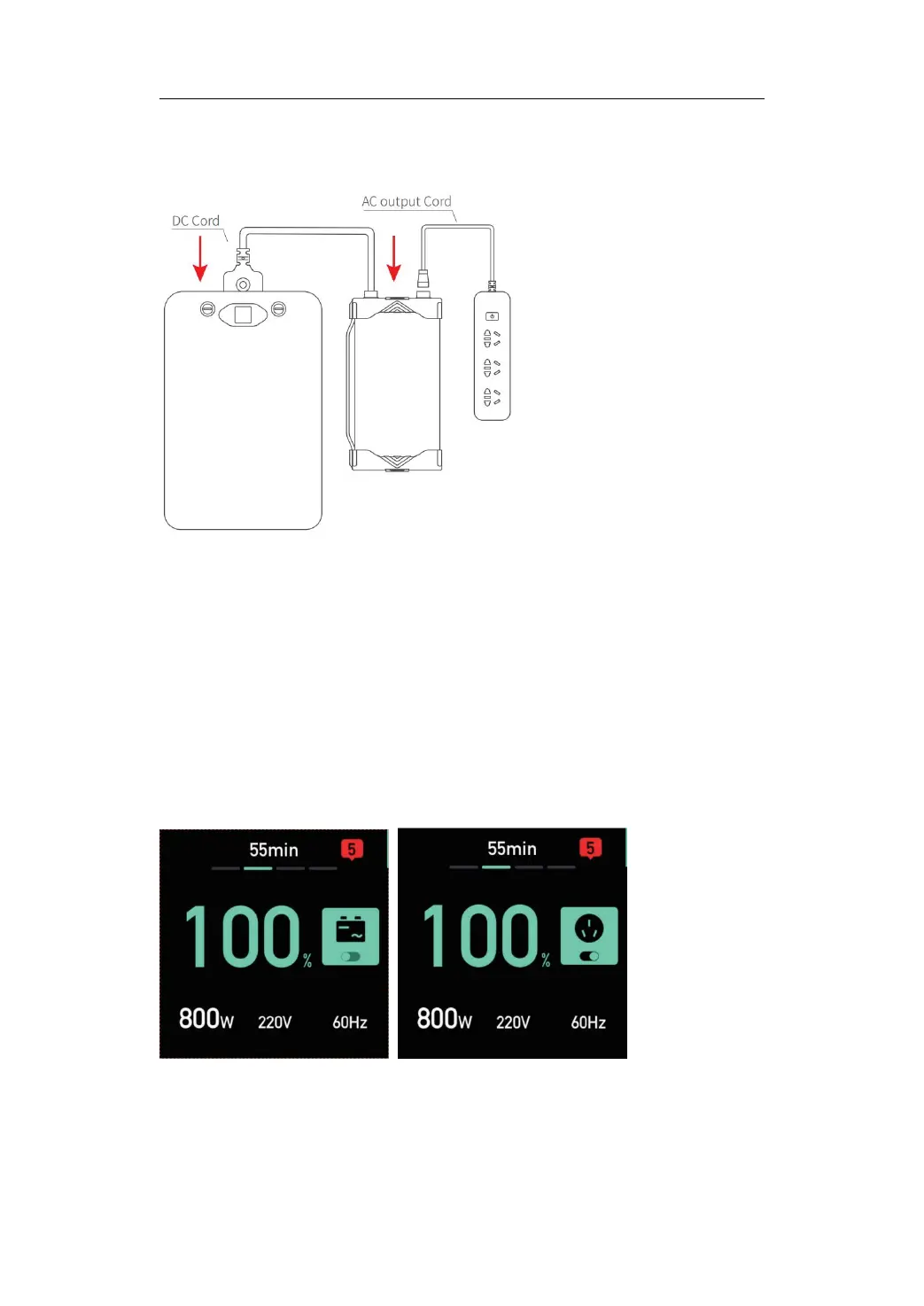
1. Connect the AC output cord to the AC port of the inverter charger and
tighten the black round buckle clockwise.
2. Connect the DC cord to the DC port of the inverter charger and tighten
the black round buckle clockwise, and connect the plug to the Powerflight
battery.
3. After the battery is turned on, the main inverter interface is entered as
shown in (a), which displays the currently set voltage and frequency. If the
settings are correct, long press the charging start/stop button to start the
inverter as shown in (b). If the voltage and frequency settings are incorrect,
the powered device may work abnormally, be damaged, or even catch fire.
(a) (b)
4. During the inverter process, short press the charging start/stop button
once to stop the inverter.


 To Next Page