Waydoo Flyer EVO USER GUIDES
© 2024 All rights reserved by Waydoo
How to use the charging function
1.Place the Powerflight battery in a cool, dry place away from flammable or
high-temperature items.
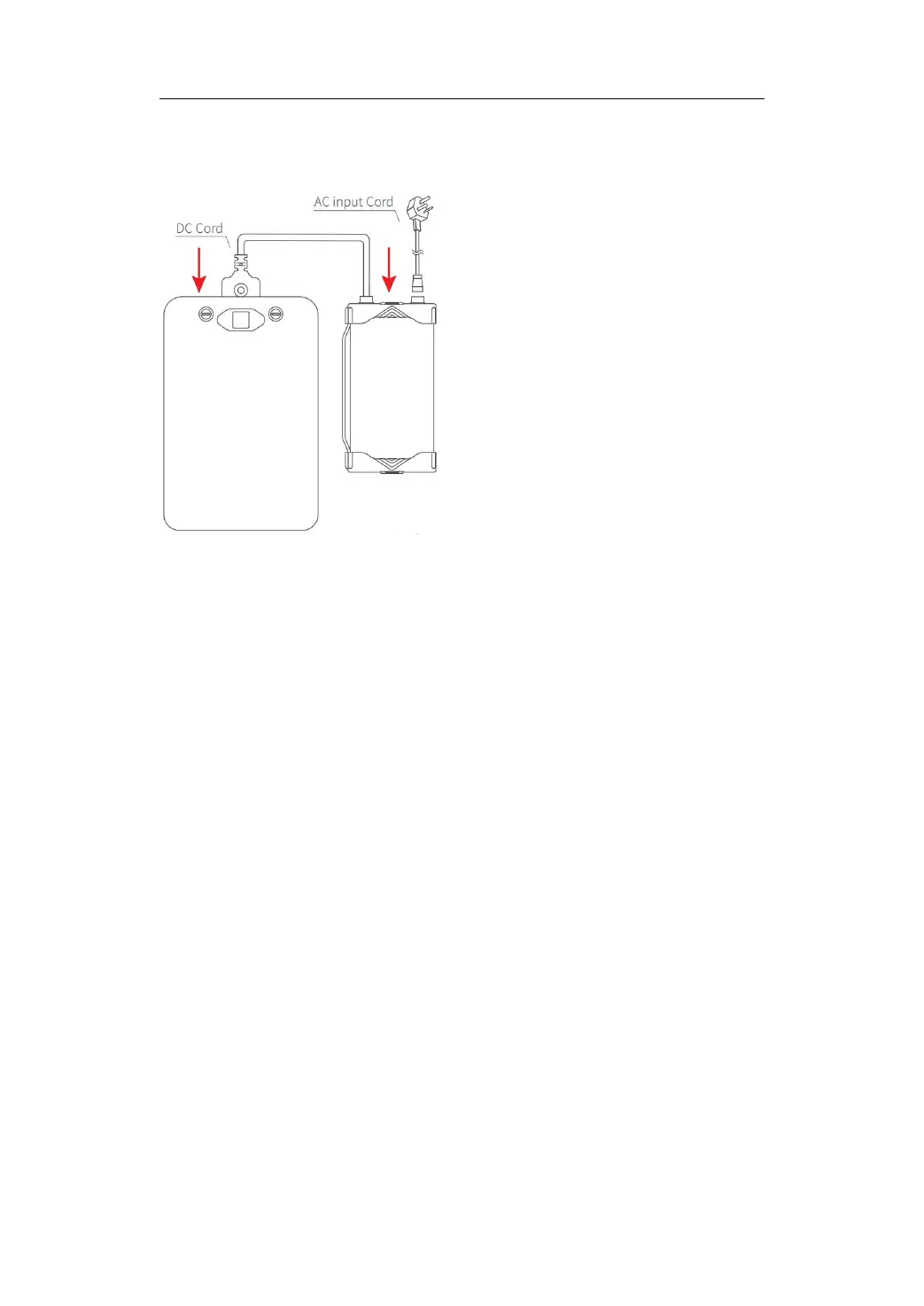
2. Connect the charger's DC cord to the battery, press the DC cord plug to
ensure a secure connection, and then place the battery face up on the
ground horizontally.
3. Connect the charger's AC input cord to the charger and plug the AC input
cord into the wall outlet.
4. Press the charging start/stop button on the charger's DC cord once to
start charging.
How to Stop Charging
When the battery is in charging mode, short press the charging start/stop
button once, and then unplug the AC input cord from the wall outlet to stop
charging, and the battery display screen will turn off after awhile.
Note: When the battery is charging, please do not unplug the DC cord from
the battery directly to avoid damaging the inverter charger or battery.


 To Next Page