EasyManua.ls Logo

wayscral ANYWAY A2 - Page 61

wayscral ANYWAY A2
Print Icon
To Next Page IconTo Next Page
To Previous Page IconTo Previous Page
Loading...
61
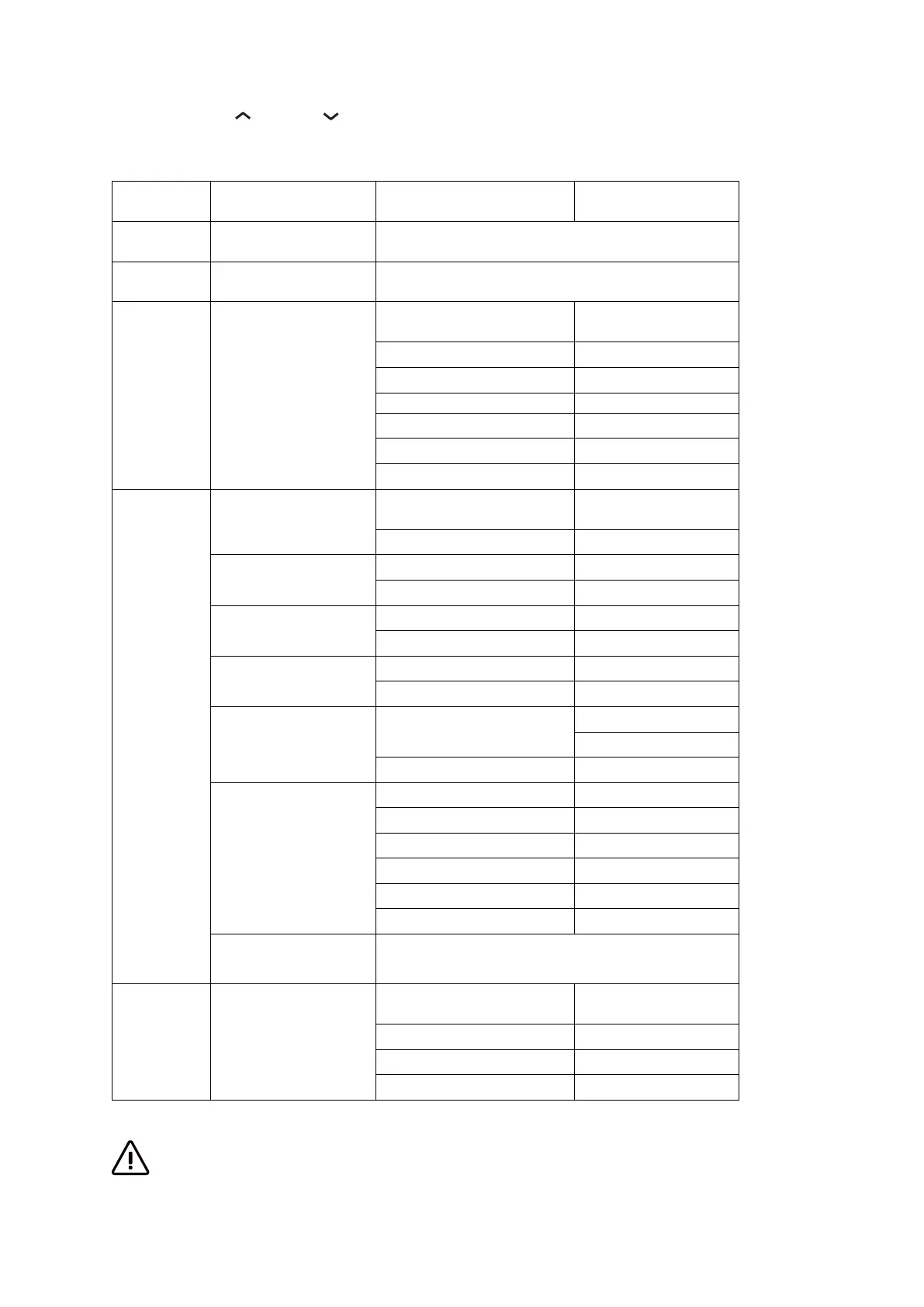
Use one of the '' '' and '' '' buttons to select the option you want, then press ''
i
'' to
confirm.
This menu has several levels, with the BACK option allowing you to return to the previous level.
For your safety, do not connect or disconnect your display when the battery and display are switched on. If an error code is
displayed, we advise you to go to a shop to have the bike diagnosed.
1st level
2nd level
3rd level
4th level
Reset
Yes
-
No
-
Settings
Brightness
20%
40%
40%
-
60%
-
80%
-
100%
-
Auto
-
Settings
Speed unit
km/h
-
mph
-
Consumption unit
Wh
-
Ah
-
Language
English
-
French (by default)
-
Factory settings
Yes
-
No
-
Bluetooth
(if available)
Status
On
Off
Name
Auto-off
5min (by default)
-
10min
-
15min
-
20min
-
25min
-
30min
-
Functions available
-
Selected if white circle
-
Deselected if black circle
Information
Engine
Software version
#value
Equipment version
#value
Serial number
#value
ODO
#value

Table of Contents