15
Turn the control knob in order to choose fan speed.
Press the control knob within 5 seconds in order to confirm
selection.
6.3 Setting the remaining operation time of fan during ventila-
tion mode
3
The heater is in the ventilating mode
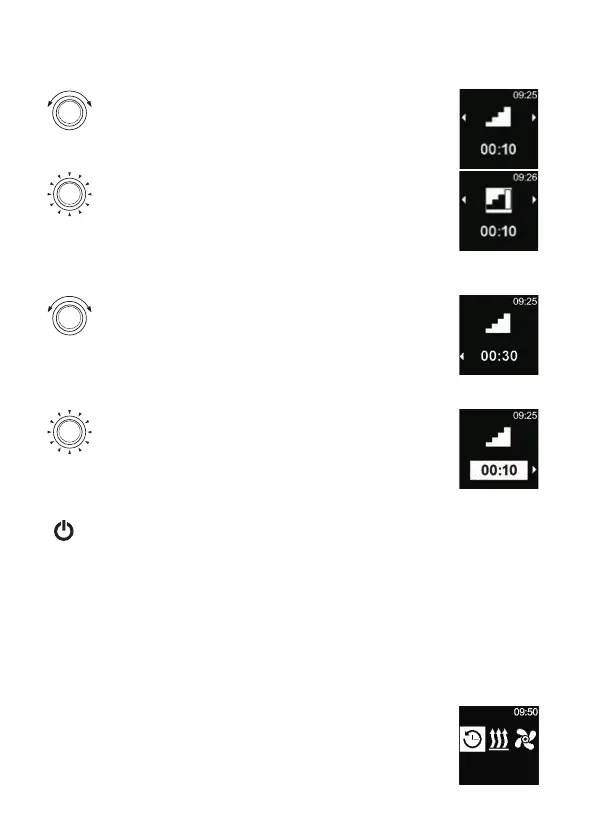
Turn the control knob in order to adjust the desired remain-
ing operation time.
By means of turning the control knob in anticlockwise direction
one can shorten remaining operation time.
If longer remaining operation time is desired then longer remai-
ning operation time must be reset.
Press the control knob within 5 seconds in order to confirm
selection.
7 Switching off
3
Heater in operation
Press quick start button.
Backlight of quick start button changes its colour from blue (in ventilation
mode) or green into white colour (in heating mode).
8 Programming the Timer menu (time setting)
There is a possibility of programming the time settings 7 days in advance. The heater
switches on automatically at the programmed time. There is a possibility of saving up to
3 time settings per day and altogether up to 21 time settings.
Only one time setting (timer) can be activated.
8.1 Timer: Setting the time setting
3
Time and current day of week are set.
3
The heater is switched off.
3
“Timer” menu element has been selected in the main menu.
Timers



 To Next Page