9
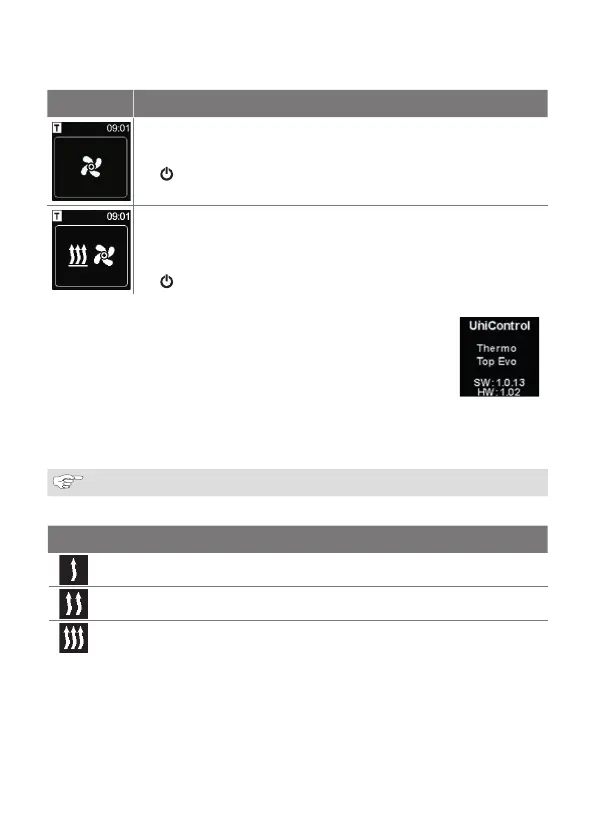
Display Operating mode
Ventilation (ventilating mode must be supported by the installed
heater)
The passive mode can be deactivated by pressing quick start button
. The heater is switched off.
Heating and ventilation
3
There is a possibility of combined display of ventilation and heating
symbols depending on the connected heater.
The passive mode can be deactivated by pressing quick start button
. The heater is switched off.
3.6 Information display
The following information about the connected heater and control
element is shown in the start display:
■
Name of the control element
■
Name of the connected hea
■
Software version of the connected control element
■
Hardware version of the connected control element
The view returns to the main menu after 1.5 seconds.
Example
3.7 Selecting the heating level
The selection of the heating level is not supported by all heaters.
There are three heating levels:
Heating level Heating mode
Eco Energy-savings mode
Normal Comfort heating
Boost Rapid heating
The heating levels differ in terms of energy consumption and time during which the set
temperature is reached. Eco heating level needs the least energy. However, it takes more
time to reach the set temperature.



 To Next Page