9
WWW.WEBER.COM
®
9
MAINTENANCE
1
2
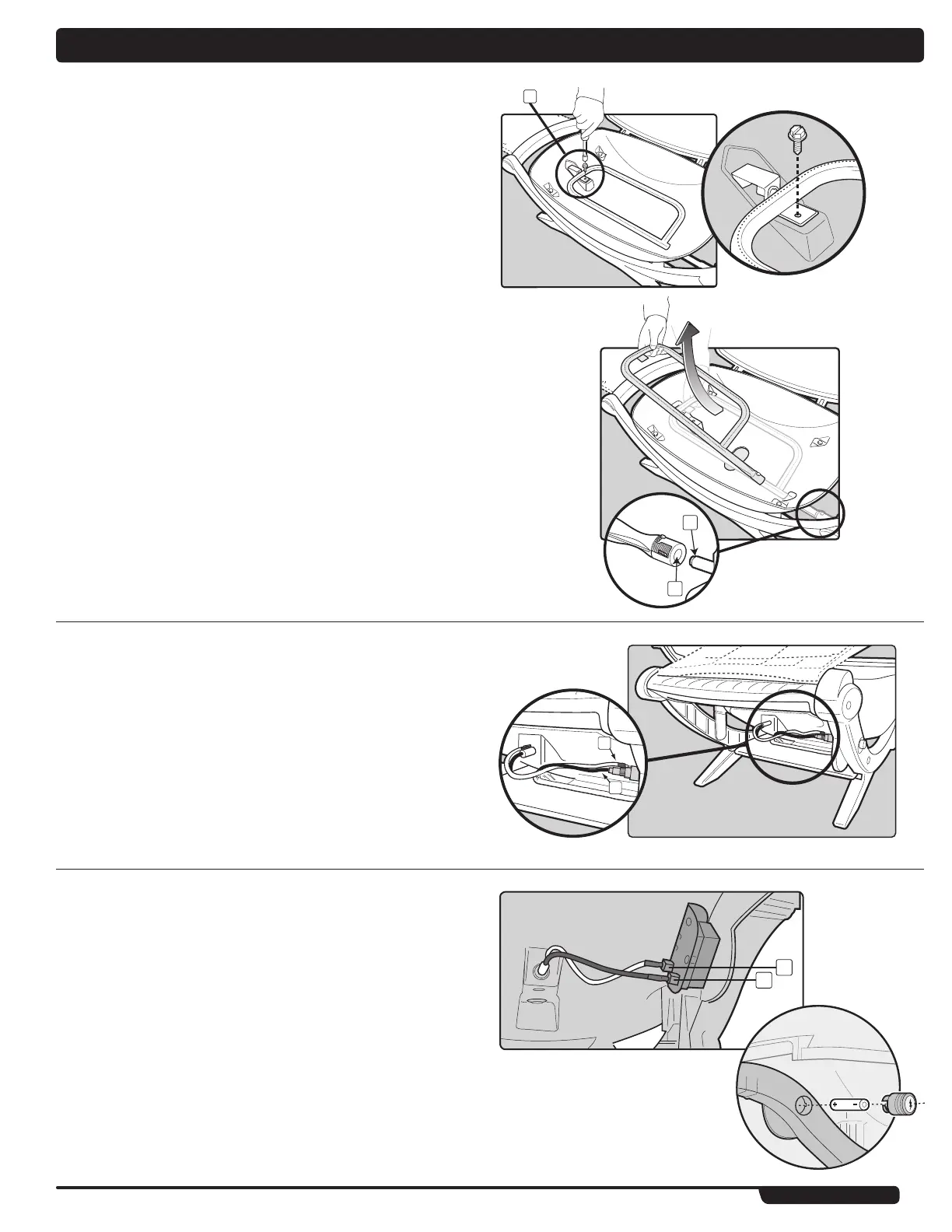
REPLACING BURNER TUBE
1) Your Weber
®
Q
™
grill must be OFF and cool.
2) Unscrew and remove propane cylinder from the valve/regulator assembly.
3) Open the lid.
4) Remove cooking grate.
5) Remove the 1/4 x 20 inch screw that holds the burner tube to the cookbox (x).
6) Carefully slide the burner tube out from the cook box.
Caution: The burner opening (1) must be positioned properly
over the valve orifices (2).
7) To reinstall the burner, reverse 5) through 7).
IGNITION SYSTEM OPERATIONS (Q100, 200)
If the ignition system fails to ignite the burner, light the burner with a match. If the burner
lights with a match, then check the ignition system.
• Check that both the white(1) and black(2) ignition wires are attached properly.
• Check that the ignition button pushes the igniter (button) down, and returns to the
up position.
If the ignition system still fails to light, Contact the Customer Service
Representative in your area using the contact information on our web site.
Log onto www.weber.com
®
.
ELECTRONIC IGNITION SYSTEM OPERATIONS (Q120, 220)
If the electronic ignition system fails to ignite the burner, light the burner with a match. If
the burner lights with a match, then check the Electronic Ignition System.
• Check that both of the ignition wires are attached properly to the igniter electrodes
on the ignition module. Black wire to electrode (1), white wire to electrode (2).
• Check that the Electronic Ignition Button is working by listening and looking for
sparks at the burner.
REPLACE BATTERY IF NECESSARY
AAA alkaline battery only. See illustration:
If the Electronic Ignition System still fails to light, contact the Customer Service
Representative in your area using the contact information on our web site. Log
onto www.weber.com
®
.
x
1
2



 To Next Page