2.3 Assemblng the Parent Unt
The package ncludes two rechargeable batteres. The parent unt can be powered by two rechargeable
batteres or by pluggng t n. Even f the parent unt s plugged n, the rechargeable batteres should be
nserted. Ths ensures that operatons are not dsrupted n the case of a power nterrupton.
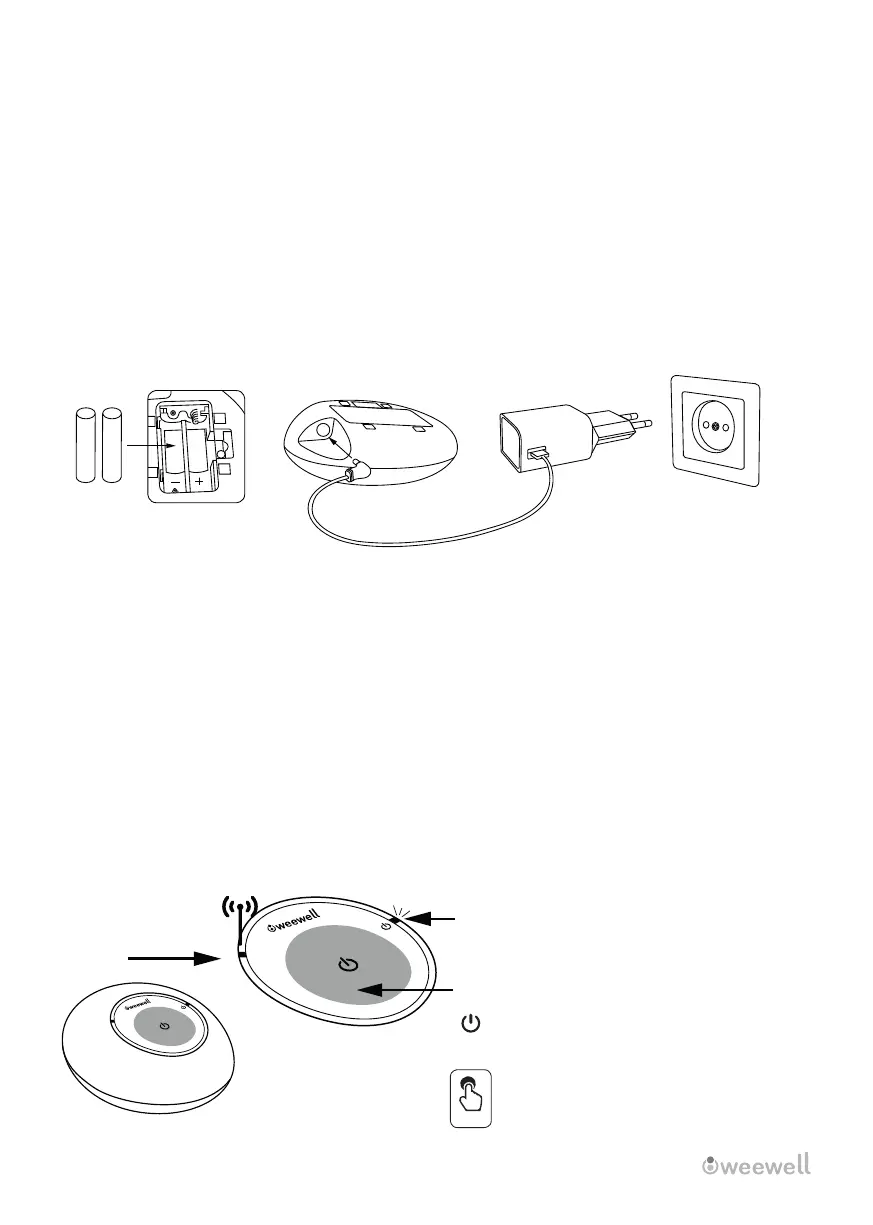
To set up the parent unt, follow these steps:
1. Take off the battery-chamber ld.
2. Match the polarty of the suppled rechargeable batteres to the battery holder.
3.I nsert the battery-chamber ld back nto place.
4. Plug the other power adapter's DC plug nto the DC socket on the parent unt's sde.
5. Plug the power adapter's other end nto an approprate outlet.
6. The chargng lghts on the parent unt turn on, ndcatng that t s chargng.
IMPORTANT BATTERY WARNING
-FOR YOUR SAFETY, THIS PRODUCT DOES NOT WORK WITH NON-CHARGABLE OR ALKALINE
(1.5 V) BATTERIES.
-THE DEVICE WILL WORK WHEN IT IS PLUGGED, EVEN IF THE BATTERIES ARE FULL AND
CHARGED IN AN EXTERNAL CHARGER,
BUT THE BATTERY WILL SHOW AS EMPTY BECAUSE IT IS NOT CHARGING ITSELF.
(THIS DOES NOT PREVENT THE USE OF THE DEVICE. YOU CAN USE IT AS NORMAL IN THIS WAY)
- IT IS RECOMMENDED THAT THE BATTERIES BE CHARGED BY THE DEVICE.
(Note: When chargng rechargeable batteres for the frst tme or after they have been fully depleted, they
must be charged constantly for at least 2 hours.) The battery empty alert wll contnue to reman on the
screen f t s charged for less tme.)
3. GETTING TO KNOW THE BABY MONITOR
3.1 Baby Unt Overvew
+
+
1 - Power ndcator
Lghts up when the baby unt s on
Goes off when the baby unt s turned off
2- (On/ Off)
To turn the nfant unt on or off,
press and hold the button.
3- Mcrophone
6 │ WMA500 USER MANUAL
ON / OFF
2
1
3sec
3


 To Next Page