WMV850 USER MANUAL I 5
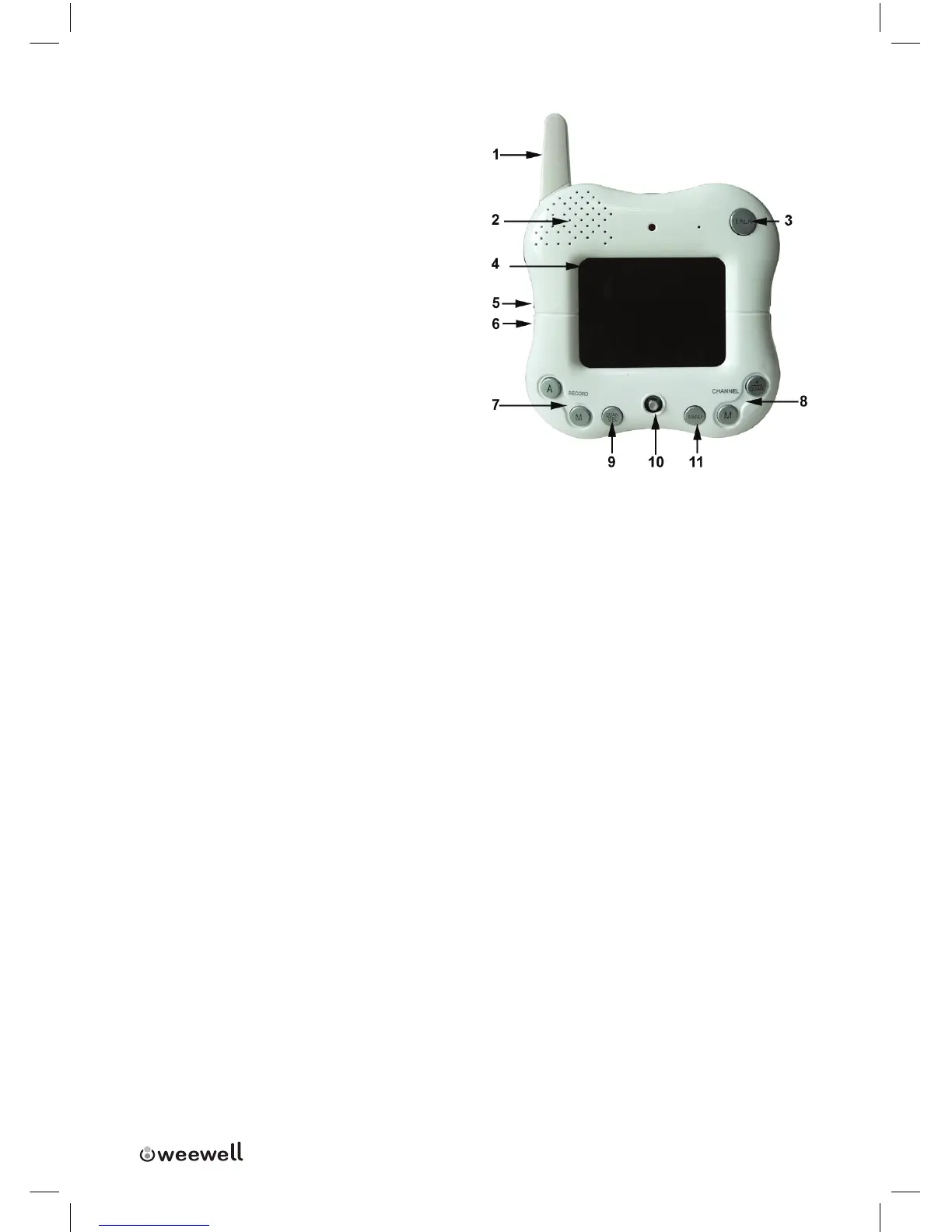
6. Next Sound:Pressthebuttontoplaynexttune.
7. Auto/ Manual Record:Pressto
automatically/manuallyrecord
duringmonitoring.Onlyavailable
whentheMicroSDcardisinserted.
(Notincluded)REC[A]:Startrecord-
ingwhenanalarmisdetected.
REC[M]:Startrecordingwhenthe
buttonispressed
8. Auto/Manual Channel:Pressthe
buttontochooseachannelmode
9. Scan/Delete Button:Whenthe
Scanbuttonispressed,theLCD
Screenisturnedoandthesystemcontinuouslyscansallavailablecameras
whilethemonitorisdark.TheSCANfeaturecanbeusedforthefollowingtwo
reasons:(1)Topreventtheuserfrombeingdisturbed(i.e.whensleeping)bythe
brightLCDscreen,or(2)Toconservebatterypower.Ifaudioisdetectedabove
thepresetaudiotriggerlevelontheCamera(s)*,theReceiverwillbeepand
displaythetriggeredCamera.ThereceiverwillreturntoScanmodeabout8
secondsaftertheAlarmhascompleted.Pressanybuttonexcept“Power”onthe
frontpanelofmonitorwillexitScanMode.
10. Navigation Controls/OK Button: Usethecontrolstomoveorselectwhilein
ViewingModeandMenuModes:
Viewing Mode:
The
following
controls
are
used
while
watching live
video
from
the
camera:
When the image size is set double by selecting Zoom*2, press the
navigation button to view the parts out of the LCD screen. In this mode,
one can also adjust the volume of LCD. When playing video, press the UP
v to play/pause and press DOWN V to stop it. Press the LEFT arrows to fast
forward the recorded le. Press RIGHT arrow to fast backward the recorded
le.
Menu Mode: Use
the
UP/DOWN/LEFT/RIGHT
vVY
arrows
to
navigate
in
Menu
Mode.
Press
the
OK
Button
to
conrm
the
menu
selection.


 To Next Page
 Loading...