English
QUICK REFERENCE OF PARAMETERS, ALARMS AND FAULTS
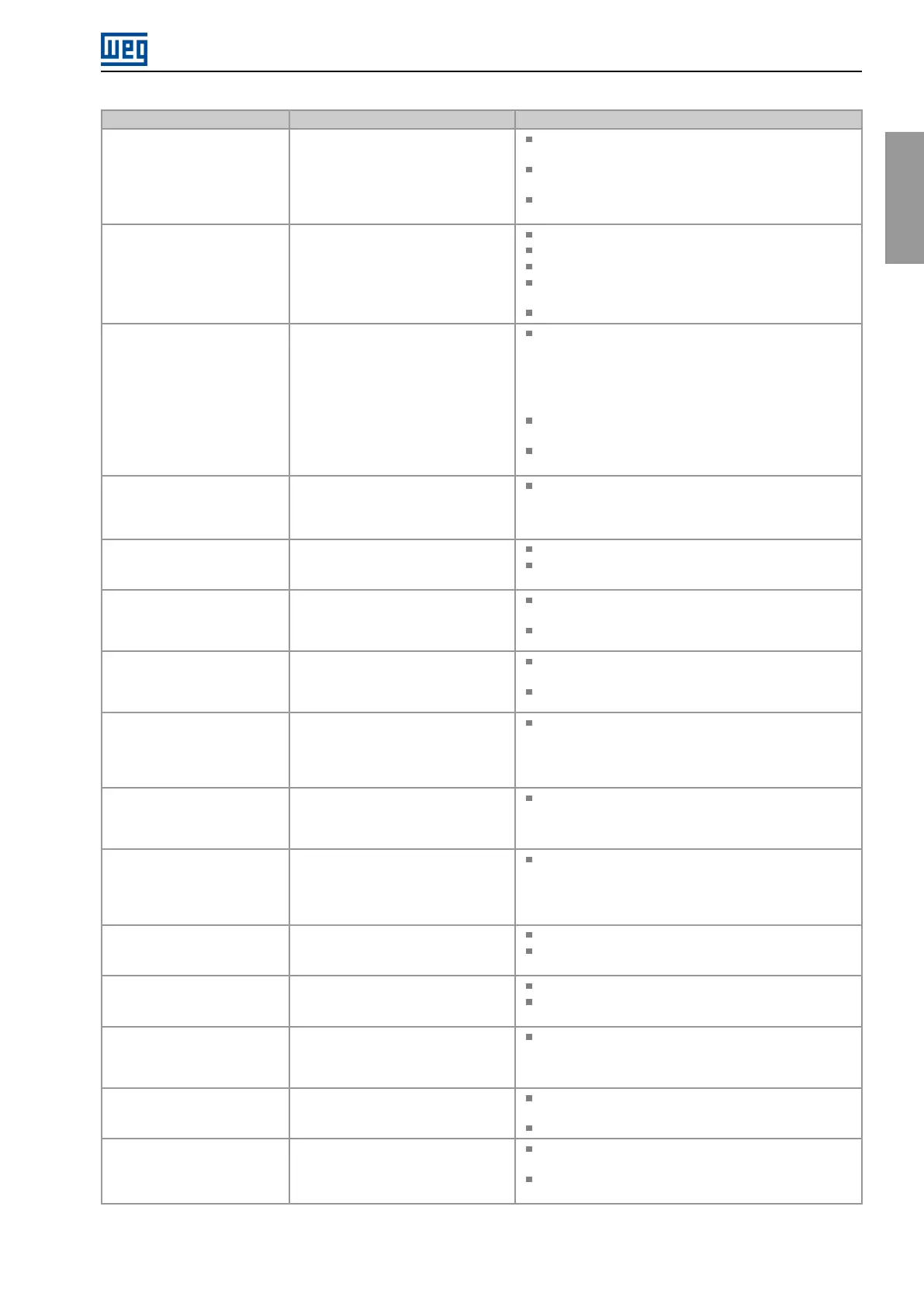
Fault / Alarm Description Possible Causes
F233
No Power Supply on the CAN
Interface
It indicates that the CAN interface has
no power supply between pins V(-) and
V(+) of the connector.
Measure if there is voltage within the allowed range between
pins V(-) and V(+) of the CAN interface connector.
Check if the power supply cables are not misconnected or
inverted.
Check for contact problems on the cable or connector of
the CAN interface.
F234
Bus Off
Bus off error detected on the CAN
interface.
Check for short circuit on the CAN circuit transmission cable.
Check if the cables are not misconnected or inverted.
Check if all the network devices use the same baud rate.
Check if the termination resistors with the right specification
were installed only at the end of the main bus.
Check if the CAN network was properly installed.
F235
Node Guarding/ Heartbeat
CANopen communication error control
detected communication error using
the guarding mechanism.
Check the times set on the master and on the slave for
message exchange. In order to prevent problems due to
transmission delays and time counting, it is recommended
that the values set for error detection by the slave be
multiples of the times set for message exchange on the
master.
Check if the master is sending the guarding telegrams in the
time set.
Check problems in the communication that may cause
missing telegrams or transmission delays.
F236
Idle Master
Fault indicates that the DeviceNet
network master is in Idle mode.
Set the switch that controls the master operation for Run
or the corresponding bit on the configuration word of the
master software. If further information is needed, refer to the
documentation of the master used.
F237
DeviceNet Connection Timeout
Fault that indicates that one or more
DeviceNet connections timed out.
Check the network master status.
Check network installation, broken cable or fault/poor
contact on the connections with the network.
A700
Remote HMI Communication
No communication with remote HMI,
but there is no frequency command or
reference for this source.
Check if the communication interface with the HMI is
properly configured in parameter P312.
HMI cable disconnected.
F701
Remote HMI Communication
Fault
No communication with the remote
HMI; however, there is command or
frequency reference for this source.
Check that the HMI communication interface is properly
configured in parameter P312.
HMI cable disconnected.
A702
Inverter Disabled
This failure occurs when there is a
SoftPLC movement block active and
the “General Enable” command is
disabled.
Check if the drive General Enable command is active.
A704
Two Movem. Enabled
It occurs when 2 or more SoftPLC
movement blocks are enabled at the
same time.
Check the user’s program logic.
A706
Refer. Not Progr. SPLC
This failure occurs when a SoftPLC
movement block is enabled and the
speed reference is not programmed for
the SoftPLC.
Check the programming of the references in the Local
and/or Remote mode (P221 and P222).
A708
SoftPLC Application Stopped
SoftPLC Application not running.
SoftPLC Application is stopped (P901 = 0 and P900 = 3).
SoftPLC state presents application incompatible with the
firmware version of the frequency inverter.
F709
SPLC Application Stopped
SoftPLC application not running.
SoftPLC application stopped (P901 = 0 and P900 = 3).
SoftPLC state presents incompatible application with the
firmware version of the frequency inverter.
F710
Size of the SoftPLC Application
The size of the SoftPLC user’s program
exceeded the maximum memory
capacity.
The logic implemented on the SoftPLC is too large. Check
project size.
F711
Fault on SoftPLC Application
Fault found in SoftPLC user’s program.
SoftPLC user’s program stored on flash memory is
corrupted.
Timeout during execution of SoftPLC scan cycle.
A712
SPLC Protected Against Copy
It occurs when there is an attempt
to copy the SoftPLC application
protected against copies.
Attempt to copy SoftPLC application protected against
copies (“never permit copies”).
Attempt to copy SoftPLC from a copy protected against
copies (“no permission to copy from a copy”).
CFW100 | 21


 To Next Page
 Loading...